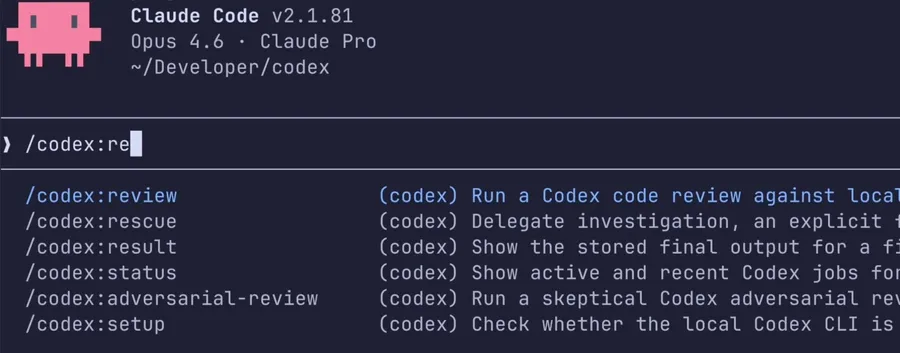
You’re writing code with Claude Code. Behind you stands an assistant named Claude, helping with generation, refactoring, and debugging. Here’s the question: who reviews what Claude wrote?
Before this, you’d have to open another window, copy-paste code into Codex (or just squint at it yourself). On March 31, 2026, OpenAI engineer Vaibhav Srivastav released a plugin called Codex Plugin for Claude Code, letting you summon Codex from inside Claude Code. Think of it as getting your competitor to work for you.
Three Commands, Three Scenarios
Once installed, the plugin registers three commands in Claude Code, each tailored to different situations.
/codex:review: Routine Review
The most basic use. It’s like saying to Claude Code: “Hey, get Codex over here to take a look.”
Good for:
- Final check before commits
- Reviewing others’ PRs during collaboration
- Any situation where you want an extra pair of eyes
For multi-file changes, append --background to run it in the background while you keep working. Add --base <branch-name> to compare against a specific version.
/codex:review --background
/codex:status
/codex:result
/codex:status checks progress, /codex:result retrieves results, /codex:cancel stops a running job mid-way.
This is a read-only operation—it won’t modify any code.
/codex:adversarial-review: The Devil’s Advocate
This one hits different. Codex doesn’t just check syntax—it actively challenges your implementation logic and design decisions.
What does that mean? Say you wrote a caching strategy. The standard Codex would say “LRUCache here, looks good.” The adversarial version would ask: “What if the cache fails? Does the logic hold up under concurrent writes?”
Good for:
- Database migrations
- Authentication and authorization logic changes
- Infrastructure script refactoring
- Any high-risk change where danger hides in implicit assumptions
You can add text after the command to tell Codex what to focus on challenging:
/codex:adversarial-review focus on the permission logic
/codex:adversarial-review --base main look for race conditions
Still read-only, still won’t touch your code.
/codex:rescue: Hand Off Completely
When you’re stuck on a task and genuinely can’t figure it out.
Just throw your problem at Codex:
/codex:rescue investigate why the build is failing in CI
/codex:rescue fix the failing test with the smallest safe patch
/codex:rescue --resume apply the top fix from the last run
Add flags like --model gpt-5.4-mini --effort medium to pick a specific model or set how deep it thinks. --fresh starts from scratch, --resume picks up where it left off.
Background execution is supported—long-running tasks should use --background.
Installation
Requirements are surprisingly light:
- ChatGPT account (free tier works) or OpenAI API key
- Node.js 18.18 or later
First-time setup is four steps:
/plugin marketplace add openai/codex-plugin-cc
/plugin install codex@openai-codex
/reload-plugins
/codex:setup
Note: /reload-plugins is mandatory—skip it and the plugin won’t activate.
If Codex isn’t installed yet, /codex:setup will prompt you. You can also do it manually:
npm install -g @openai/codex
!codex login
Once done, the three commands are ready for action.
Lightweight by Design
Many developers hear “plugin” and brace for installation nightmares. This one takes the opposite approach.
It’s essentially a delegation layer wrapping your local Codex CLI. All authentication, environment variables, and MCP settings are reused from your existing setup—no extra runtime needed.
If the plugin finds ~/.codex/config.toml or a project-level .codex/config.toml, it reads those too. Your existing Codex configuration stays intact.
Review Gate: Making Claude Wait for Codex
An advanced feature. Toggle it with:
/codex:setup --enable-review-gate
Once enabled, Claude Code runs a targeted Codex review before proceeding with certain operations. If Codex finds issues, Claude Code gets blocked until you address them first.
The author cautions: this can trigger back-and-forth calls between Claude and Codex and drain your usage limits fast. “Turn it on only when needed, and watch it when it’s running.”
Usage and Configuration Notes
Every time you use this plugin, it counts toward your Codex usage quota. Per the OpenAI Codex pricing page , free ChatGPT accounts have usage limits—and running reviews heavily or leaving the review gate on will burn through them quickly.
To control costs or specify a model, create a .codex/config.toml in your project or home directory:
model = "gpt-5.4-mini"
model_reasoning_effort = "xhigh"
model_reasoning_effort controls how deeply Codex thinks. Higher settings catch more, but your quota disappears faster.
Who Is This For?
If any of the following sounds familiar, this plugin is worth a try.
You’ve been using Claude Code for a while and want an extra safety check before commits. You happen to have a free ChatGPT account and don’t want to juggle another tool. You’re facing a high-risk change—database migration, refactor—and don’t want to go in blind.
If you normally use only one AI tool for coding, installing this gives you a cross-model review for free. OpenAI and Anthropic may be rivals on the surface, but their underlying infrastructure plays nice together.
The source code is open on GitHub: openai/codex-plugin-cc . For detailed Codex CLI configuration, check the official OpenAI Codex docs .
FAQ
Q: Do I need a separate Codex account for this plugin?
If Codex is already installed and logged in on your machine, it reuses that account. If you’ve never used Codex before, just log in with your free ChatGPT account—no paid subscription needed.
Q: Will this affect my normal Claude Code workflow?
Barely. The plugin is purely additive—it doesn’t change Claude Code’s default behavior. Codex only gets called when you explicitly invoke a /codex:* command. The --background flag is useful for long tasks to keep your main workflow uninterrupted.
Q: How fast will a free ChatGPT account run out of quota?
Depends on usage. Every code review consumes Codex quota, and free accounts have limits. Heavy users or anyone leaving the review gate running will burn through it faster. You can reduce consumption by lowering model_reasoning_effort.