
Tell Codex CLI to “refactor these three modules” and it dutifully works through them one by one. First module done, then the second, then the third. Your hands go cold waiting while it writes a 500-word essay explaining why it renamed a variable from a to count.
It’s like ordering three dishes at a restaurant where the chef insists on finishing one, bringing it out, watching you eat, and only then starting the next. Three burners sitting idle.
After GPT-5.3-Codex dropped, this problem is fixable with collab parallelism and AGENTS.md prompt configuration. Here’s the full setup, with a copy-paste-ready AGENTS.md template at the end.
GPT-5.3-Codex by the Numbers
OpenAI released GPT-5.3-Codex on February 5, 2026 (official announcement ). Benchmarks tell part of the story: 57% on SWE-Bench Pro, 76% on TerminalBench 2.0, 64% on OSWorld.
The numbers that matter more: token consumption is less than half of 5.2, and it runs 25% faster. OpenAI also says this model “was instrumental in creating itself” (System Card ) — early versions were used to debug its own training pipeline and deployment issues. Using your AI to fix your AI. Kind of cyberpunk.
But a powerful model with bad configuration is still a waste.
If you’re not familiar with Codex CLI basics, check out this Codex CLI Getting Started Guide first for sandbox modes, skills, and other fundamentals.
Codex CLI Parallel Mode Configuration
Make sure your Codex CLI is up to date. Older versions don’t support collab.
Then type /experimental in the CLI and enable Sub-agents. This tells Codex it’s allowed to call for backup.
Finally, edit ~/.codex/config.toml:
model = "gpt-5.3-codex"
model_reasoning_effort = "xhigh"
personality = "pragmatic"
web_search = "live"
network_access = true
sandbox_mode = "workspace-write"

[features]
plan_tool = true
parallel = true
collab = true
skills = true
unified_exec = true
shell_snapshot = true
parallel = true lets shell commands run concurrently — lint and tests at the same time instead of queued. collab = true is the main switch. Once enabled, Codex splits tasks into subtasks and dispatches up to 6 Sub-agents to work simultaneously. Per the Codex changelog
, the Sub-agent cap was tightened from earlier versions to 6 to prevent resource runaway.
personality = "pragmatic" keeps output style practical and concise. model_reasoning_effort = "xhigh" maxes out reasoning depth — worth it for complex projects.
See the Codex config reference for the full list of parameters.
What Goes in AGENTS.md
Flipping switches isn’t enough. You need to tell Codex how to work, what quality bar to hit, and what it must never do on its own.
Codex reads AGENTS.md on every startup (official guide
). Think of it as the employee handbook. Global config goes in ~/.codex/AGENTS.md, project-level goes in the project root. Project-level overrides global, same logic as .gitignore.
There’s a complete copy-paste AGENTS.md at the end of this article. Here’s what each section does.
Parallel Scheduling Rules
This is the core of the whole file. The idea: parallelize what you can, don’t force-split things with dependencies.
Think of it as being a project manager with 6 developers. A new feature comes in — frontend updates the UI, backend writes the API, DBA creates the tables. Three independent tasks, all dispatched at once. When that round finishes, integration testing has to be sequential because the frontend needs to call the backend endpoints. Order matters there.
The collab mode handles exactly this kind of task splitting and result collection.
The AGENTS.md encodes this as a four-step loop: analyze dependencies, dispatch in parallel, collect results, iterate. Each round only parallelizes tasks that don’t interfere with each other. Anything with a dependency chain waits its turn.
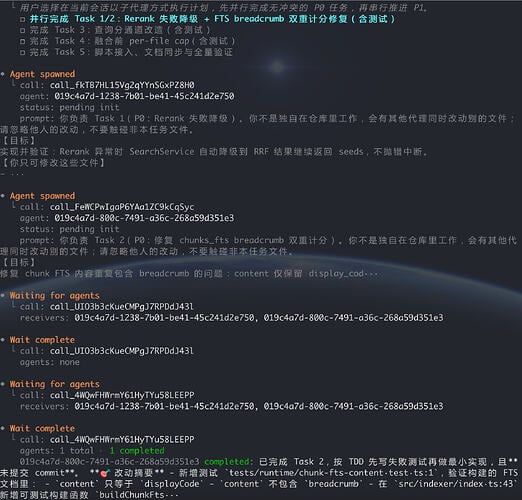
Here’s what it looks like in practice, with multiple Sub-agents working on different subtasks simultaneously:
Output Style Constraints
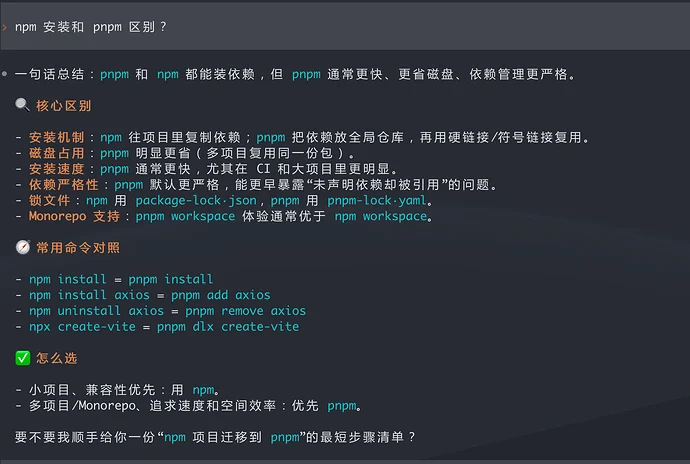
Pre-5.3 Codex answered questions like it was writing a thesis. Ask it to change a CSS color value and it’d write 200 words of background analysis, 300 words comparing approaches, then finally tell you to change #fff to #000.
The “language rules” and “terminal output style” sections in AGENTS.md fix this. They enforce short sentences, lead with the key point, use language-tagged code blocks. The difference after adding these constraints is noticeable — everything you need, nothing you don’t:
I wrote previously about Codex CLI shipping 12 versions in 20 days , covering how the personality parameter went from unstable to officially supported. Combined with AGENTS.md style constraints, output quality is far more controllable than relying on personality alone.
Quality Standards and Engineering Principles
This section governs code quality itself. Architecture follows SOLID, DRY, and YAGNI. Naming must be clear, comments go where they matter (critical flows, core logic, tricky parts), dead code gets deleted, no legacy compatibility wrappers for modified features.
Performance standards too: be conscious of time and space complexity, handle edge cases properly. Testing requires testable design with unit test coverage, and a 60-second timeout cap on background test runs to prevent hanging tasks.
Without these rules written down, Codex follows its own defaults. The code runs, but it’s not always up to your standards.
Dangerous Operation Confirmation
With multiple Sub-agents working independently, what if one of them deletes your files?
The AGENTS.md includes a red-line list: file deletion, environment variable changes, database schema modifications, global package install/uninstall — all require explicit confirmation before execution. Write code freely, but ask before deleting anything.
The official changelog also recently hardened Git safety — destructive Git operations like force push and reset –hard no longer bypass approval checks.
Codex 5.3 Parallel Mode Token Cost
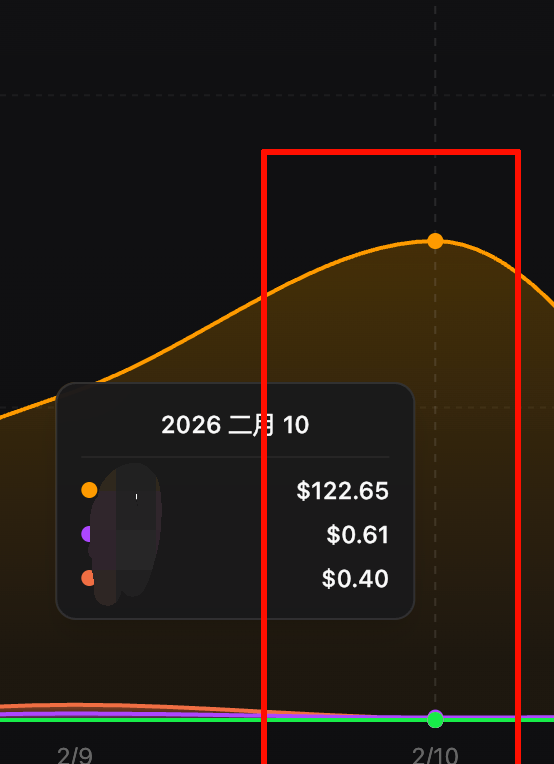
Parallel mode drives token consumption up fast. Running three projects simultaneously cost me roughly $100+ per day.
But 5.3’s per-task token usage is less than half of 5.2, and it’s 25% faster. A task that used to take 10 minutes serially now finishes in 3-4 minutes with parallelism. The time saved, valued at developer hourly rates, easily exceeds the API cost.
If you’re on ChatGPT Pro or Team plans, Codex usage is included — no extra charge.
Complete AGENTS.md Template (Copy-Paste Ready)
Here’s the full AGENTS.md. Copy it and save to ~/.codex/AGENTS.md. It includes parallel scheduling, language rules, quality standards, safety confirmation, and output style — all in one file.
# Agent Parallel Work Specification

> Core principle: maximize parallelism, minimize blocking. Decompose tasks into independently executable, non-conflicting subtasks. Dispatch via collab in parallel, collect all results, consolidate into stage output, then recursively decompose the next round until completion.

---

## Execution Flow

### 1. Task Analysis
- Identify the dependency graph within the task
- Distinguish "parallelizable nodes" from "must-serialize nodes"
- Estimate each subtask's duration and resource usage

### 2. Parallel Dispatch
- Bundle all subtasks with no upstream dependencies, dispatch via collab simultaneously
- Ensure no write conflicts between subtasks (e.g., modifying the same file/variable)
- Define clear input boundaries and output format for each subtask

### 3. Result Collection
- Wait for all parallel tasks in the current round to return
- Validate output consistency, handle exceptions or conflicts
- Consolidate into stage results as input for the next round

### 4. Recursive Iteration
- Based on stage results, repeat steps 1-3
- Until all subtasks are complete, output final result

## Serial Task Handling

For tasks with strong dependency chains (e.g., A→B→C must execute in order), proceed step by step without forcing parallelism.

## Parallelism Best Practices

- Independent multi-file processing → parallel
- Multiple edits in the same file → split into non-overlapping regions then parallel, or serialize
- Clear sequential dependencies → serialize
- Information gathering + analysis → gather in parallel, analyze after consolidation

---

## Language Rules (Non-negotiable)

1. Respond only in Simplified Chinese - all thinking, analysis, explanations and answers must use Simplified Chinese
2. Chinese-first - prefer Chinese terminology, expressions and naming conventions
3. Chinese comments - generated code comments and documentation should use Simplified Chinese
4. Chinese thinking - thought processes and logical analysis conducted in Simplified Chinese

## Core Principles

1. Quality first: code quality and system security are non-negotiable
2. Think before coding: deep analysis and planning before implementation
3. Tools first: prefer validated, best-in-class toolchains
4. Transparent logging: key decisions and changes must be traceable
5. Continuous improvement: learn and optimize from each execution
6. Results-oriented: ultimate measure is goal achievement

---

## Quality Standards

### Engineering Principles

- Architecture: follow SOLID, DRY, separation of concerns, YAGNI
- Code quality:
  - Clear naming, reasonable abstractions
  - Chinese comments where necessary (critical flows, core logic, tricky parts)
  - Delete dead code, don't keep legacy compatibility code for modified features

### Performance Standards

- Algorithm awareness: consider time and space complexity
- Resource management: optimize memory usage and IO operations
- Edge cases: handle exceptions and boundary conditions

### Testing Requirements

- Test-driven: testable design, unit test coverage, 60s max timeout for background test execution to prevent hanging
- Quality assurance: static analysis, formatting, code review
- Continuous validation: automated testing and integration verification

---

## Dangerous Operation Confirmation

The following operations require explicit confirmation before execution:

- File system: delete files/directories, bulk modifications, move system files
- System config: modify environment variables, system settings, permission changes
- Data operations: database deletion, schema changes, bulk updates
- Network requests: sending sensitive data, calling production APIs
- Package management: global install/uninstall, updating core dependencies

Confirmation format: state the operation type, scope of impact, risk assessment. Wait for explicit "yes" or "confirm" before proceeding.

---

## Terminal Output Style

- Friendly and natural: conversational like a professional peer, avoid stiff formal language, prefer short sentences, keep paragraphs compact
- Lead with the point: open with one sentence summarizing the core idea
- Clear takeaways: break long paragraphs into short statements or bullet points, one idea per point
- Logical flow: use ordered lists for multi-step tasks
- Proper spacing: separate different information blocks with blank lines

### Code and Data Presentation

- Code blocks: multi-line code, config, or logs must use language-tagged code blocks
- Focus on core: example code omits irrelevant parts, highlights key logic
- Diff markers: use +/- to mark changes for easy identification
- Line numbers: add when useful (e.g., debugging scenarios)

### Structured Data

Presentation priority:
1. Lists - default first choice
2. Tables - only for data requiring strict alignment
3. ASCII diagrams - when plain text can't clearly express structure/flow/hierarchy, keep concise (under 20 lines), must include text explanation

### Output Ending

- Brief summary: append a short summary after complex content, restate key points
- Next steps: end with practical advice or action items
Codex 5.3 Parallel Optimization Quick Reference
| Setting | Location | Value | Purpose |
|---|---|---|---|
collab | config.toml [features] | true | Enable multi-agent collaboration |
parallel | config.toml [features] | true | Parallel shell command execution |
personality | config.toml | "pragmatic" | Practical output style |
model_reasoning_effort | config.toml | "xhigh" | Maximum reasoning depth |
| AGENTS.md | ~/.codex/AGENTS.md | See template above | Parallel rules + quality standards + safety + output style |
I’ve been running this setup for a few days. The most obvious change: tasks I used to have to repeatedly nudge along now just run to completion on their own and report back. Answers are tighter too — no more preamble essays.
If you’ve hit any gotchas with Codex or have a better config, drop a comment.