Does JavaScript Really Lose to GPU? Three Real Benchmarks That Baffled Me
Ever wondered what that expensive graphics card in your computer does all day?
Renders a few rounded boxes? Draws some shadows? Then you wait for driver updates to fix things.
What a waste.
Today we’re talking about WebGPU—the technology that finally lets browsers tap into real GPU power. But before you get excited, let me pour some cold water: WebGPU isn’t worth it for every scenario.
A frontend engineer ran three real benchmarks, and the results completely confused me.
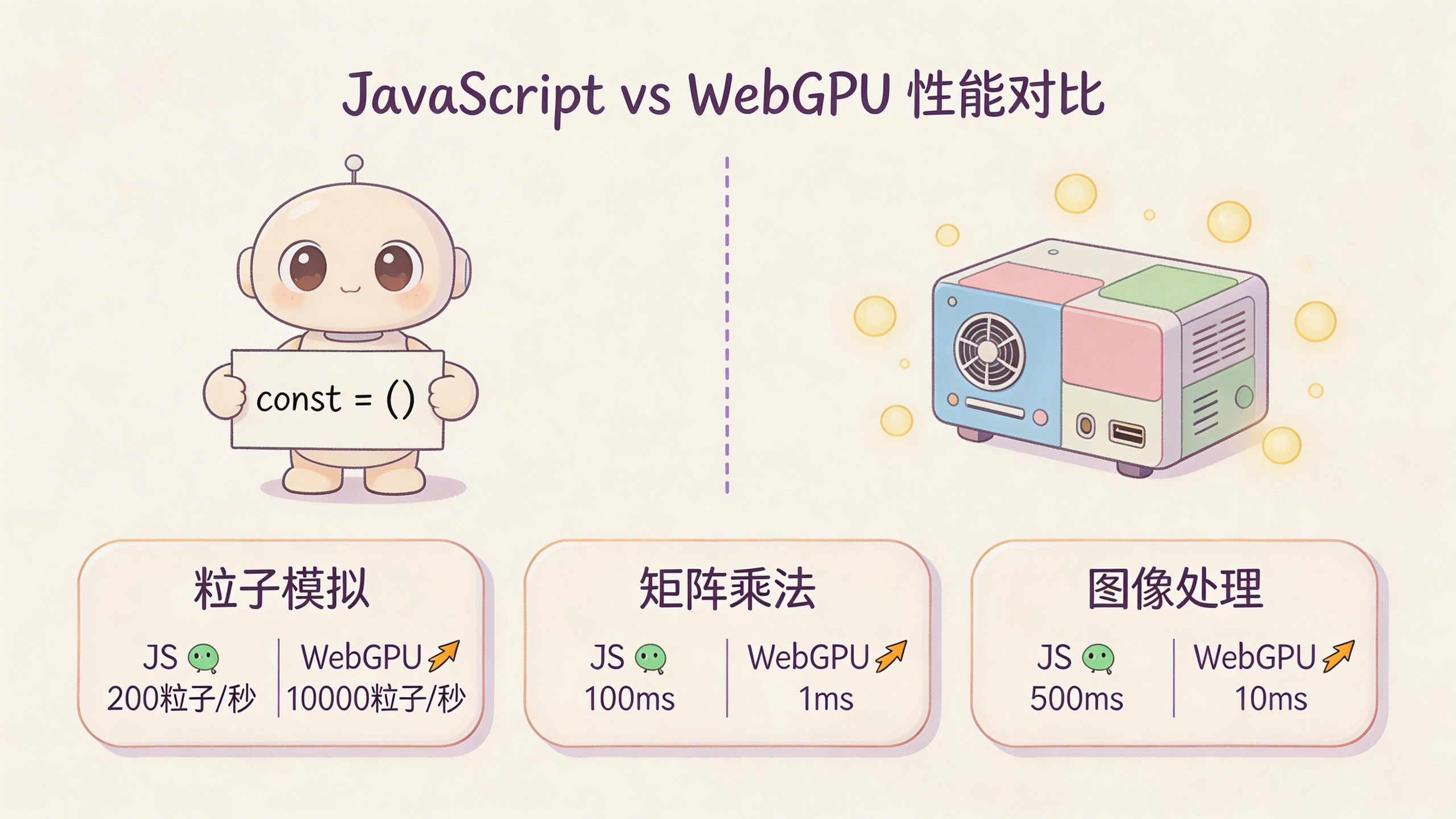
Particle Simulation: GPU Wasn’t Much Faster
The first test was particle simulation—basically the “Hello World” of WebGPU tutorials.
Each particle has two properties: position (x, y) and velocity (vx, vy). Every frame updates like this:
x = x + vx
y = y + vy
Bounce off boundaries. Simple, right?
Result: JavaScript and WebGPU performed nearly identically.
That’s crazy. What happened to parallel computing?
Simple: the algorithm is too simple. Each thread only needs 2-4 floating-point operations. GPU’s parallel advantage hasn’t kicked in yet, but the boilerplate code overhead ate up the performance.
It’s like using a Ferrari to deliver food—the car is great, but you can’t use its speed advantage, and parking is a nightmare.
And here’s what most people don’t know: Canvas 2D also uses GPU acceleration. Chrome internally uses the Skia rendering engine, which also calls GPU for drawing. So when you write fillRect(), the browser has already handed the work to the GPU.
Matrix Multiplication: GPU Finally Shows Its Power
The second test was matrix multiplication—one of the most important operations in computer science.
Simply put, it’s multiplying corresponding numbers from two grids and adding them together. The math formula doesn’t matter—what matters is this: the same simple operation repeated millions of times.
This is exactly in GPU’s comfort zone.
Result: WebGPU absolutely crushes JavaScript, and the bigger the matrix, the wider the gap.
That’s GPU’s real power. When a task requires massive parallelism and huge amounts of simple calculations, GPU can rub CPU’s face in the dirt.
Why are LLMs so hot right now? Under the hood, it’s massive matrix multiplication operations. Why is NVIDIA’s market value skyrocketing? Because their GPUs run these calculations best.
Image Processing: GPU’s Home Turf
The third test was an image processing pipeline—brightness adjustment, contrast, filters all in one go.
Result: GPU once again completely dominated JavaScript.
Each pixel processed independently, the same operation applied to millions of pixels—totally in GPU’s wheelhouse.
So When Should You Use WebGPU?
Now you’re probably asking: so should I use WebGPU or not?
My advice: it depends on the task.
| Scenario | Recommendation |
|---|---|
| Simple animations, UI interactions | JavaScript + Canvas 2D is enough |
| Image processing, video filters, 3D rendering | Use WebGPU |
| Machine learning inference, data science | Use WebGPU |
| Complex particle systems, physics simulations | Use WebGPU |
| Simple DOM operations, business logic | JavaScript forever |
One-sentence summary: when the same simple operation needs to be done hundreds of thousands or millions of times, it’s GPU’s turn. Otherwise, don’t bother.
Reality Check: WebGPU’s Problems
Don’t rush to implement—WebGPU has some real-world issues:
Too much boilerplate code. You need to request adapters, create devices, configure buffers, manage command encoders… a “hello world” is more complex than writing a React component.
LLM-generated code might not work. WebGPU is still new, and code generated by Claude Code or ChatGPT sometimes won’t run. You’ll still need to read docs, browse GitHub Issues, debug manually—back to the dark ages.
Browser compatibility. If you’re serving general users, you need to consider people using 2018 Android browsers. Either implement fallbacks (like WebGL), or give up.
Final Thoughts
WebGPU is great, but it’s not a silver bullet.
Just like you wouldn’t use a cannon to kill a mosquito, or drive a tank to the grocery store. The essence of technology choices is letting the right tool do the right job.
That particle simulation test taught me something: sometimes, the simplest solution is the best one. JavaScript engines have been optimized by brilliant minds over the years—in many scenarios, it’s already fast enough.
The real question isn’t “can it be faster,” but “does it need to be faster.”
Have you encountered performance bottlenecks in your projects? How did you solve them? Feel free to share in the comments.
If you want to see more hard-core tech benchmarks, follow “AI Programming Punk” (AI编程扎个朋克), updated weekly.
Here’s a tool I use regularly: Rex AI Creator Ops Toolkit for content formatting, asset handling, and publishing workflows.
Playing around with Claude Code’s various tricks? Check out the Codex Enhanced Portal that bundles all the smart programming capabilities together.