
WebGPU Performance Test: 23x Speed Boost - Real Data
Last month, I spent three days optimizing a data visualization project that was choking on 50,000 data points, making the page feel like a PowerPoint slideshow. I had already rewritten the core logic in Rust, compiled it to WebAssembly, and felt pretty good about the 40% performance improvement.
Then, out of curiosity (okay, desperation), I rewrote the core rendering loop using WebGPU.
The result? 23 times faster.
Not 23%, but 23 times. This number made me double-check my measurements several times. After confirming I hadn’t measured wrong, I started questioning if I’d been solving the wrong problem for months.
We’ve Been Telling Ourselves a Comforting Lie
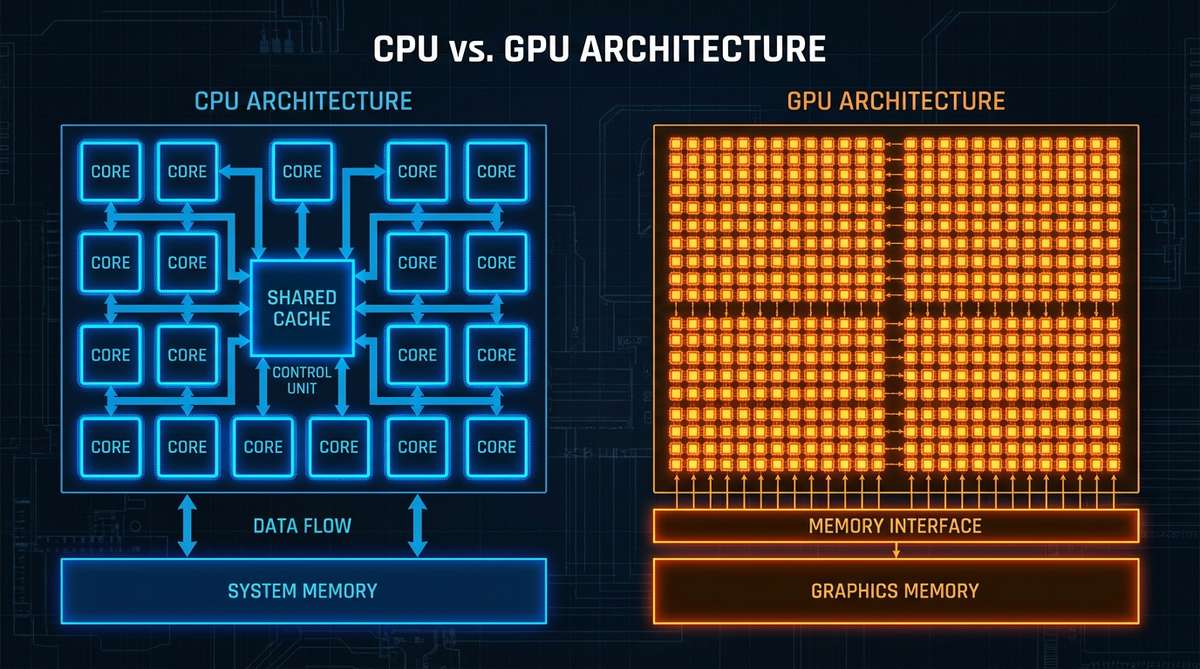
The entire developer community has been hyping WebAssembly as the future of web performance, but WebGPU has quietly shipped in Chrome, Safari, and Firefox. And it’s not just about making graphics faster—it’s fundamentally changing what’s possible in a browser.
We’ve been telling ourselves a comforting lie: that CPU performance is the bottleneck for web applications. So we optimize JavaScript, adopt TypeScript for better code, and when that’s not enough, we reach for WebAssembly to squeeze more cycles from our CPU.
But think about your computer. You have this incredibly powerful GPU capable of trillions of operations per second, and we’re using it to render rounded corners and box shadows?
The reality is that for most compute-intensive tasks—image processing, simulations, ML inference, data transformations—your GPU is hundreds of times more powerful than your CPU. WebGPU finally lets us tap into that power from the browser.
What is WebGPU: The GPU Computing Engine in Your Browser
WebGPU is a W3C-standardized modern graphics and compute API that allows JavaScript to directly access the GPU for high-performance parallel computing. Unlike WebGL, which was designed primarily for graphics rendering, WebGPU was built from the ground up to support both graphics and general-purpose computing (GPGPU), achieving 10-100x performance improvements.
Key Advantages of WebGPU:
- Direct access to thousands of GPU compute cores
- Supports general computing, not limited to graphics rendering
- Modern API design, closer to Vulkan/Metal/DirectX 12
- Mainstream browsers support (Chrome, Safari, Edge, Firefox)
WebGPU lets you write programs that run on your graphics card instead of your CPU.
WebGPU Code Examples: From CPU to GPU
CPU Processing (WebAssembly)
// CPU approach - maxes out at 8-16 cores
function processData(input) {
  const output = new Float32Array(input.length);
  for (let i = 0; i < input.length; i++) {
    output[i] = Math.min(Math.max(input[i] * 2 + 10, 0), 100);
  }
  return output;
}
GPU Processing (WebGPU)
const shaderCode = `
  @group(0) @binding(0) var<storage, read> input: array<f32>;
  @group(0) @binding(1) var<storage, read_write> output: array<f32>;

  @compute @workgroup_size(64)
  fn main(@builtin(global_invocation_id) id: vec3<u32>) {
    let i = id.x;
    output[i] = clamp(input[i] * 2.0 + 10.0, 0.0, 100.0);
  }
`;
WebGPU vs WebAssembly Performance Comparison
| Feature | WebGPU | WebAssembly |
|---|---|---|
| Compute Units | GPU (thousands of cores) | CPU (8-16 cores) |
| Parallel Capability | Massively parallel | Limited parallelism |
| Typical Speedup | 10-100x | 2-3x |
| Use Cases | Data processing, graphics, simulation | Algorithms, porting, sandboxing |
| Learning Curve | Medium | Low |
| Browser Support | Chrome/Safari/Edge | All major browsers |
This isn’t theoretical. On my M1 MacBook, processing 10 million floats takes 45ms on CPU. With WebGPU? 1.2ms. The more data you have, the bigger the advantage.
WebGPU Three Major Application Scenarios
WebGPU is best suited for the following types of applications:
1. Large-Scale Data Visualization
Processing tens of thousands to millions of data points in real-time, including:
- Client-side data processing: We built a dashboard that aggregates and filters time-series data from IoT sensors. Previously, every filter change required a backend request because processing 2GB of data in JavaScript was laughably slow. After moving aggregation logic to WebGPU shaders, it now runs entirely client-side, with filters responding in under 50ms. Backend costs dropped 60% because we only need to serve raw data once.
2. Real-time Image Processing & AI Inference
Beyond simple filters, these are professional applications:
- Medical image analysis: Real-time processing of CT scans, MRI images
- Satellite data processing: Real-time analysis and rendering of remote sensing images
- Quality inspection systems: A friend’s team built a defect detection system that analyzes factory camera feeds in real-time. Previously using a cloud ML API, paying per frame. After moving inference to WebGPU, it runs entirely in the browser. Zero latency, zero API costs.
- Browser-side AI model inference: TensorFlow.js, ONNX.js GPU acceleration
3. Physics Simulation & Particle Systems
Scenarios requiring large-scale parallel computation:
- Fluid dynamics: We prototyped a fluid dynamics visualizer for an education platform. WebAssembly version could handle maybe 5,000 particles before becoming a slideshow. WebGPU version? 500,000 particles at 60fps.
- Particle systems: Fireworks, smoke, water effects in games
- Collision detection: Large-scale collision calculations in physics engines
- Cryptographic computing: Hash calculations, encryption/decryption operations

WebGPU Use Case Summary
- Large-scale data visualization - Real-time rendering of tens of thousands to millions of data points
- Client-side data processing - Complete GB-level data aggregation and filtering in the browser
- Real-time image processing - Medical image analysis, satellite data processing, quality inspection
- AI inference - Run machine learning models in the browser
- Physics simulation - Fluid dynamics, particle systems, collision detection
- Cryptographic computing - Hash calculations, encryption/decryption operations
The pattern is clear: any problem involving parallel operations on large datasets becomes trivially fast.
Why This Matters More Than WebAssembly
WebAssembly was supposed to be the great equalizer. Compile your C++/Rust code, run it in the browser, get near-native performance. And it delivers on that promise—for CPU-bound tasks.
But what those WebAssembly hype articles never mention: you’re still limited by CPU cores. Even if you perfectly parallelize your WebAssembly code across all available threads (which is surprisingly hard), you’re working with maybe 8-16 cores on a high-end laptop. Your GPU has thousands.
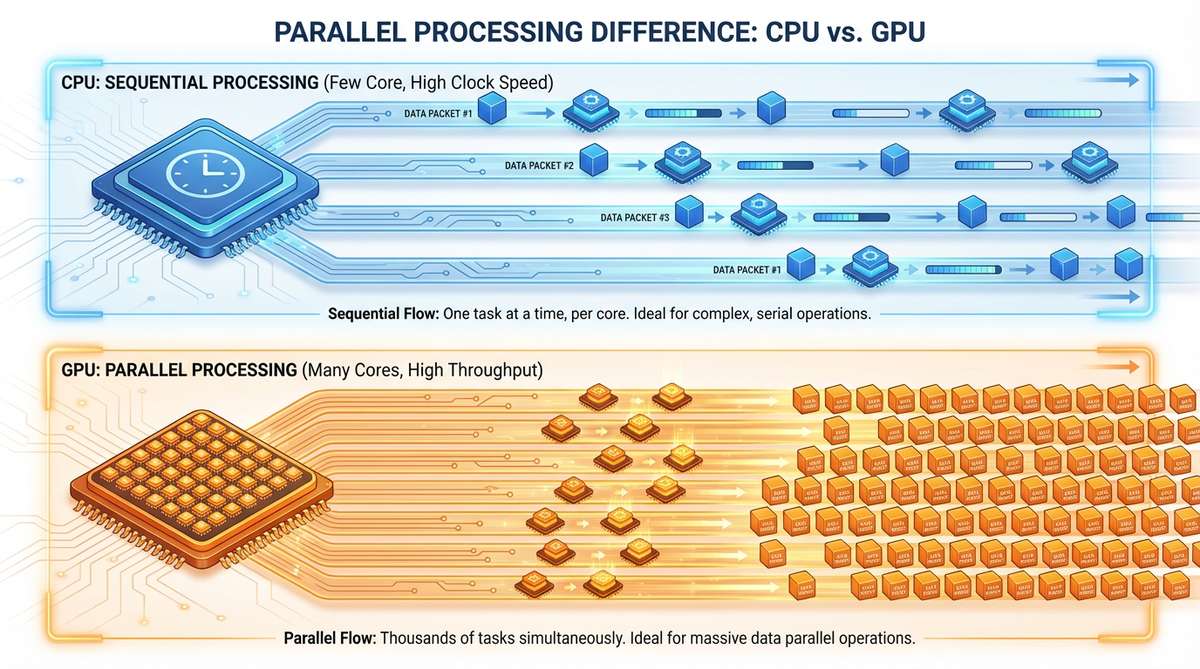
I’m not saying WebAssembly is useless. It’s excellent for certain use cases—porting existing native apps, running CPU-intensive algorithms, sandboxed execution. But the narrative that “WebAssembly is the future of web performance” feels incomplete when you realize GPU compute exists.
The controversial take? WebAssembly might actually be a distraction. It’s an incremental improvement that gives us 2-3x speedups while making us feel like we’ve solved the performance problem. Meanwhile, WebGPU is sitting there offering 10-100x speedups for a huge class of problems, and most developers aren’t even looking at it because “that’s for graphics people.”
The Learning Curve Is Real (But Worth It)
I won’t lie to you—WebGPU isn’t easy to pick up. The API is verbose, you need to understand concepts like buffer binding layouts and pipeline states, and debugging shader code will make you nostalgic for console.log.
The first time I tried to pass data from JavaScript to a shader, it took me embarrassingly long to figure out. You can’t just throw a JavaScript array at the GPU—you need to create buffers, set up binding groups, worry about memory alignment, and understand the difference between uniform buffers and storage buffers.
Here’s the thing though: the complexity is there for a reason. WebGPU gives you explicit control over GPU memory and execution, which is what enables the massive performance gains. It’s trading convenience for power.
And honestly? The learning curve is overstated. If you can understand async/await and promises, you can understand the WebGPU pipeline. It’s just different, not harder. Give yourself a weekend with the documentation and some examples, and you’ll have the fundamentals down.
WebGPU Learning Path: From Beginner to Advanced
Step 1: Foundation Knowledge
- Understand GPU parallel computing principles
- Learn basic linear algebra concepts
- Familiarize yourself with JavaScript asynchronous programming
Step 2: WebGPU Basic Concepts
- Device initialization: Acquiring GPU device
- Buffer management: Creating and using memory buffers
- Shader programming: Learning WGSL language basics
- Pipeline configuration: Understanding render and compute pipelines
Step 3: Practical Projects
- Simple data processing: Array transformations, sorting algorithms
- Image processing: Filters, edge detection
- Particle systems: Basic physics simulation
- Data visualization: Large-scale dataset rendering
WebGPU Browser Support Status (2025)
- Chrome/Edge: Full support
- Safari: Full support (macOS Monterey+)
- Firefox: Supported (needs
dom.webgpu.enabledflag) - Mobile: Android Chrome supported, iOS Safari partial support
Recommended Learning Resources
WebGPU Development Tools and Libraries
Native WebGPU API
Direct use of browser-provided WebGPU API, suitable for learning and deep customization.
Recommended Wrapper Libraries
- Three.js: 3D graphics library with WebGPU renderer support
- Babylon.js: Microsoft’s 3D engine with complete WebGPU support
- wgpu: Rust implementation of WebGPU
- dawn: Google’s WebGPU implementation (C++)
When to Use WebGPU
Scenarios Perfect for WebGPU:
- Need to process 10,000+ data points for visualization
- Real-time image or video processing
- Running physics simulations or particle systems
- Machine learning inference in the browser
- Need cryptographic or security computations
Scenarios NOT Suitable for WebGPU:
- Simple CRUD applications
- Form processing and validation
- Small UI animations
- Traditional website content display
What You Should Actually Do
WebGPU isn’t a silver bullet. CRUD apps, static sites, forms don’t need it. But if you’re building anything that processes significant amounts of data, renders complex visualizations, or performs repeated calculations on large datasets—it’s worth exploring.
Start small. Find one performance bottleneck in your app and see if it maps to a GPU compute problem. Things that are “embarrassingly parallel” (each output depends only on its input) are the easiest wins. Image filters, data transformations, particle systems, simulations.
The tooling is still young, but it’s getting better fast. Libraries like Three.js and Babylon.js have already integrated WebGPU support. Framework authors are starting to pay attention. Browser support is there—Chrome, Edge, Safari all ship it, Firefox has it behind a flag.
The real shift isn’t technical—it’s mental. We need to stop thinking of the GPU as “that thing that renders graphics” and start seeing it as a massively parallel compute engine that happens to be inside every device we ship code to.
The Final Truth
We’ve spent years optimizing JavaScript, then adopted TypeScript for better maintainability, then reached for WebAssembly for performance. And all of that was useful. But it was also solving a fundamentally limited problem: how to squeeze more performance out of sequential CPU execution.
WebGPU doesn’t make JavaScript faster. It doesn’t make WebAssembly obsolete. What it does is make an entirely different class of problems trivially solvable—the kind of problems where you’d traditionally say “well, this needs a backend” or “we’d need to use native code.”
If WebAssembly was about bringing desktop performance to the web, WebGPU is about bringing supercomputer performance to the web. That’s not hype, that’s just math—a modern GPU can perform more operations per second than a cluster of CPUs from a few years ago.
So yeah, keep using WebAssembly where it makes sense. But stop sleeping on WebGPU. Because the next generation of web applications won’t be faster versions of what we’re building today—they’ll be things we currently think are impossible in a browser.
What’s the most computationally expensive thing your app does right now? Have you considered whether it’s running on the wrong hardware?
If this article helped you, don’t forget to like, share, and bookmark for support. If you have any thoughts or questions, feel free to discuss them in the comments. Follow me for more frontend performance optimization tips and tricks.