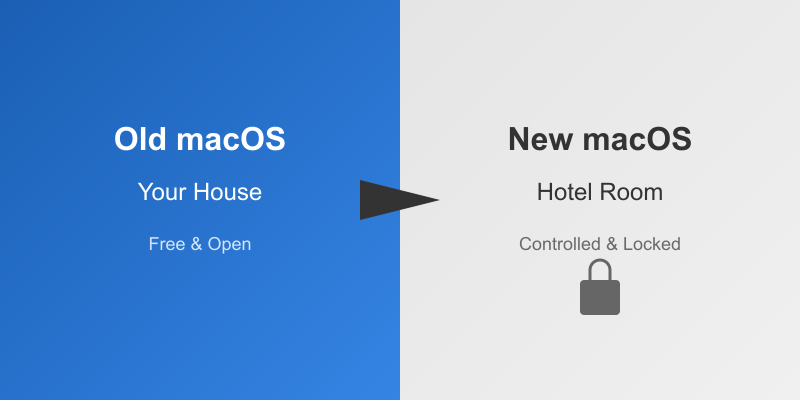
The House You Once Owned is Now a Hotel Room
Do you remember how you felt when you first used a Mac?
I started using Mac in 2017, back in the High Sierra era. Even then, macOS was still fairly open—at least it felt like this computer was yours. Install whatever software you wanted, change whatever settings you needed.
What about macOS now? It’s more like a hotel room. Looks nice, but you can’t move the furniture, can’t change the wall color, and you need front desk permission just to enter your own room.
How is this progress? It’s regression.
The Freedoms That Disappeared, Let’s Talk One by One
Recovery Mode Getting More Complex
I’ve heard from older users that when Mac had problems, you could hold Command+S at startup to boot directly into root shell for repairs. Like having a first aid kit at home—when you feel unwell, you can help yourself.
Now? That first aid kit is long gone. Replaced by “Recovery Mode”—a heavily guarded room where the system volume is read-only, and you need your Apple ID. On Apple Silicon, this encryption process is even more complex, so complex you don’t even know what you’re doing.
Apple says it’s for security. I say it’s for control.
Gatekeeper and Sandbox Restrictions Getting Tighter
When I first started using Mac, Gatekeeper already existed, but at least the system still felt open. Want to explore system directories? Go ahead. Want to install developer tools? Not so many obstacles.
Now third-party apps are locked in sandboxes, stuck in the maze of ~/Library/Containers/. Want to access system folders? No way. Want to write low-level tools? Sorry.
What’s most ironic? Apple’s own apps aren’t subject to these restrictions. It’s like your family can freely enter your room, but you can’t even enter your own living room.
They say it’s security. What you lose is control.
Hardware Obsolescence: Not Can’t Use, Just Won’t Let You Use
That Intel Mac that still runs perfectly well suddenly gets announced as “unsupported.” No technical reason, just market reasons.
Buy a new one. Buy an M-series. Old hardware still works, but they just make it harder to use.
Some apps also “automatically retire,” regardless of whether your hardware can still run them. The entire ecosystem pushes you forward, but only down the path Apple specifies.
Software Quality: One Half-Baked Release Per Year
Some versions used to be released just for stability and fixes. Now a new version comes out every year, whether it’s ready or not.
Finder crashes? Normal. App crashes? Used to it. New features disappear after a year? No surprise.
Fixing bugs used to be a selling point. Now releasing versions is just to make old versions look like they need replacing.
Disk Utility: From Toolbox to Toy Box
Look at the old Disk Utility: detailed logs, advanced partition options, RAID tools, clear system feedback. This was a tool for professionals.
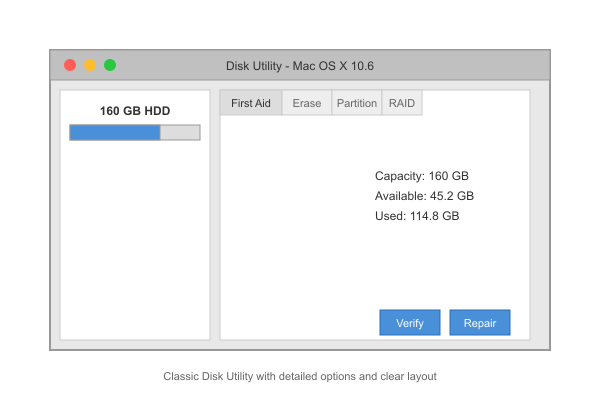 Figure: The once-powerful Disk Utility
What about Disk Utility now? Big buttons, few options, pitifully little you can do. Need advanced features? Go use command line. Or buy third-party tools.
This isn’t simplification, this is castration.
SIP and Secure Boot: You Can’t Even Master Your Own Machine
System Integrity Protection, sealed system volumes, T2 chip. These things together mean even replacing an SSD can brick your machine.
Apple says it’s to prevent malware. I say it’s to prevent you from being in control of your own machine.
Want to install an old version of macOS? Already difficult on Intel Mac, simply impossible on Apple Silicon. Apple controls the entire boot chain, verifying every component. You no longer own this machine, you’re just borrowing it, as long as Apple’s firmware allows.
AppleScript and Automator: Legacy Tainted by iOS
AppleScript and Automator were once the pride of macOS, magic that let ordinary people automate too.
Now they’re half-abandoned, replaced by iOS-style Shortcuts. Terminal still exists, but its connection to the system grows weaker, more like a toy in a sandbox.
Many people now use Homebrew to fill the gap. But this isn’t true package management, it just dumps files in user space, living in a parallel universe under /usr/local or /opt/homebrew.
It works, but feels like a patch, not a solution.
UI Design: From Clear and Practical to Blurry and Flashy
macOS once had a unique identity: sharp, clear tactile feel, recognizable at a glance.
Now? It’s a mirror of iOS, excessive translucency, worsening contrast. Liquid Glass design was originally for iOS fluid feel, now forced onto macOS. Some places buttons really blur into the background, contrast is inconsistent, windows like layers of frosted plastic.
Not a disaster, but when you’re used to a clean practical desktop, sometimes current macOS just tries too hard to force iPad aesthetics.
Apple Silicon: Technical Miracle, Funeral for Freedom
Apple switching to its own chips M1, M2, M3 and beyond, that’s a technical miracle. But it’s also the final nail in flexibility’s coffin.
They now control the entire stack, from silicon to software, can precisely decide when your device becomes obsolete. And what’s worst? This decision doesn’t need to make sense, only serve Apple’s timeline.
The End of an Era
macOS hasn’t evolved, it has migrated.
From a few years ago still being an open, customizable system, to a sealed, strictly managed component in Apple’s walled garden.
Security and consistency did improve, but at the cost of freedom, transparency, and trust.
Apple calls this progress. But for those of us who experienced that freer era of macOS, it feels like everything that made macOS lovable is slowly disappearing.
I hope I’m being pessimistic, but this is indeed where things are heading.
Final Thoughts
After saying all this, I’m not telling you to stop using Mac. Mac is still a productive tool, it’s just different from before.
Before: you owned a Mac. Now: Apple lends you a Mac. That’s the difference.
Accept this reality, then find the usage that suits you best within the limitations. That’s what we can do.
This article writes about macOS, but it actually writes about a trend in the entire tech industry: open becoming closed, users becoming consumers, tools becoming platforms.
The trend is irreversible, but at least we can still choose how to use and what to use.
If This Was Helpful, Give It a Like
If this article speaks your mind, give it a like to let more people see it. Every like is your greatest encouragement to me.
Forward to Friends, Let’s Chat
Forward this article to your Mac-user friends, see if they feel the same way. With tech, chatting always reveals new perspectives.
Follow Dream Beast Coding
Follow Dream Beast Coding to never miss more tech observations and practical articles. Together, let’s find our place in the tech world.
See You in the Comments
When did you start using Mac? What’s the biggest change you’ve felt over these years? Come chat in the comments, I want to hear your story.