GLM-5 Just Dropped: $1/M Tokens Doing What $5/M Does — Is Your AI Subscription Still Worth It?
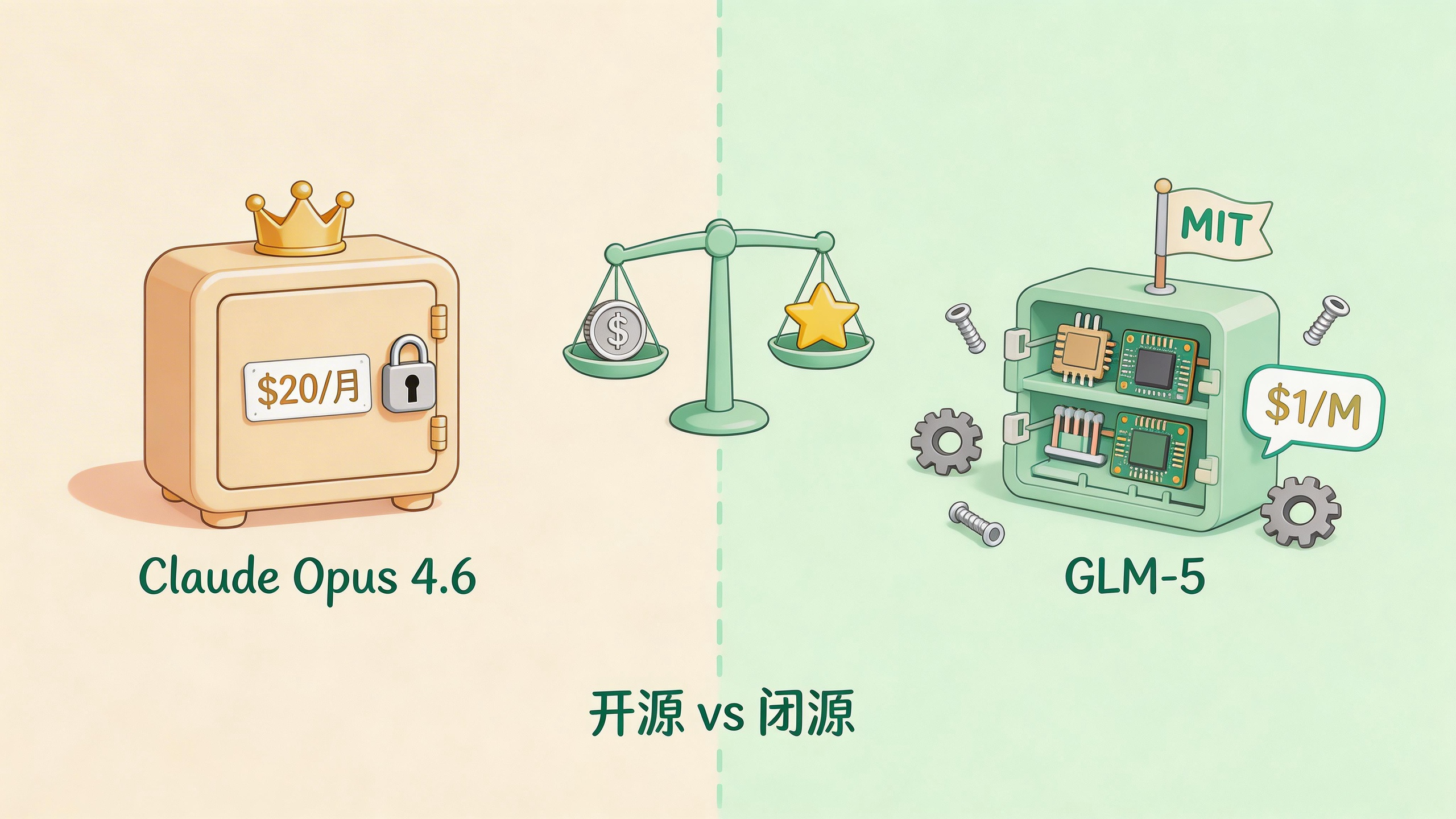
Table of Contents
- How Much Are You Spending on AI Coding Tools Per Month
- The Specs: What GLM-5 Actually Is
- The Benchmarks: How Far Behind Claude Opus 4.6
- The Real Sting: GLM-5 vs Claude Opus on Price
- Trained on Huawei Chips — Does It Actually Work?
- Hands-On Testing: How GLM-5 Actually Writes Code
- GLM-5 or Claude Opus: Which Should You Pick?
- Is That $20 Claude Subscription Still Worth Keeping?
- FAQ
How Much Are You Spending on AI Coding Tools Per Month
Here’s a question: how much did you spend on AI tools last month? Zhipu AI just released GLM-5, priced at $1 per million tokens. Claude Opus 4.6’s API costs 5x that. The gap made me sit down and do some real math.
If you’re like me, Claude Pro at $20/month is the baseline. Add API calls on heavy days — another $30 to $50 — and you’re looking at $60 to $80 monthly. That’s roughly the cost of a couple of nice dinners out with your coworker.
Except instead of dinner, you’re paying an AI to refactor async functions, write unit tests, and analyze 800-line legacy files. Claude Opus 4.6 handles these jobs like a well-paid contractor — solid work, solid invoice.
Then on February 11, 2026, Zhipu AI released GLM-5.
My first reaction wasn’t “oh, another new model.” I opened a calculator. After running the numbers, I stared at the screen for a while, because the math was kind of absurd.
The Specs: What GLM-5 Actually Is
GLM-5 is Zhipu AI’s (Z.ai) fifth-generation flagship model. If the name doesn’t ring a bell, here’s an analogy:
Imagine a company with 744 employees (744B parameters), but only 40 show up for any given project (40B active parameters). That’s the Mixture-of-Experts (MoE) architecture — assign the right specialist to each task instead of having everyone clock in at once.

The key numbers:
- Total parameters: 744B (256 experts, 40B active per token)
- Training data: 28.5 trillion tokens
- Context window: 200K tokens
- Training hardware: Huawei Ascend chips + MindSpore framework — zero NVIDIA GPUs involved
- License: MIT (real open source — commercial use, modification, redistribution, no strings)
- Release date: February 11, 2026
That last one bears repeating: MIT license. You can download the model weights to your own machine. If Zhipu changes pricing or terms someday, you have the model and the code. No vendor lock-in anxiety.
The Benchmarks: How Far Behind Claude Opus 4.6
Hype means nothing without data. I pulled up the main coding benchmark scores and compared them head to head:
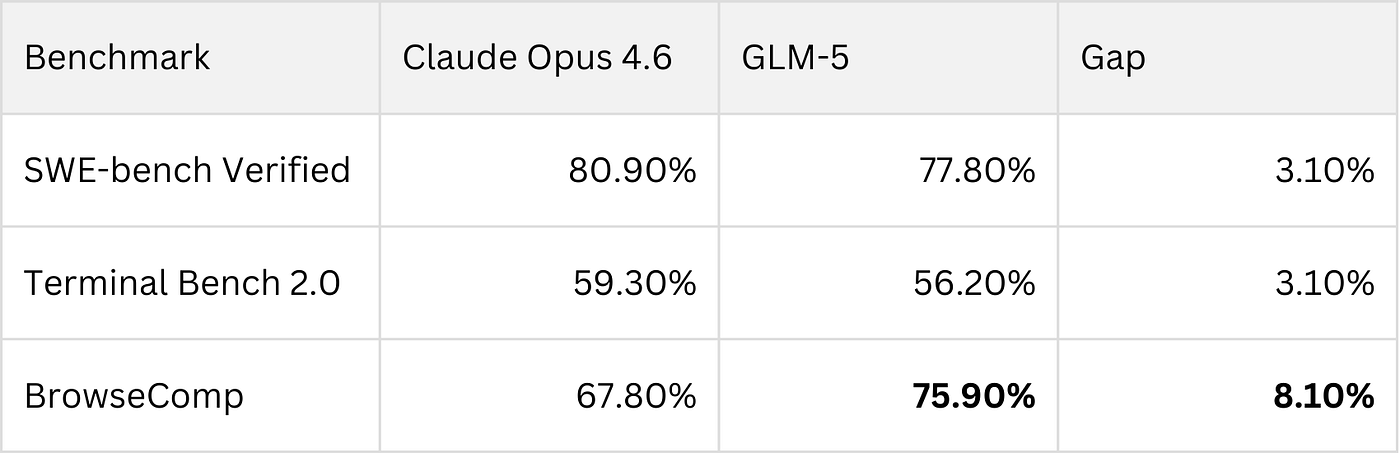
| Benchmark | Claude Opus 4.6 | GLM-5 | Gap |
|---|---|---|---|
| SWE-bench Verified | 80.9% | 77.8% | 3.1% |
| Terminal Bench 2.0 | 65.4% | 56.2% | 9.2% |
| BrowseComp | 67.8% | 75.9% | GLM-5 wins by 8.1% |
SWE-bench Verified is the most widely respected coding benchmark — think of it as the SAT for code models. Claude scored 80.9, GLM-5 scored 77.8. A 3.1-point gap. Not huge, not trivial. For everyday coding tasks, most people wouldn’t feel the difference.
Terminal Bench 2.0 measures how well a model debugs and executes shell commands. Claude leads by nearly 10 points here. If your workflow involves heavy terminal work and cross-file debugging, Claude’s advantage is real.
But BrowseComp is where things get interesting. This benchmark tests multi-step tool use, web browsing, and information retrieval — basically how good a model is at being an agent. GLM-5 scored 75.9%, beating Claude by over 8 points.
Here’s a broader comparison across multiple dimensions:
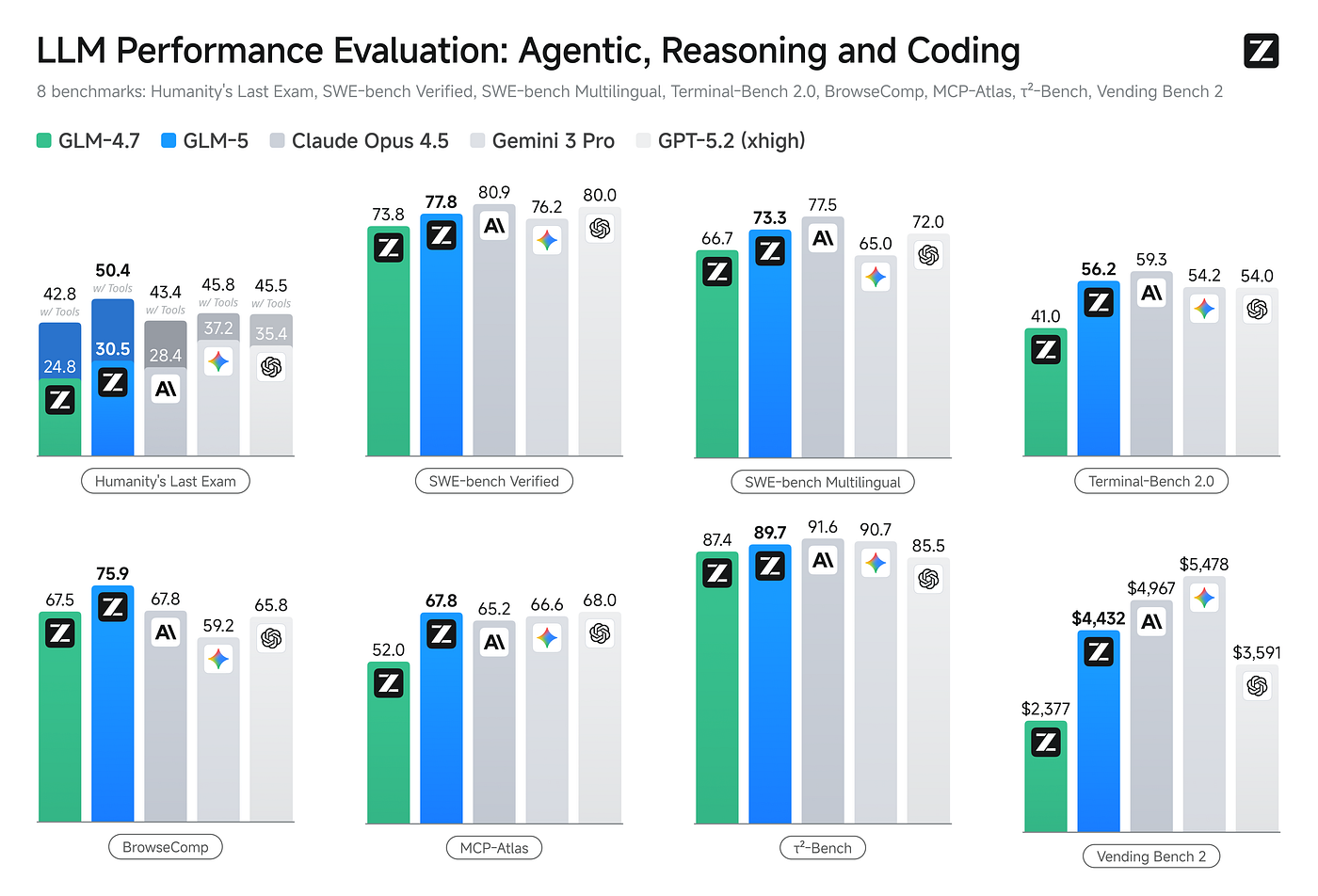
Overall, GLM-5 sits in the same tier as Claude Opus 4.6 for coding, and pulls ahead on agentic and tool-use tasks. For an open-source model to reach this level — two years ago, nobody would have believed it.
The Real Sting: GLM-5 vs Claude Opus on Price
The technical gap is a small step. The pricing gap is a canyon.

| Model | Input (per 1M tokens) | Output (per 1M tokens) |
|---|---|---|
| Claude Opus 4.6 | $5.00 | $25.00 |
| GLM-5 | $1.00 | $3.20 |
I calculated based on my own last month’s usage: roughly 10 million input tokens and 1.5 million output tokens (mostly code refactoring and analysis).
With Claude Opus 4.6: $50 input + $37.50 output = $87.50
With GLM-5: $10 input + $4.80 output = $14.80
Same workload, costs drop from $87.50 to $14.80. The $72.70 saved could buy you a decent mechanical keyboard — or about three months of a Spotify subscription.
You might ask: what about that 3.1% coding quality gap? Flip it around — would you pay 6x more for a 3% improvement?
For most developers’ daily work, that math doesn’t add up. But if you’re auditing security-critical code or working on financial systems where error tolerance is near zero, that 3% might be worth paying for.
Trained on Huawei Chips — Does It Actually Work?
GLM-5 has a backstory worth discussing: it was trained entirely on Huawei Ascend chips.
Why does this matter? Think of it this way: if AI chips are kitchen stoves, NVIDIA’s GPUs are the industry-standard professional range. For the past several years, every AI company training frontier models needed NVIDIA hardware. It’s like every chef in the world buying their stove from one shop — the shop sets the price, controls the supply.
Then the US imposed export controls on Huawei’s chips. Many expected China’s AI training to fall behind.
But GLM-5 was trained from scratch on Huawei’s Ascend chips and MindSpore framework — a 744B-parameter frontier model — and its benchmark scores land in the same ballpark as models trained on NVIDIA hardware. It’s like a chef saying “I built my own stove, and you can’t tell the difference in the food.”
For the broader industry, this might matter more than GLM-5 itself. One more chip option for AI training means the competitive landscape shifts.
Hands-On Testing: How GLM-5 Actually Writes Code
Benchmarks only tell part of the story. I ran a few real-world scenarios from my own workflow.
Scenario 1: Python async code refactoring
I had a ~200-line Python script with a classic async race condition — two async tasks fighting over the same resource, producing intermittent bugs. I fed it to GLM-5. Eight seconds later, results came back.
What it did:
- Identified the race condition’s location and root cause
- Rewrote the critical section with
asyncio.Lock - Offered three alternative async context manager patterns with trade-off notes
- Included full type hints and unit tests
Tests passed on the first run. Honestly, comparable quality to what Claude produces for the same task — at a fraction of the cost.
Scenario 2: Multi-step tool calls
I asked GLM-5 to automate a task: check the latest version of an npm package, read the project’s package.json, then generate an upgrade plan. For multi-step tool-use scenarios like this, GLM-5’s BrowseComp strength shows — clean step decomposition, logical tool call ordering, no wasted loops.
One thing to note: GLM-5 is particular about prompt formatting. The casual “hey, refactor this code for me” style that works with Claude? Mediocre results. But structure your prompt like this:
<role>Senior backend engineer</role>
<task>Refactor the following function to async/await</task>
<rules>
  - Preserve existing behavior exactly
  - Add type hints for all parameters
  - Include 3 unit tests
</rules>
<output_format>Diff format with inline comments</output_format>
And the output quality jumps dramatically. GLM-5 excels at following structured instructions. It won’t guess what you mean, but tell it clearly and it executes precisely.
GLM-5 or Claude Opus: Which Should You Pick?
With all that context, here’s a straightforward reference:

Pick Claude Opus 4.6 when:
- You’re doing security audits or financial systems requiring peak reasoning accuracy
- Your work involves heavy terminal debugging and cross-file analysis
- Your team already built workflows around Claude and migration costs are high
- You need Anthropic’s safety compliance documentation (enterprise use)
Pick GLM-5 when:
- You’re a solo developer or small team watching costs
- Your tasks are mainly code generation, refactoring, and analysis
- You want to self-host the model and avoid API vendor lock-in
- You’re building multi-step agent applications where tool-use is core
Use both (what I currently do):
- Critical, one-off architecture decisions go to Claude Opus 4.6
- Daily batch code generation and refactoring goes to GLM-5
- Security-sensitive code reviews still go through Claude
- Same logic as cooking at home — different dishes need different pans
Is That $20 Claude Subscription Still Worth Keeping?
Back to the opening question. After GLM-5, what should you do with your AI subscription?
My answer: it depends on your usage and context.
If your monthly AI spend stays under $20 (just a Claude Pro subscription), the difference is marginal. Claude’s experience is smoother, ecosystem more mature.
But if you’re like me, spending $60-$80/month on Pro plus API, GLM-5 deserves serious evaluation. Shifting batch tasks to GLM-5 can save $50-$60 monthly. That’s $600-$700 a year — enough for a nice mechanical keyboard.
Don’t go all-in overnight though. Here’s how I’d approach it:
- Sign up at the Z.ai API and grab an API key
- Run your 3 most common tasks through both models
- Record the quality and latency, build your own comparison
- Decide which tasks can migrate based on actual results
Don’t switch based on someone else’s benchmark article alone. Your scenarios, your data, your call.
GLM-5 scores 77.8% on SWE-bench, ships under MIT, and costs a dollar per million tokens. Open-source models have moved past the “good enough” stage — in many scenarios, they genuinely save you money while getting the job done.
As for me? I kept the Claude subscription. But last month’s API bill was noticeably thinner. What did I do with the savings? Bought a new keyboard. Typing feels better now.
FAQ
Can GLM-5 fully replace Claude Opus 4.6?
Depends on the task. For everyday code generation, refactoring, and analysis, GLM-5 is more than capable — SWE-bench gap is only 3.1 percentage points. But for complex terminal debugging (Terminal Bench gap is 9.2 points) or enterprise safety compliance documentation, Claude still has the edge. My approach is using both — keeping costs down without sacrificing quality on critical tasks.
Is GLM-5 free? How do I get started?
The model itself is MIT open-source — you can download weights from Hugging Face and self-deploy. Most people will use the API though: $1 per million input tokens, $3.20 per million output tokens. Register at Z.ai for an API key. The API format is OpenAI-compatible, so migration effort is minimal.
Is a model trained on Huawei chips actually reliable?
Based on benchmark scores, absolutely. GLM-5 hits 77.8% on SWE-bench Verified and 75.9% on BrowseComp (where it actually beats Claude). These results are on par with top models trained on NVIDIA hardware. The brand of training chip doesn’t determine inference quality — what matters is the training framework and data engineering behind it.
Sources: