Go + sqlc + Postgres: The Zero-ORM Stack Behind Cloudflare's 99.99% Uptime
Convenience Has a Price
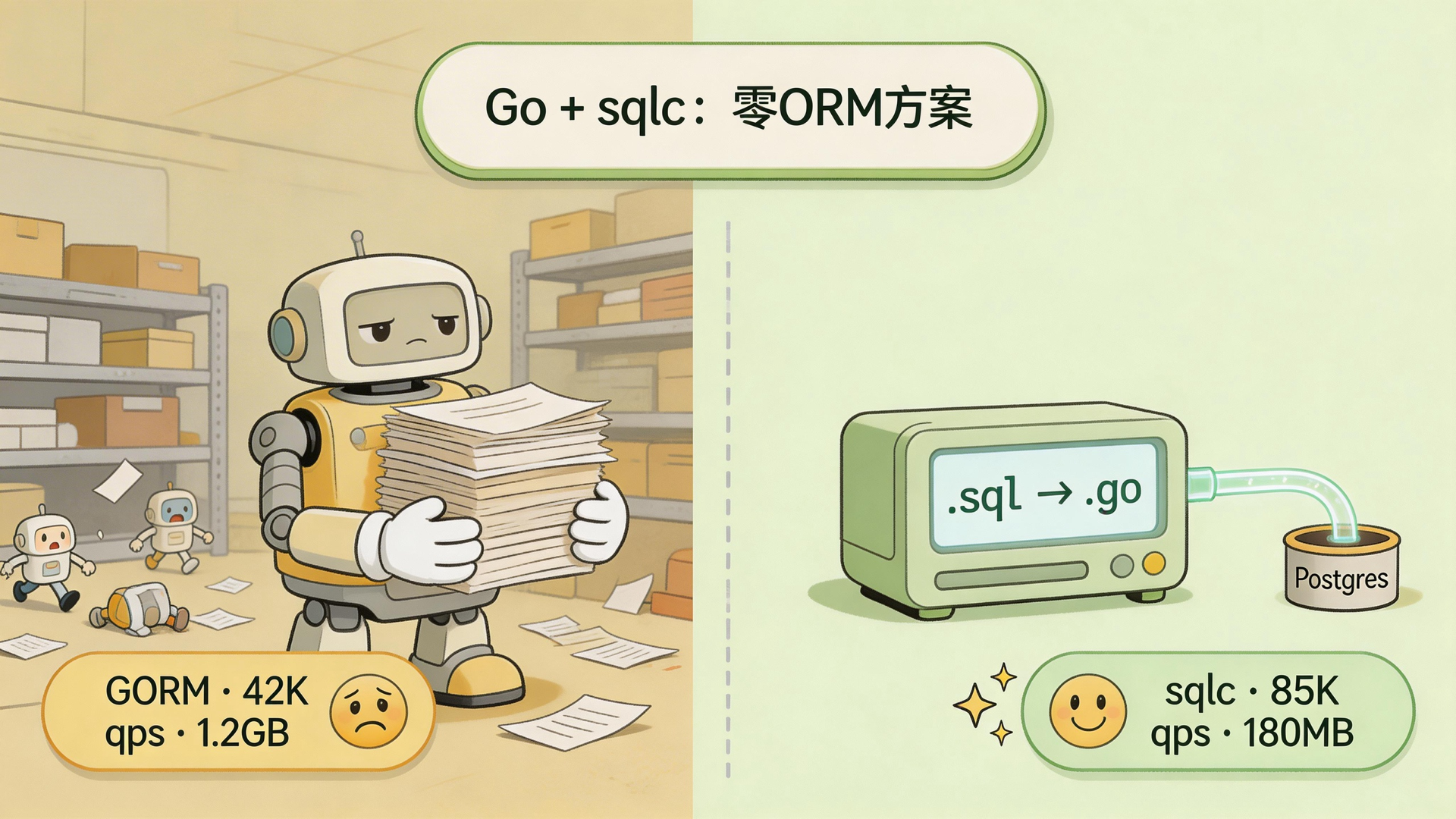
Using GORM to talk to your database is a bit like hiring a contractor who charges by the trip. You say “grab me all the orders for this user, along with their items,” the contractor nods and says no problem — then quietly makes N+1 trips to the warehouse. You only wrote two lines of code. The database just fired off dozens of queries.
You don’t have to think about the details. But you’re picking up the tab on performance.
Most Go projects reach for GORM first when they need a database. Hard to blame them — solid docs, big community, easy to copy-paste. That works fine, right up until traffic actually shows up.
Beyond N+1 queries, GORM has a less obvious problem: runtime reflection. Every incoming request triggers a dynamic inspection of your struct tags, field types, and associations. At 10K RPS you can live with that overhead. Push to 100K RPS and that “reflection check” becomes a brick sitting on your p99 latency — GC pressure climbs, memory starts bloating.
Cloudflare looked at this path and walked the other direction with sqlc.
How sqlc Works: SQL Compiles Directly to Go
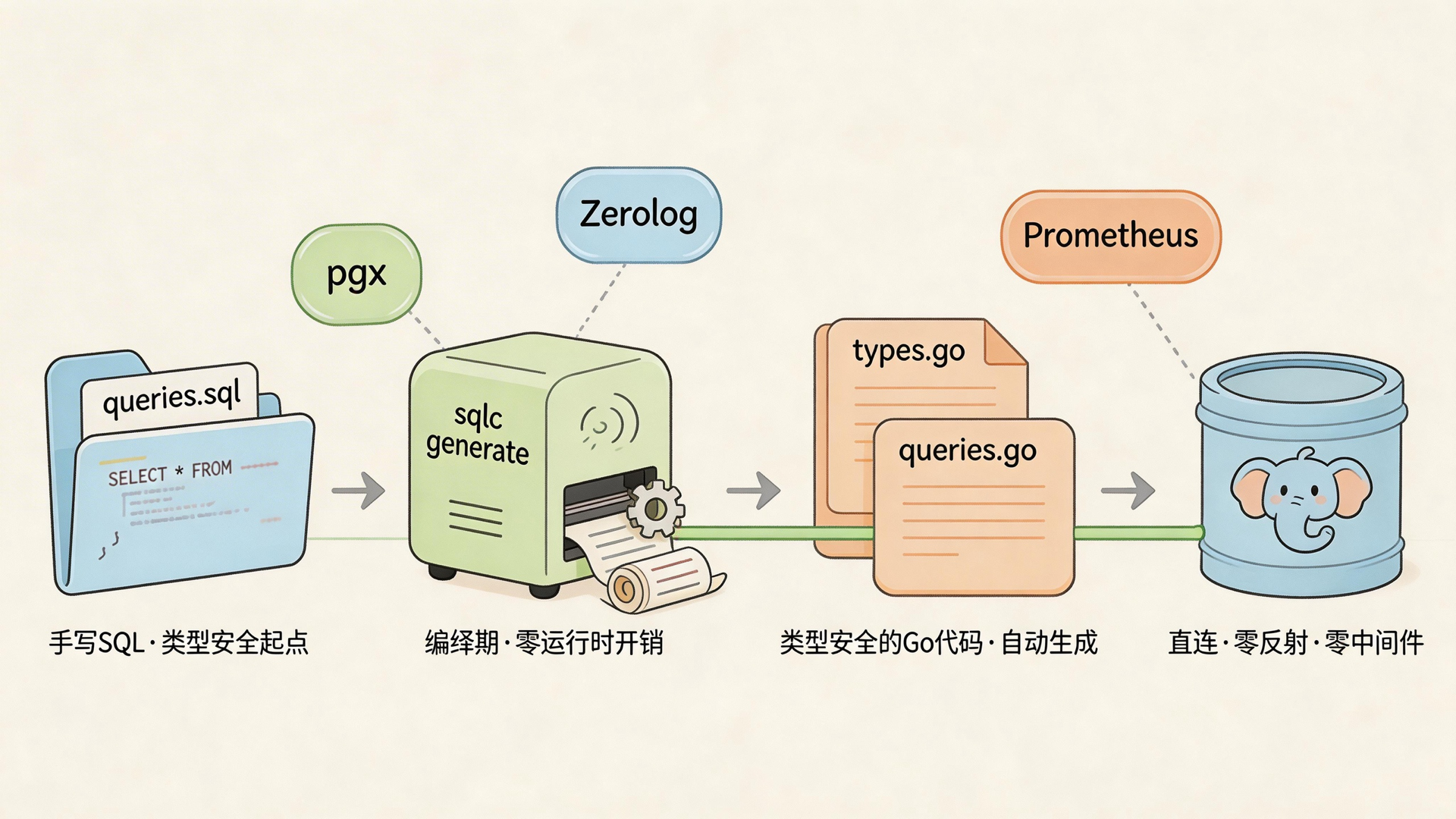
The core idea behind sqlc is straightforward: you write SQL, it generates Go code.
It compiles your .sql files into type-safe Go functions and structs — this is real compile-time code generation. Run sqlc generate and the code is there, no runtime reflection, no mapping layer, direct call to the Postgres driver.
The workflow looks like this:
1. Write SQL (queries.sql)
2. Run sqlc generate → produces types.go + queries.go
3. Call the generated functions in your business logic — IDE autocomplete works
4. Compiler catches SQL/code mismatches at build time, not during an incident
Here’s a concrete example: you change a column type in your schema, re-run sqlc generate, then go build — the compiler tells you exactly which line broke. You don’t wait for a real request to hit production before discovering the mapping is wrong.
It’s like double-checking the map before you leave, instead of finding the road closed at the junction.
The Numbers: 85K vs 42K qps

Cloudflare’s production measurements (10K concurrent):
| Stack | QPS | p99 Latency | Memory |
|---|---|---|---|
| Go + sqlc + pgx | 85,000 | 1.2ms | 180MB |
| Go + GORM | 42,000 | 3.8ms | 1.2GB |
| Go + Ent | 38,000 | 4.2ms | — |
Throughput doubles. p99 drops from 3.8ms to 1.2ms. Memory shrinks from 1.2GB to 180MB.
The memory gap is the most telling column. Under high concurrency, GORM keeps reflection running — memory accumulates, GC frequency rises, which drags p99 further. It’s a feedback loop that feeds itself. sqlc has no runtime reflection, so memory sits steady around 180MB.
Cloudflare’s Production Stack
Here’s the full combination they run:
Go + sqlc + Postgres production stack
├── sqlc (queries.sql → generates queries.go)
├── pgx (native driver + connection pooling)
├── Zerolog (structured logging)
└── Prometheus (query latency histograms)
Cloudflare engineers describe this setup as “intentionally boring.” SQL lives in version control. Migrations run first. sqlc regenerates code. Services deploy. No implicit query planner, no auto-generated joins. When something breaks, you open the .sql file directly — no need to reverse-engineer what the ORM decided to do.
Every query gets clean Prometheus instrumentation because the generated code is plain Go functions. You can see exactly where to add metrics at a glance. With ORM operations, you’re often circling the abstraction layer trying to figure out which SQL actually ran.
Zero-Downtime Migrations with sqlc
Schema changes are where ORMs cause the most pain. “Auto-sync schema” sounds convenient until you’re doing it on a production system — roughly the equivalent of changing a tire at highway speed.
sqlc’s migration flow is explicit steps, not magic:
1. Write new migration file (add column or change type)
2. sqlc generate (new query methods appear, old ones stay)
3. Dual-read period: old and new queries both live in production, shift traffic gradually
4. Once traffic is fully over, delete old query files and regenerate
Because every query has type checking, the dual-read/dual-write transition gets verified at compile time. No downtime, no staring at migration scripts at 3am.
When to Switch from GORM to sqlc
sqlc isn’t free. It requires you to actually write SQL — you can’t lean on the ORM to generate queries for you. If the team isn’t fluent in SQL, the migration cost will be higher than expected.
Cases where sqlc makes sense:
- Queries are complex — window functions, CTEs, or Postgres-specific features like JSONB
- Service latency matters and p99 is starting to hurt user experience
- You want the database layer under strict type system control to cut runtime surprises
- The team is already writing raw SQL and just needs a type-safety layer on top
Cases where it probably isn’t worth switching yet:
- Project is still in prototype stage, schema changes daily
- Team’s SQL skills are uneven and the ORM is serving as a guardrail
- Business logic is simple, GORM runs fine, p99 shows no anomalies
- Query volume is low enough that the ORM overhead is completely acceptable
A practical approach: start with your hottest endpoint. Migrate just those queries to sqlc. Let both coexist for a while. If the numbers improve, expand. A full migration in one shot carries too much risk.
The Real Point: Stop Hiding SQL
The logic behind Cloudflare’s approach is simple: SQL is the contract between your code and your database. That contract should be explicit — not auto-generated by an ORM into something you can’t read.
sqlc goes all the way on this. It isn’t a “better ORM” — it’s a different direction. The cost is that you need to actually know SQL. The benefit is no black box between your code and the database. When something breaks, you find the SQL file.
If your service is already under high concurrency and p99 is starting to drift, pull out your hottest queries, rewrite them with sqlc, and compare latency — 85K or 42K, that table is sitting right there.
FAQ
Q: How do I install and configure sqlc?
Install with go install github.com/sqlc-dev/sqlc/cmd/sqlc@latest, then create a sqlc.yaml config file in your project root specifying database type (postgresql/mysql/sqlite), schema path, and SQL file path. Run sqlc generate and the Go code appears in the configured output directory. Official docs at docs.sqlc.dev — most people have a working first example within 15 minutes.
Q: Can sqlc fully replace GORM?
Not entirely. sqlc focuses on query code generation and doesn’t handle migrations (you’d pair it with golang-migrate or Atlas). Features like GORM’s automatic association management and soft deletes require hand-written SQL in sqlc. They solve different problems.
Q: Which databases does sqlc support?
Primarily PostgreSQL, MySQL, and SQLite. PostgreSQL support is the most complete, including JSONB, arrays, and custom domain types. If you’re already on Postgres, sqlc works out of the box for most cases.
Q: How do I migrate an existing GORM project?
Incrementally. Find your slow or complex queries, rewrite them in sqlc, run both side by side for a while, verify, then expand. A full migration in one pass is high-risk — when the scope is large, it’s hard to isolate what went wrong.