RAG in Practice: Stop Making Your LLM Take Closed-Book Exams

Table of Contents
Last week I asked Claude: “Where’s our project deployment doc?” It launched into a lecture on Kubernetes best practices — well-written, perfectly structured, and completely irrelevant to our project.
Another time I asked it to look up the latest usage of an API. It gave me code that was deprecated a year ago, confidently claiming it was “tested and working.”
AI isn’t dumb. It’s taking a closed-book exam. RAG (Retrieval-Augmented Generation) fixes this: give the model a reference book and let it look things up before answering.
Why LLMs Make Things Up
Large language models read a lot during training, but they have two hard limitations.
Their memory has an expiration date. Claude’s training data cuts off around early 2025. Ask it about something from 2026 and it can only guess. It’s like asking a student who graduated in 2020 to answer current affairs questions from 2026 — they can’t exactly flip through their old textbooks.
The other problem is that it has never seen your data. Your company’s internal docs, product manuals, customer records — the model has zero knowledge of any of it. According to Gartner’s 2025 report, over 80% of enterprise data is non-public internal data. Asking a model to answer questions about it is like asking a day-one intern what the refund rate was last quarter. Of course they’ll make something up.
So what do you do? Hand it a reference book. Let it take an open-book exam.
That’s RAG — Retrieval-Augmented Generation.
What Is RAG
The idea behind RAG is almost embarrassingly simple. Think back to school:
Closed-book exam: Whatever the teacher asks, you rely entirely on what you memorized. Can’t remember? Make it up. It sounds plausible but doesn’t hold up to scrutiny.
Open-book exam: Look up the relevant chapter first, read through it, then answer based on what you found. Much more reliable.
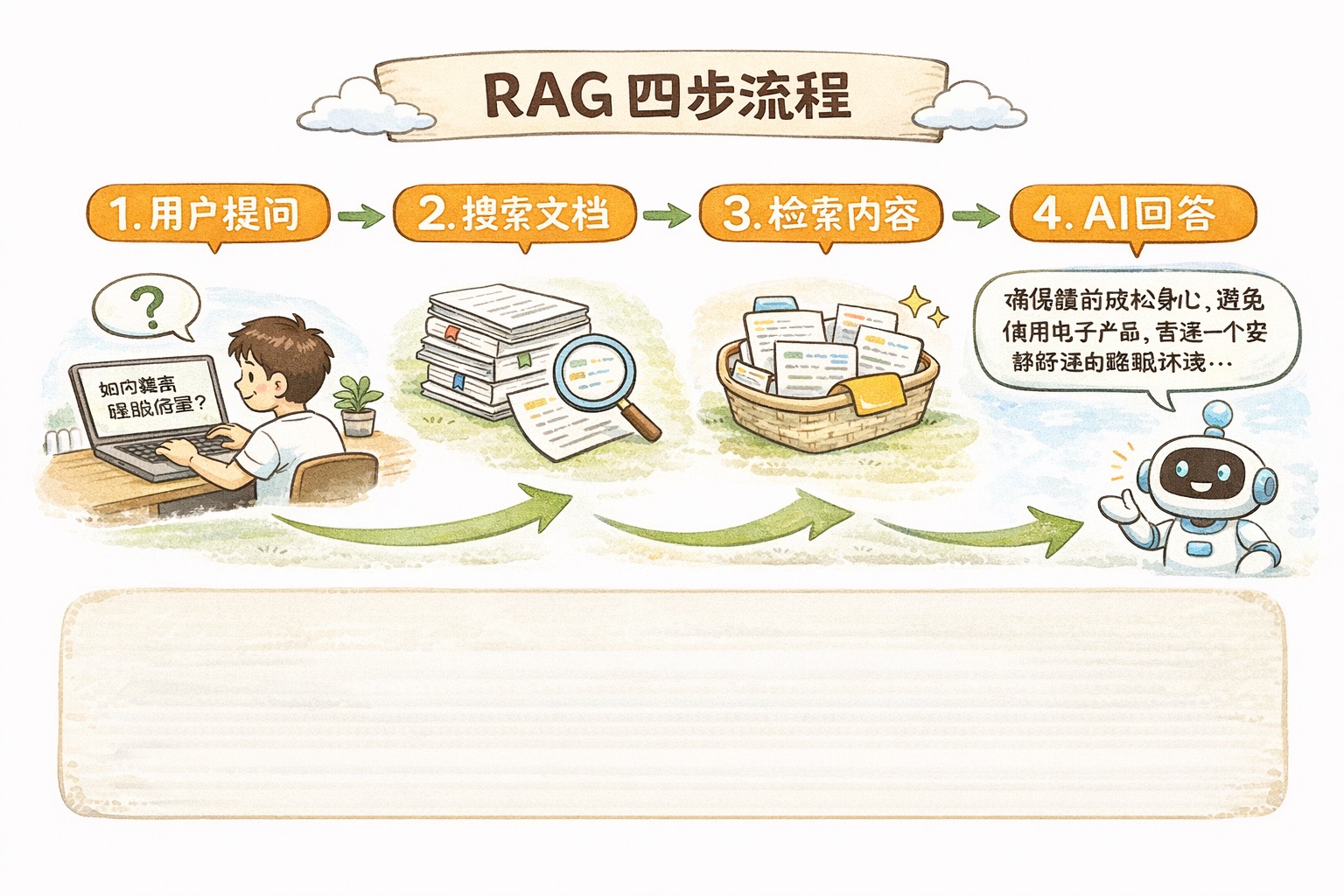
RAG switches AI from closed-book mode to open-book mode. The flow isn’t complicated:
- You ask a question: “How much did PostgreSQL 18’s async IO improve performance?”
- The system looks it up: Finds the most relevant chunks from your knowledge base
- AI answers with references: Claude reads those chunks, then gives you a well-grounded answer
The whole process is like going to the library to research a paper. You don’t haul every book home — you check the catalog, find the relevant ones, flip to the right chapter, and write your report.
Embedding Vector Search: How the “Looking Up” Works
Here’s where we need to talk about embeddings — the core component of any RAG system.
The name sounds intimidating. The concept is intuitive.
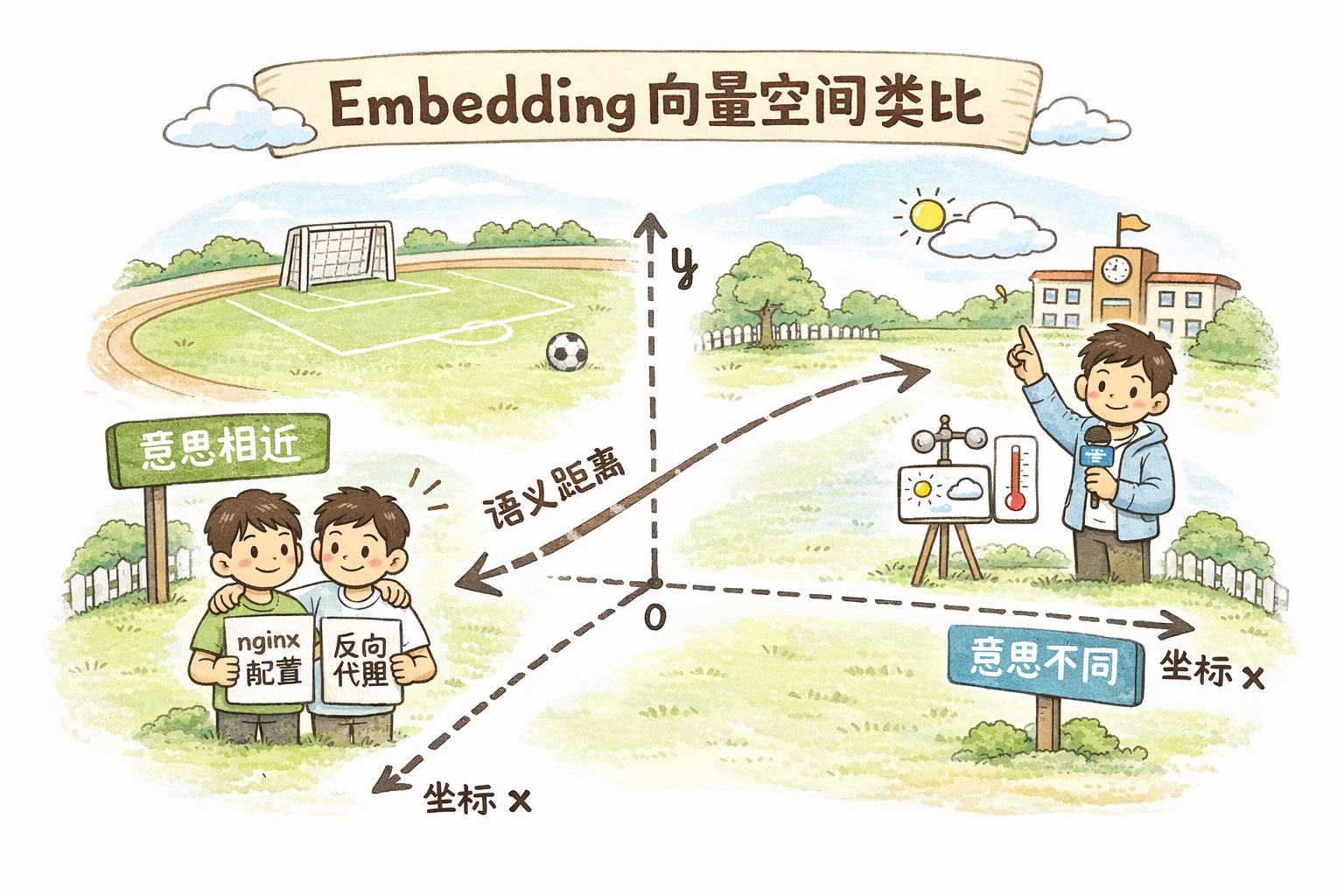
Imagine every piece of text is a person standing on a giant field. People with similar meanings stand close together; people with different meanings stand far apart. “How to configure nginx” and “nginx reverse proxy setup” are practically shoulder to shoulder, while “Nice weather today” is across the field on the opposite diagonal.
What embeddings do is assign a “coordinate” to each piece of text. These coordinates aren’t two-dimensional — they’re thousands of dimensions (don’t try to visualize it, you can’t) — but the principle is the same: the closer the meaning, the closer the coordinates.
With coordinates, search becomes “find the nearest neighbors.” Your question gets converted into a coordinate, then the system finds the closest few among all document coordinates.
How is this better than keyword search? Keyword search only matches literal text. You search “how to make a website faster” and it can’t find the article titled “Web Performance Optimization Guide” because not a single word matches. Embedding search understands that both phrases mean the same thing.
Build a RAG System in 4 Steps (Full Code)
Enough theory. Let’s write code.
Step one: chunk your documents.
You can’t feed an entire book to the AI — it won’t fit in the context window. You need to split documents into appropriately sized chunks, roughly 200-500 tokens each.
def chunk_text(text, chunk_size=400, overlap=50):
    """Split long text into overlapping chunks"""
    words = text.split()
    chunks = []
    for i in range(0, len(words), chunk_size - overlap):
        chunk = ' '.join(words[i:i + chunk_size])
        chunks.append(chunk)
    return chunks

# Chunk your documents
documents = [
    "PostgreSQL 18 introduces async IO based on io_uring...",
    "The real latency of a Redis cache layer isn't the hit latency...",
    "B-tree skip scan can skip leading columns of composite indexes...",
]
One detail: chunks need to overlap. Otherwise a key piece of information gets split right in half, both sides incomplete, and search can’t find it. It’s like tearing a newspaper to line your shoes — try not to rip through the middle of an article.
Step two: generate embeddings for each chunk.
Anthropic recommends Voyage AI
embedding models. The latest is voyage-3.5, supporting 32,000 tokens of context and producing 1024-dimensional vectors.
import voyageai
import numpy as np

vo = voyageai.Client()

# Generate vectors for documents (note input_type="document")
doc_embeddings = vo.embed(
    documents,
    model="voyage-3.5",
    input_type="document"
).embeddings
Don’t forget the input_type="document" parameter. Voyage prepends different instruction prefixes depending on the type — "query" for queries, "document" for documents. Adding the type annotation produces better retrieval quality than omitting it, per Voyage’s own testing.
Step three: when a user asks a question, search for the most relevant chunks.
def search(query, doc_embeddings, documents, top_k=3):
    """Semantic search: find the most relevant document chunks"""
    # Generate a vector for the question too
    query_embd = vo.embed(
        [query],
        model="voyage-3.5",
        input_type="query"
    ).embeddings[0]

    # Calculate similarity (Voyage vectors are normalized, so dot product = cosine similarity)
    similarities = np.dot(doc_embeddings, query_embd)

    # Get the top_k most relevant
    top_indices = np.argsort(similarities)[-top_k:][::-1]
    return [(documents[i], similarities[i]) for i in top_indices]

results = search("How much did io_uring improve performance", doc_embeddings, documents)
Step four: feed the retrieved results to Claude and let it answer open-book.
import anthropic

client = anthropic.Anthropic()

def rag_answer(query, retrieved_docs):
    """Have Claude answer based on retrieved results"""
    context = "\n\n---\n\n".join([doc for doc, score in retrieved_docs])

    response = client.messages.create(
        model="claude-sonnet-4-5-20250514",
        max_tokens=1024,
        messages=[{
            "role": "user",
            "content": f"""Answer the question based on the following reference materials. If the materials don't contain relevant information, say so explicitly.

Reference materials:
{context}

Question: {query}"""
        }]
    )
    return response.content[0].text
Four steps and you have a basic RAG system. Your AI doesn’t have to guess anymore.
Contextual Retrieval: Cutting Retrieval Failure by 67%
The basic version above has a problem.
Say your knowledge base contains the sentence: “The company’s Q3 revenue grew by 15%.” After chunking, this becomes an isolated sentence. Which company? Q3 of which year? The context is gone.
Traditional RAG is like ripping a page out of a book — looking at just that page, you might not be able to tell what it’s about.
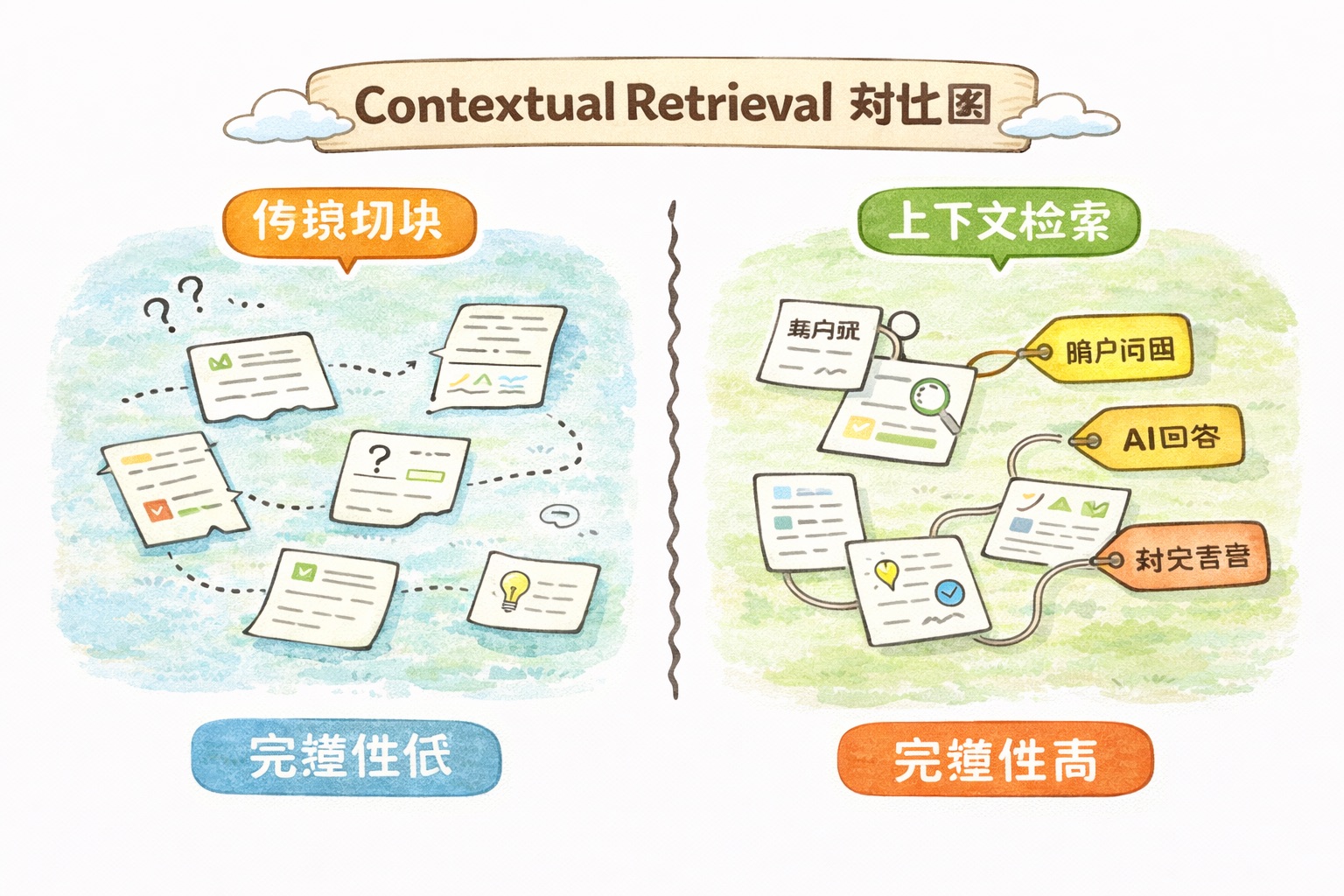
Anthropic introduced Contextual Retrieval in late 2024 to solve this. The approach is straightforward: after chunking but before generating embeddings, have Claude add a brief “context annotation” to each chunk.
For that “Q3 revenue grew by 15%” sentence, Claude would prepend: “This content is from Apple Inc.’s 2025 annual report, discussing Q3 2025 financial performance.” Now even when the chunk is pulled out in isolation, the information is complete.
How well does it work? Anthropic’s benchmark data:
| Approach | Retrieval Failure Rate |
|---|---|
| Traditional Embedding | 5.7% |
| Contextual Embedding | 3.7% (35% reduction) |
| Contextual Embedding + BM25 | 2.9% (49% reduction) |
| All of the above + Reranking | 1.9% (67% reduction) |
Retrieval failure dropped from 5.7% to 1.9%.
The cost is low too. Using Claude’s Prompt Caching, contextualizing one million tokens of documents costs about $1. A 300,000-word technical manual — a few dollars and you’re done.
When to Use RAG (and When Not To)
Don’t slap RAG on everything.
If your knowledge base is under 200K tokens (roughly 150,000 words), just stuff it directly into the prompt. Claude’s context window is 200K tokens — a small book fits right in, and that’s far simpler than building a whole RAG pipeline. If your kitchen only has three drawers, you don’t need a warehouse management system to find the bottle opener.
When you need RAG:
- Enterprise knowledge bases — hundreds of thousands to millions of words of documentation
- Frequently updated content like product manuals and API docs
- Scenarios requiring precise source citations, like legal or medical consulting
- Integrating knowledge from multiple different sources
When you probably don’t need RAG:
- General knowledge Q&A — the model already knows
- Small data volumes — just shove it in the context
- Tasks requiring reasoning rather than retrieval
Common RAG Pitfalls
Chunks too small or too large.
Too small: each chunk has incomplete information, AI answers are fragmented. Too large: retrieval precision drops, one useful sentence buried in a wall of text. 200-500 tokens is a decent range, but adjust for your document type. Technical docs can go larger since a concept often needs a complete paragraph. FAQs can go smaller — one Q&A per chunk.
Only using semantic search.
Embedding search is great at understanding meaning, but weak on exact term matching. Search for “ERR_CONNECTION_REFUSED” and semantic search might return a bunch of generic “network connection problems” content instead of the exact solution for that error code.
The fix is hybrid search: semantic search + BM25 keyword search. Take the top-20 from each, merge and deduplicate, then rerank with a reranking model. Anthropic’s data shows the hybrid approach reduces retrieval failure by 49% compared to semantic search alone.
Force-using irrelevant retrieval results.
Sometimes the knowledge base genuinely doesn’t have the answer, but the system still returns the “most relevant” chunks (highest similarity, not necessarily actually relevant). AI takes these half-relevant chunks and might generate an answer that looks reasonable but is completely off base.
The fix: set a similarity threshold. Drop any results below the threshold and let the AI honestly say “I didn’t find relevant information in the available materials.” Honesty beats making things up.
Forgetting to update the index.
Documents get updated but embeddings aren’t regenerated — AI keeps answering with stale information. This error is sneaky because the AI’s response has perfect formatting and sound logic; it’s just outdated. Set up a scheduled task: when documents change, re-index.
Voyage AI Embedding Model Comparison
Anthropic officially recommends Voyage AI models. Here are the current options:
| Model | Use Case | Context Length |
|---|---|---|
| voyage-3.5 | General retrieval, best value | 32,000 tokens |
| voyage-3-large | Highest retrieval quality | 32,000 tokens |
| voyage-3.5-lite | Low latency, low cost | 32,000 tokens |
| voyage-code-3 | Code retrieval | 32,000 tokens |
| voyage-finance-2 | Finance domain | 32,000 tokens |
| voyage-law-2 | Legal domain | 16,000 tokens |
If you’re not sure which to pick, voyage-3.5 is the safe bet. For code-related work use voyage-code-3, for finance use voyage-finance-2. Domain-specific models outperform general models by a solid margin in their respective fields.
Voyage also supports vector quantization. Raw 32-bit floating-point vectors can be compressed to 8-bit integers or even 1-bit binary, reducing storage by 4x and 32x respectively. For large-scale knowledge bases, that saves real money on storage and speeds up retrieval.
Get Started Today
Don’t just bookmark this.
Pick the one document your team looks up most often, chunk it with the code above, generate embeddings, and store them in a numpy array. That’s a 30-minute job. The four-step code combined is under 50 lines. Run it, ask your document a few questions, see how it feels.
Then take the same question, answer it with plain Claude and with RAG + Claude, and compare. Especially for questions involving your company’s internal information — the difference will make you wonder why you didn’t do this sooner.
At the end of the day, RAG is just giving AI a reference book. That book can be your product docs, your company wiki, your support ticket history, or even all of Wikipedia. The AI doesn’t have to rely on potentially stale “memories” anymore.
What document do you most want to let AI “look up” in your workflow? Your company’s internal docs, or a domain-specific knowledge base? Drop a comment — your use case might be exactly what someone else is trying to solve.
Next up: Claude’s Tool Use — letting AI not just search documents but also call APIs, query databases, and send notifications. From “can only talk” to “can take action.”
References:
- Anthropic: Contextual Retrieval
- Anthropic Docs: Embeddings
- Anthropic Cookbook: Wikipedia Search
- Voyage AI Embedding Models
Found this useful? Give it a like. Got friends building AI applications? Share it with them. Follow Dream Beast Programming for more hands-on AI content.