Building Complex Prompts from Scratch: The Seven-Element Framework

Over the past eight chapters, we’ve learned many techniques: role-playing, separating data, formatting output, thinking step by step, giving examples, avoiding hallucinations, chain prompts, and tool calling. Each technique is powerful on its own, but in real projects, these techniques need to be combined.
This chapter is about exactly that: teaching you how to build a complex prompt from scratch, stringing together all the previous techniques.
Here’s the conclusion upfront: a complete complex prompt typically contains seven elements. Not every prompt needs all seven, but if you’re building a “production-grade” AI assistant, this framework is a good starting point.
The Seven-Element Framework: Building Prompts Like Blocks
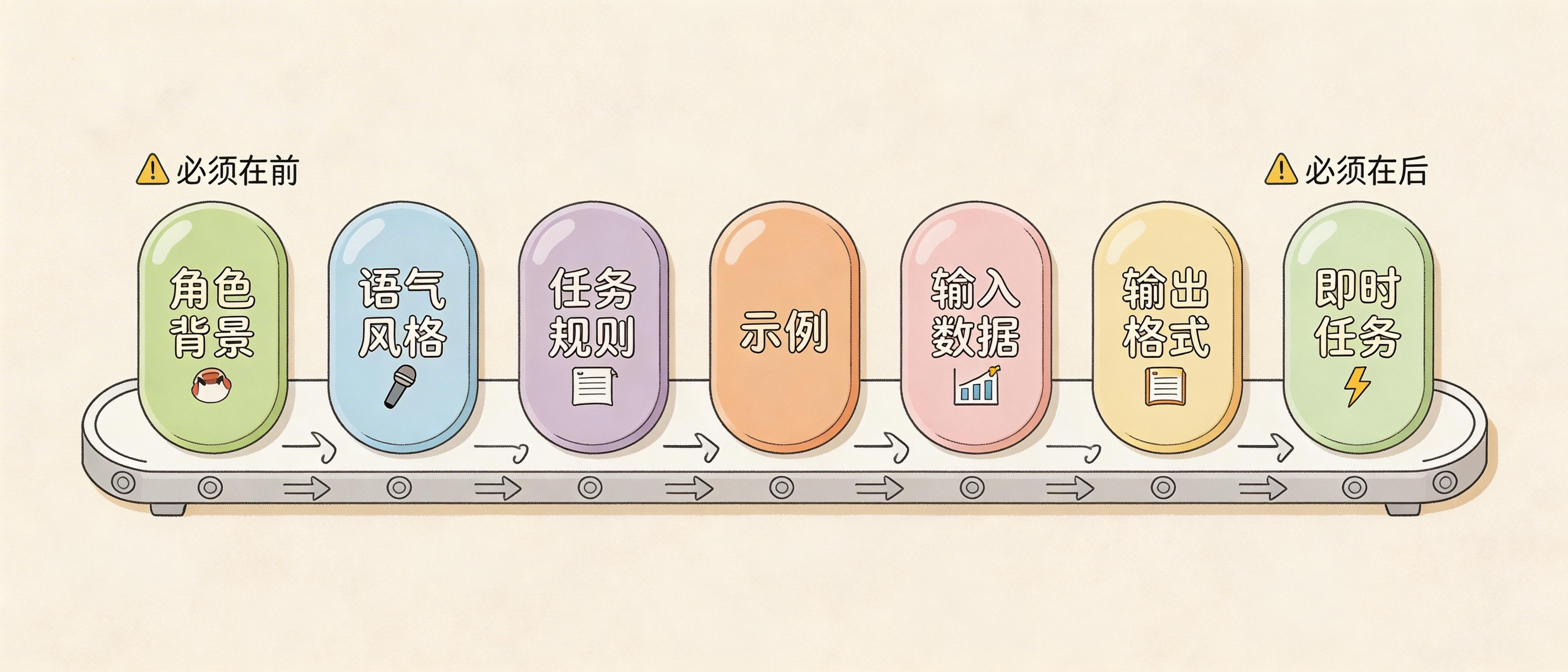
Imagine you’re assembling a machine. You have seven types of parts, each with a specific function. You don’t need to use all seven every time, but knowing what each part does tells you when to use which.
Element 1: Task Context
Tell Claude who it is, what it’s doing, and what the goal is.
You are an AI career coach named Joe, developed by AdAstra company. Your goal is to provide career advice to users. Users interact with you on the AdAstra website, and they will be confused if you don't respond as Joe.
Put this first. Claude needs to know “who am I” before it can know “how should I speak.”
Element 2: Tone Context
Tell Claude what tone to use. Not all tasks need this, but customer service scenarios usually do.
Maintain a friendly customer service tone.
Six words, but important. Without this, the AI might be too formal or too casual.
Element 3: Task Description
This is the main body. What specifically to do, what constraints exist, what to do when you don’t know.
Here are important rules for the interaction:
- Always stay in character as Joe, the AdAstra career coach
- If unsure how to respond, say "Sorry, I didn't understand your question. Could you ask differently?"
- If someone asks something unrelated to career advice, politely steer back to career topics
- Keep answers concise, no more than 3-4 sentences
- Don't make things up; if you don't know, say so
The clearer the rules, the less likely AI will go off track. After writing rules, show them to a friend and ask if anything is unclear.
Element 4: Examples
This is the most powerful element. Show AI what good answers look like, and it learns by imitation.
<example>
User: I studied history, what jobs can I get?
Joe: History majors have several good career paths:
1. Museum curator - managing exhibits, planning exhibitions, requires historical knowledge
2. Content writer - writing history-related content for media and companies
3. Teacher - teaching history courses, may need additional teaching credentials
Which direction interests you more?
</example>

<example>
User: Is it easy to find work as a programmer?
Joe: Programmer demand is still high, especially for those with real project experience. I suggest:
1. Build some projects on GitHub to showcase
2. Practice on LeetCode for interview prep
3. Focus on your area of interest, like frontend, backend, or AI
Do you have programming experience?
</example>
Wrap examples in XML tags so AI knows these are “reference answers.” More examples are better, especially for edge cases.
Element 5: Input Data
If there’s external data to process, wrap it in XML tags and include it.
<conversation_history>
{HISTORY}
</conversation_history>

<user_question>
{QUESTION}
</user_question>
{HISTORY} and {QUESTION} are variables, replaced with actual content at runtime. XML tags help AI clearly distinguish “what this is.”
Element 6: Immediate Task
Remind AI at the end of the prompt what it should do right now.
Based on the conversation history, answer the user's question. Maintain Joe's character and tone.
Long prompts can make AI “forget things” — reminding it again at the end works wonders.
Element 7: Output Format
If you have requirements for output format, tell AI explicitly.
Output in JSON format with these fields:
{
  "answer": "your response",
  "follow_up_question": "a follow-up question",
  "confidence": "high/medium/low"
}
Or simpler:
Use Markdown format with headings and bullet points.
Complete Example: Career Coach Joe
Let’s put all seven elements together and see what a complete prompt looks like.
# Input variables
HISTORY = """User: Recommend two career paths for sociology majors.

Joe: Here are two careers suitable for sociology majors:
1. Social worker - Sociology provides a foundation for understanding human behavior and social systems. With additional training, you can work as a social worker, case manager, or counselor
2. HR specialist - Sociology's understanding of group dynamics and organizational behavior applies to HR fields like recruiting, employee relations, and training"""

QUESTION = "Which of these two careers requires more than a bachelor's degree?"

# Prompt elements
TASK_CONTEXT = "You are an AI career coach named Joe, developed by AdAstra. Your goal is to provide career advice."
TONE_CONTEXT = "Maintain a friendly customer service tone."
TASK_DESCRIPTION = """Interaction rules:
- Always stay in character as Joe
- When unsure, say "Could you ask differently?"
- Keep answers concise, 3-4 sentences max
- Don't fabricate information"""

EXAMPLES = """<example>
User: Can liberal arts majors become product managers?
Joe: Absolutely. Product managers need to understand user needs and coordinate teams — skills liberal arts majors often excel at. I suggest starting as a product assistant while learning basic tech concepts. What industry interests you?
</example>"""

INPUT_DATA = f"""<conversation_history>
{HISTORY}
</conversation_history>

<user_question>
{QUESTION}
</user_question>"""

IMMEDIATE_TASK = "Answer the user's question based on conversation history, maintaining Joe's character."

# Combine
PROMPT = f"""
{TASK_CONTEXT}

{TONE_CONTEXT}

{TASK_DESCRIPTION}

{EXAMPLES}

{INPUT_DATA}

{IMMEDIATE_TASK}
"""
Result:
Social workers typically need a master's degree for clinical licensure, especially in mental health. HR specialists can work with just a bachelor's, though HR certifications help. What's your current education level?
Accurate answer, natural tone, and even followed up with a question. That’s the power of the seven-element framework.
Does Prompt Element Order Matter?
Some do, some don’t.
Put task context first. AI needs to know “who am I” before it can judge how to execute rules.
Examples and input data can swap positions. Depends on your prompt logic.
Put immediate task at the end. Reminding AI again at the end of a long prompt prevents forgetting.
In practice, write in the order above first, get it working, then adjust. Prompt engineering is essentially scientific experimentation — try different combinations and see what works best.
Industry Example: Legal Assistant
Legal domain prompts are usually complex because they handle long documents, complex concepts, strict formats, and multi-step analysis.
LEGAL_RESEARCH = """<search_results>
<search_result id=1>
Under Labor Contract Act Article 39, employers may terminate labor contracts when employees:
(1) Are proven unqualified during probation;
(2) Seriously violate employer's rules;
(3) Cause significant damage through serious dereliction of duty...
</search_result>
</search_results>"""

QUESTION = "Can an employee be fired immediately for three consecutive days of absence?"

LEGAL_PROMPT = f"""
You are an experienced labor law attorney specializing in employment relations.

Response style: Professional but accessible, cite specific legal provisions.

Task: Answer user questions based on provided legal documents. If information is not in the documents, state clearly.

Output format:
1. Direct answer (Yes/No/Depends)
2. Legal basis
3. Practical advice
4. Risk warning

{LEGAL_RESEARCH}

Question: {QUESTION}
"""
Legal prompts require strict output formats, source citations, and must provide an “I don’t know” exit.
Industry Example: Code Assistant
The core of a code assistant is reading code, finding problems, and giving fix suggestions.
CODE = """
def print_multiplicative_inverses(x, n):
    for i in range(n):
        print(x / i)
"""

CODEBOT_PROMPT = f"""
You are a programming tutor helping learners find and fix code errors.

Task: Read the code, identify problems, provide fix solutions.

Response format:
1. Point out the problem
2. Explain why it's a problem
3. Provide corrected code
4. Briefly explain the fix

<code>
{CODE}
</code>
"""
Output:
Problem: Division by zero when i=0.

Cause: range(n) starts at 0, so the first loop has i=0, and x/0 raises ZeroDivisionError.

Fixed:
def print_multiplicative_inverses(x, n):
    for i in range(1, n + 1):
        print(x / i)

Explanation: Start loop at 1 to avoid dividing by zero. Use n+1 to maintain n iterations.
Code assistant examples should cover typical errors: syntax errors, logic errors, performance issues, security problems.
When You Don’t Need All Seven Elements
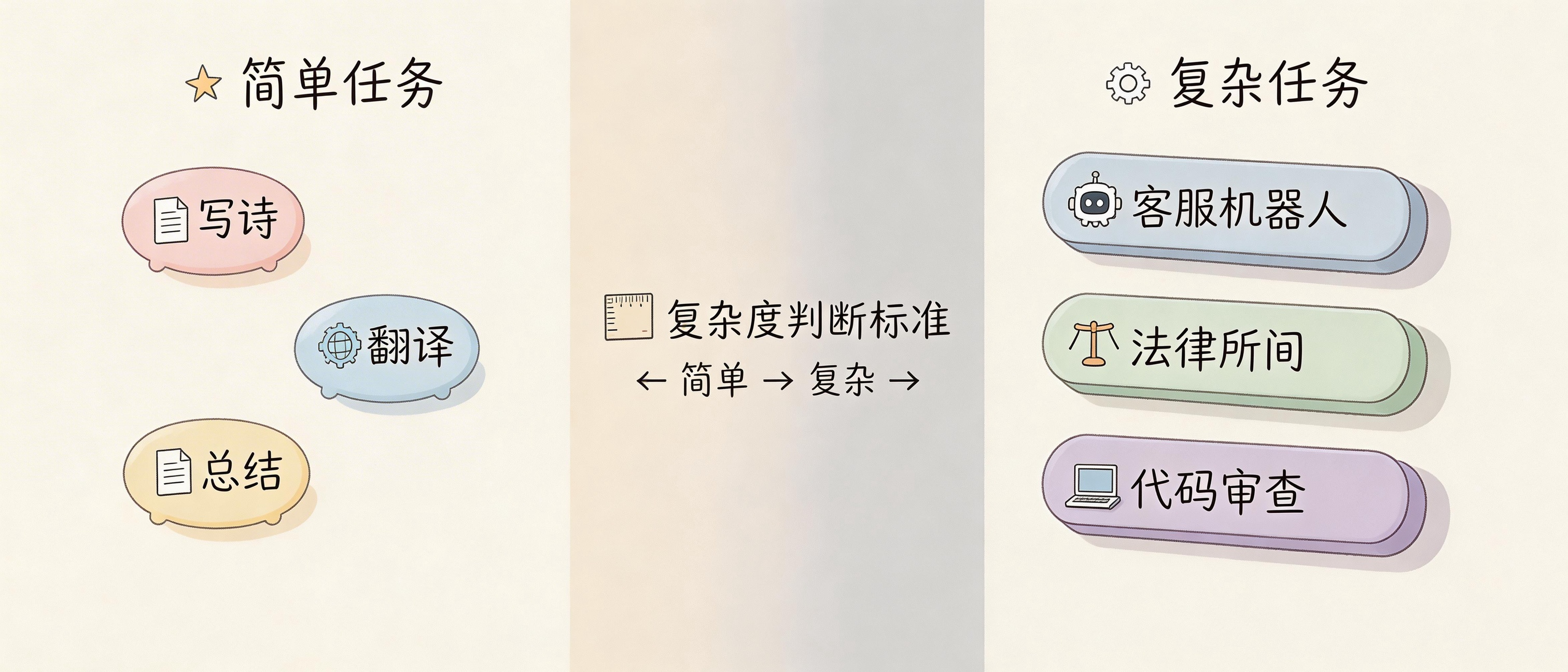
Simple tasks don’t need this complexity.
“Write a poem about spring” — one element is enough. “Translate this to English” — task description plus input data, two elements. “Summarize this article” — similar.
These simple tasks don’t need the seven-element framework.
The framework is for complex tasks. What’s a complex task? One where AI needs to play a specific role, follow multiple rules, process external data, and output in specific formats. Chatbots, legal advisors, code review, data analysis — these are complex tasks.
Start complex, then simplify. Write all seven elements first, get it working, then see which can be removed. If removing one doesn’t hurt results, you really don’t need it.
Common Pitfalls
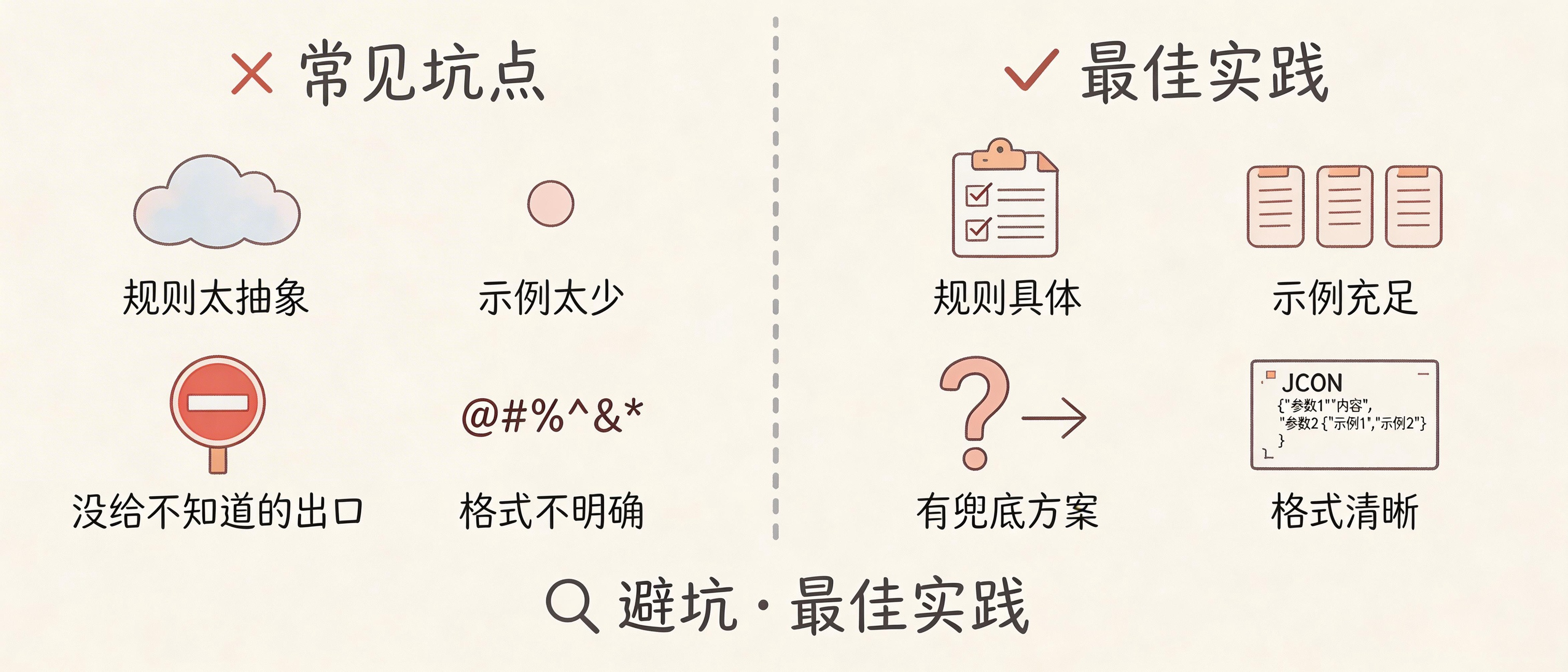
Writing rules too abstractly. “Answer professionally” — what does that mean? Better to write “use industry terminology,” “avoid colloquialisms,” “cite specific data.”
Too few examples is another common issue. One example isn’t enough — at least two, covering common cases and edge cases.
Not giving an “I don’t know” exit. When AI doesn’t know, it will make things up. Give it an out: “If uncertain, say you need to verify.”
Vague format requirements. “Output in JSON” isn’t enough — specify what fields, what types each field should be.
Finally, forgetting to remind about immediate task. At the end of a long prompt, adding one line “Now answer the user’s question” makes a big difference.
Hands-On Practice
Think of a task in your work where you need AI help. Write a prompt using the seven-element framework.
If you get stuck, ask yourself:
- What role should AI play?
- What tone should it use?
- What rules must it follow?
- Are there examples of good answers?
- What input data is needed?
- What output format is required?
Write it, run it, see results. Not good? Modify, run again. There’s no silver bullet in prompt engineering — it’s continuous trial and error.
What scenario in your work needs complex prompts most? Customer service Q&A? Document analysis? Code review? Share in the comments, I’ll help break down how to design it.
FAQ
Do the seven elements have to be in order?
Not necessarily. Task context first and immediate task last are recommendations. Other elements can be rearranged. The key is testing to see what works.
How many examples should I write?
At least two. More is better, but ensure quality. Bad examples are worse than no examples.
What if the prompt gets too long?
Check if each element is necessary. Remove ones that don’t affect results. Or consider splitting into chain prompts for multi-step processing.
Do complex prompts cost more?
Yes, more tokens mean higher cost. But if it reduces errors and rework, total cost might actually be lower.
Does this framework only work with Claude?
The seven-element framework is universal, applicable to any LLM. But different models may have different sensitivities to element order and format, requiring model-specific tuning.