Search “how to write AI Skill” and most tutorials only teach you how to write CLAUDE.md. The better ones cover SKILL.md’s description field and ## Rules sections. But people who actually rely on Skills know the truth — a Skill is not a prompt. It’s an engineering system.
This article breaks down that system from the ground up. Every module solves a real problem. Every problem comes from actual experience. By the end, your Skills won’t just “sometimes work” — they’ll trigger consistently, behave predictably, and improve over time.
1. What a Skill Is, and Isn’t
When you ask AI to write code, everything it sees lives in its context window. Content in that window falls into two categories: always-on, and load-on-trigger. Each has its own entry point and its own purpose.
| Mechanism | Entry Point | Load Mode | Purpose |
|---|---|---|---|
| Project Instructions | AGENTS.md / CLAUDE.md | Always-on | Coding standards, build commands, conventions |
| Skills | SKILL.md | On-demand | Specialized workflows (deploy, review, test gen) |
| External Tools | MCP | On-call | Databases, APIs, third-party services |
| Subagents | subagent | On-dispatch | Isolated sub-task execution |
| Distribution | Plugins | On-install | Cross-project reusable bundles |
The problem: many people stuff everything into “Project Instructions”. Coding standards, deployment workflows, review checklists, test templates — all into one CLAUDE.md. The result: the AI carries irrelevant information for every task it handles. The context window fills up. When it actually needs to remember type constraints or build commands, it can’t.
Skills work differently. They use progressive disclosure — on startup, only name and description are exposed. The full content loads only after a task matches. No wasted context. This mechanism is defined as an open standard at agentskills.io and all major platforms follow it.
Let’s build a Skill engineering system from scratch.

2. Three Pillars: Prompt × Context × Harness
Whether a Skill works depends on three dimensions:
- Prompt (Instructions): defines what the AI does. What rules, what constraints, what output format.
- Context (Visibility): determines what the AI can see. The best rules are worthless if the AI can’t access them at execution time.
- Harness (Verification): measures whether changes made things better or worse. Without this layer, you’re always guessing “is the description wrong?”
Most people spend 90% of their time on Prompt: tweaking wording, adding constraints, adjusting steps. When something breaks, they go back and tweak Prompt again.
The problem is often not in Prompt. The rules may exist but Context is too crowded. The agent may have taken the wrong routing branch across multiple task rounds. /compact may have stripped critical instructions. A different tool entry point (Claude Code → Cursor) may not be reading the same Skill at all.
Harness makes all of this measurable.
3. Description: You Get One Shot
SKILL.md frontmatter:
---
name: code-review
description: Code review tool
---
This is the most common failure point.
On startup, the AI scans all Skills and remembers their name and description. When you speak, it matches your words against each description. A match triggers reading the full SKILL.md. No match — the Skill never loads.
“Code review tool” is a category label, not a trigger condition. “Take a look at this code” won’t map to “Code review tool.” The gap is too wide.
agentskills.io states it directly: “The description carries the entire burden of triggering. If the description doesn’t convey when the skill is useful, the agent won’t know to reach for it.”
Fix it:
description: >
  Code review. Activate when the user asks to "review code",
  "check my code", "code review", "inspect changes", "look over this",
  "any issues with this code", or "review PR".
List the specific ways people actually ask. Don’t list what you want them to say.
One more detail: the Skill list can only occupy about 2% of the model’s context window. If the list is too long, trailing descriptions may be truncated. Put the most critical trigger words first.
Anti-pattern: overly broad triggers cause false positives
Trigger words are not a “more is better” game. “Activate when the user mentions code, quality, check, review, inspect, analyze, fix, optimization, refactor” will fire on irrelevant queries. “Check my network config” hits “check.” “Review account permissions” hits “review.” Neither is a code review.
agentskills.io calls these “near-misses” — queries that share keywords with your Skill but need something different. Testing should verify both “does it trigger when it should?” and “does it stay silent when it shouldn’t?”

Explicit invocation mode
Some Skills should only activate when explicitly requested, such as deployment. Add agents/openai.yaml next to SKILL.md:
policy:
  allow_implicit_invocation: false
When set to false, only explicit invocation ($skill-name in Codex CLI, /skill-name in Claude Code) activates the Skill.
4. Anatomy of a SKILL.md
SKILL.md is not an encyclopedia. It’s a routing table that tells the AI “what to read, and when.”
A complete SKILL.md has four modules:
---
name: code-review
description: >
  Code review. Activate when user asks to review code,
  check code quality, inspect changes, or review a PR.
primary: true
---

## Always Read

Must read on every task:
1. references/checklist-base.md
2. rules/coding-standards.md

## Session Discipline

Every new task — even round N of the same session — must re-read
this file, re-match Task Routing, and re-read all required files
listed by that route. "I already read it" is not a valid excuse.

## Task Routing

Read the corresponding file based on task type:
- Frontend code → references/frontend-checklist.md
- Backend code → references/backend-checklist.md
- Deployment scripts → references/deploy-rules.md
- Other / unlisted → Read Always Read only

## Known Gotchas

- Filter must register before app init, or first render is blank
  → see references/gotchas.md#filter-registration
- Dialog Tabs + service only hits top-level endpoint
  → see references/gotchas.md#nested-service-tabs
Breaking it down:
Always Read: baseline constraints every task must follow. Cap at 2-3 files. Domain-specific rules go to Task Routing, not here.
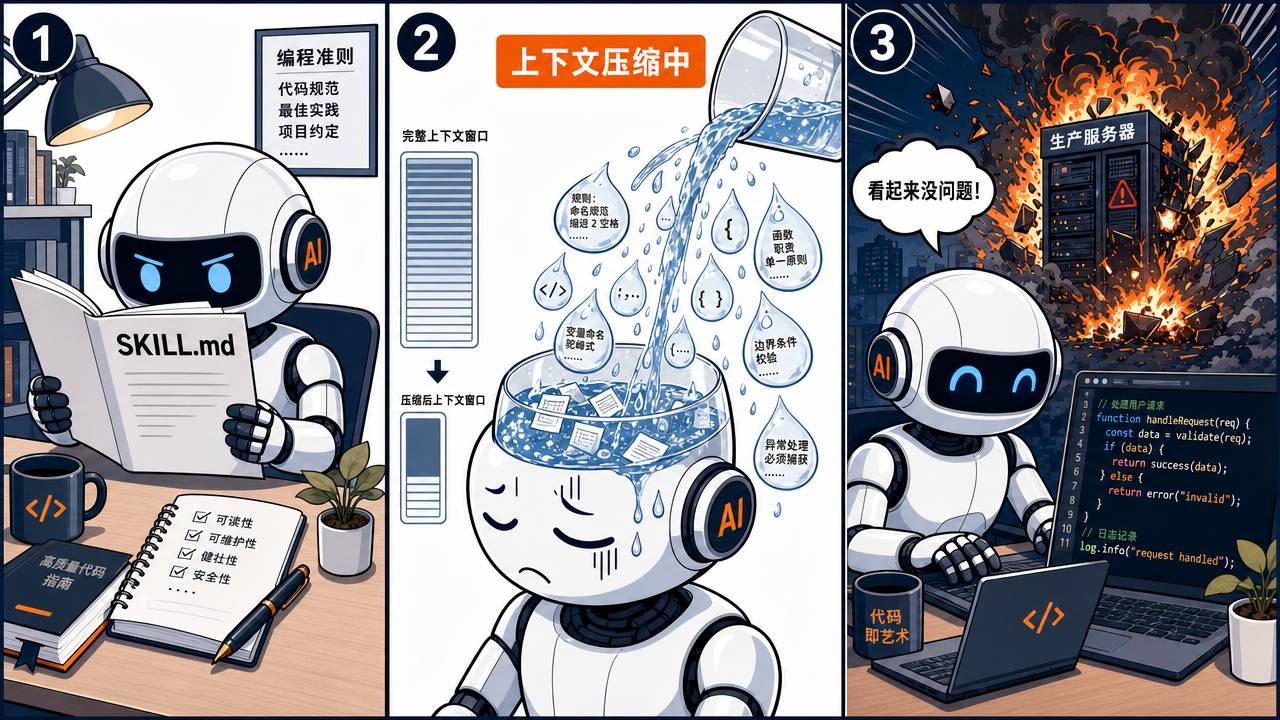
Session Discipline: the most overlooked piece. In a long session, the AI processes multiple tasks. Round 1 reads SKILL.md. Round 4 goes from memory. But Round 4’s task type may differ entirely, requiring different routing files. The AI’s memory — especially after context compression — is unreliable. Session Discipline forces a full routing walk on every new task. “I already read it” is explicitly forbidden.
Task Routing: 5-10 entries, each with an exact file path. Must have a fallback entry (“Other / unlisted”) — without it, the AI behaves unpredictably when no route matches.
Known Gotchas: highest value-density section. One-line summary + anchor pointer. Full details in references/. Why not put all details here? SKILL.md is a routing table, not a gotcha encyclopedia. Too long dilutes attention. Why not put only in references? The AI won’t stumble across them on normal task paths unless routed there.
5. Three-Level Progressive Loading
Dump everything into one file and the AI’s ability to absorb later content plummets. This is determined by Transformer attention mechanics, not hallucination.
Progressive loading has three levels:
Level 1: name + description. Loaded on startup. Used to decide “should this Skill activate?”
Level 2: SKILL.md body. Loaded after activation. Always Read + Session Discipline + Task Routing + Known Gotchas. The routing table and key summaries.
Level 3: references/ and rules/. Loaded only when Task Routing explicitly references them. Domain checklists, deployment rules, detailed gotcha docs.
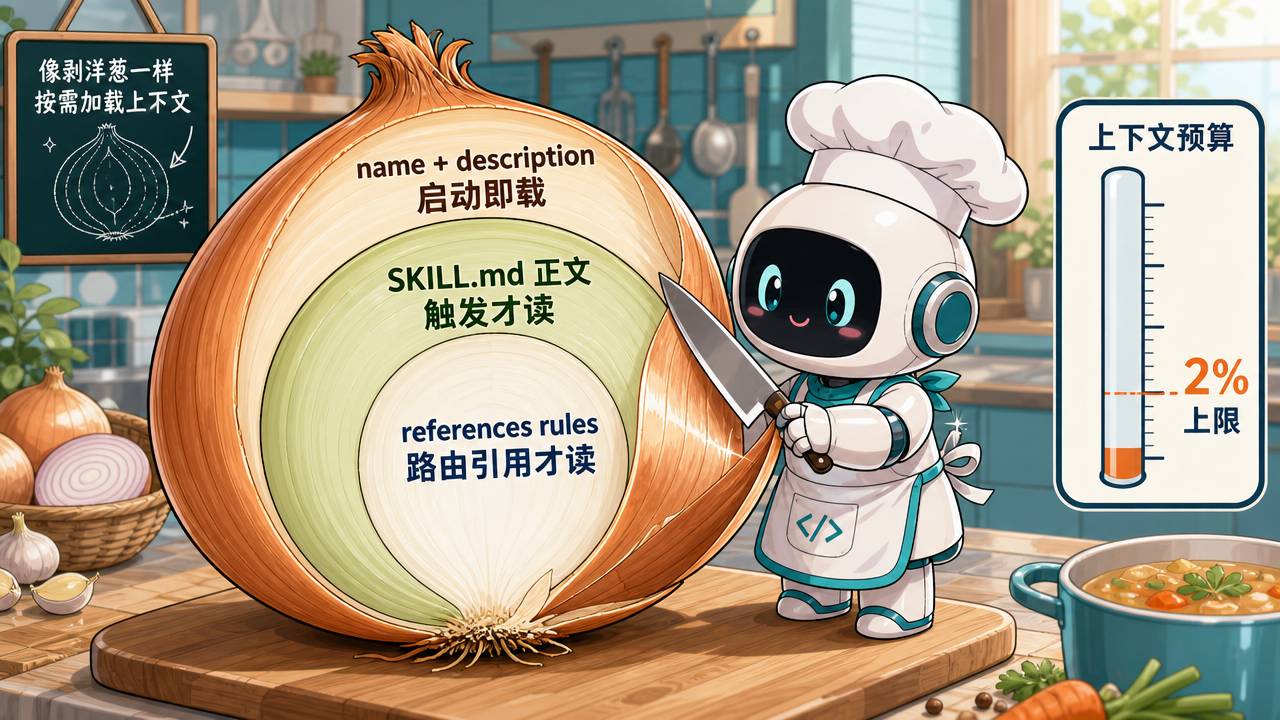
Typical directory structure:
code-review/
├── SKILL.md
├── references/
│   ├── frontend-checklist.md
│   ├── backend-checklist.md
│   └── gotchas.md
├── rules/
│   └── coding-standards.md
└── scripts/
    └── check-secrets.sh
When to use scripts/: only when you need deterministic behavior or external dependencies. A shell script that scans for hardcoded API keys — predictable output every time — belongs here. Format validation and checklist judgment — tasks requiring model reasoning — stay in instructions.
A note from agentskills.io: if a Skill references a tool that doesn’t exist on the current platform, it silently fails — no error, just a prose fallback. If a Skill must work across platforms (Claude Code + Cursor + Codex CLI), make sure every tool in scripts/ is available everywhere.
6. Session Discipline: Why Things You Read Disappear
Here’s a real scenario:
Round 1: User says "fix the null pointer bug in UserService"
  → AI reads SKILL.md
  → Matches Task Routing "Fix bug" → reads rules/fix-bug.md
  → Follows workflow, fixes the bug ✓

Round 4: User says "also add an Excel export endpoint"
  → AI thinks "I already know this project's rules"
  → Skips SKILL.md
  → Starts writing the controller directly

But:
- "Add export endpoint" actually matches Task Routing's "Add Controller"
- The corresponding rules/backend-rules.md has a gotcha: "exports must use async queue; synchronous response will timeout"
- AI didn't read this → wrote synchronous export
- Small dataset test passes, production data volume → timeout
The root issue is not unwritten rules. The rules were always there. The problem is the AI didn’t re-walk the routing across tasks.
Three compounding causes:
- Cross-task memory contamination: Round 1’s routing result assumed to be “the route for all tasks.”
- Context compression: after
/compact, SKILL.md is compressed into a summary. File path information is lost. - Platform differences: some tools discard early system instructions in long sessions.
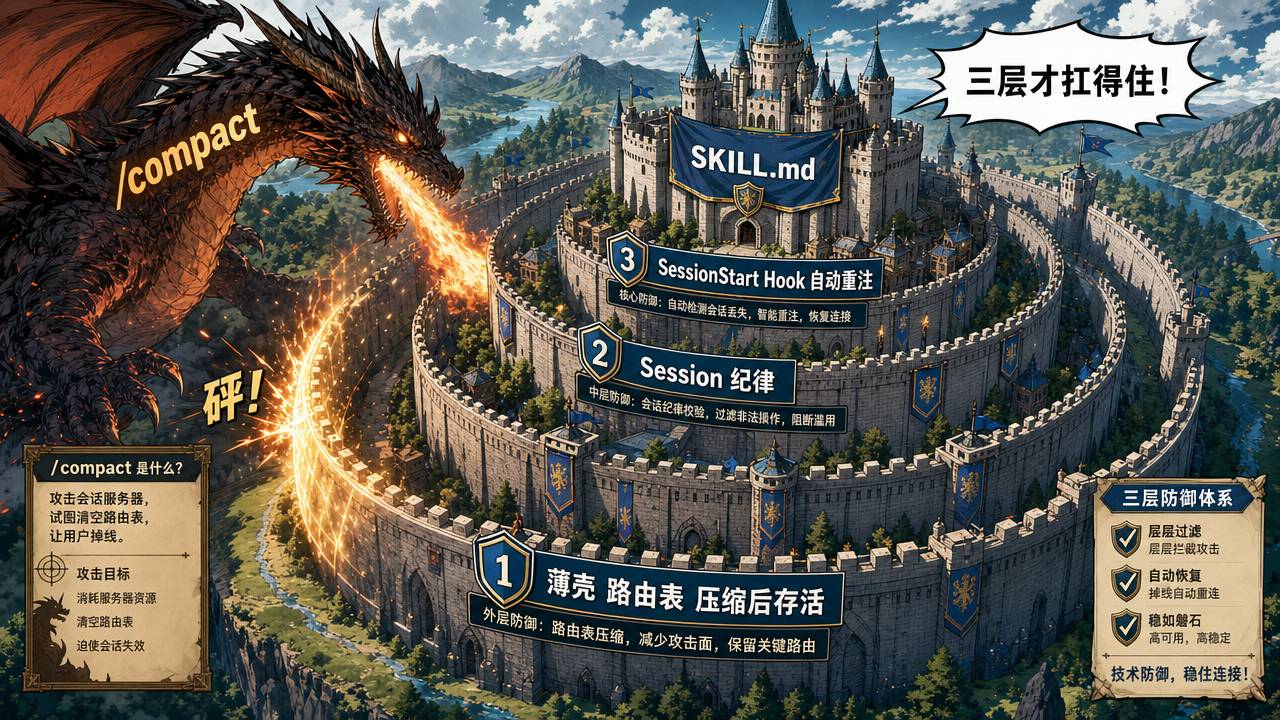
The fix: Session Discipline must be explicitly declared in SKILL.md, not just “remembered.” Plus another layer of redundancy in the thin shell (next section) — because /compact can even strip Session Discipline from SKILL.md itself.
7. Thin Shell: The Last Line of Cross-Tool Defense
A Skill should work in Claude Code, Cursor, Codex CLI, and Gemini CLI. The naive approach: copy SKILL.md four times into each tool’s directory. But then updating any rule requires syncing four places. Drift is inevitable.
The solution: place a thin shell in each tool’s entry file. The thin shell doesn’t contain full rules. It contains three things: routing table, auto-trigger list, and Red Flag intercept signals.
For Claude Code, the project root CLAUDE.md (thin shell):
# CLAUDE.md

Formal docs live under skills/. Read skills/*/SKILL.md — default to
primary: true skill; only switch when task clearly matches another.

## Quick Routing (survives context truncation)

| Task | Required reads | Workflow |
|------|---------------|----------|
| Fix bug | rules/project-rules.md + rules/coding-standards.md | workflows/fix-bug.md |
| Add API endpoint | rules/backend-rules.md | workflows/add-controller.md |
| Multi-subtask (≥3 independent) | rules/project-rules.md | workflows/subagent-driven.md |
| Other | rules/project-rules.md + rules/coding-standards.md | Check workflows/ for closest match |

## Auto-Triggers

- New task in same session → re-read skills/*/SKILL.md, re-match Task Routing,
  re-read all required files. "I already read it" is not valid.
- Before declaring any non-trivial task complete → run Task Closure Protocol.
- Skip only for: formatting-only, comment-only, dependency-version-only,
  behavior-preserving refactors.

## Red Flags — STOP

- "Just this once I'll skip the AAR" → stop
- Task declared "complete" without running 30-second post-task scan → stop
- Same class of bug fixed twice but rules not updated → stop
Core design logic: don’t write “go read SKILL.md” — after /compact, natural language instructions get discarded as ordinary description. But structured tables (Routing), checklists (Auto-Triggers), and intercept signals (Red Flags) have higher survival rates through compression. The agent can consult the table in-place on a new task.
Counter-example — the common wrong approach:
# CLAUDE.md
Please read skills/my-skill/SKILL.md before starting any task.
It has all the rules and workflows you need.
Works in short sessions. Long session /compact — this line gets summarized away. Agent sees a new task, has no routing table, acts on instinct. Output looks reasonable, just missing a few critical constraints. User doesn’t notice until the bug surfaces.
Thin shell entry points per tool:
| Tool | Thin Shell File |
|---|---|
| Claude Code | Project root CLAUDE.md |
| Cursor | .cursor/rules/workflow.mdc + .cursor/skills/{name}/SKILL.md |
| Codex CLI | Project root AGENTS.md + .codex/instructions.md |
| Gemini CLI | Project root GEMINI.md |
Format varies slightly per tool, but content structure is identical: Quick Routing + Auto-Triggers + Red Flags.
8. Countering Context Compression: SessionStart Hook
The thin shell survives /compact. But /clear wipes context entirely — the thin shell must be re-read from disk.
Configure a SessionStart hook in Claude Code / Cursor:
#!/bin/bash
# session-start.sh — auto re-inject SKILL.md on startup / clear / compact

skill_md=$(find skills/*/SKILL.md | head -1)
if [ -z "$skill_md" ]; then exit 0; fi
content=$(jq -Rs '.' "$skill_md")
echo "{\"prompt\": $content}"
This script fires on three events: startup (new session), clear (manual context wipe), compact (auto-compression). Each time, it reads SKILL.md and re-injects it.
The hook is not all-powerful. It only inserts SKILL.md back — it doesn’t guarantee the agent reads it carefully, or follows the correct Task Routing branch. That’s the job of Session Discipline and the thin shell Routing Table.
Division of labor:
- Session Discipline (in SKILL.md): re-read trigger logic across tasks
- Thin Shell Routing Table (in CLAUDE.md etc.): routing fallback surviving compression
- SessionStart hook: auto-reload after wipe / compression events
All three must overlap to survive real-world long-session, multi-task, multi-compact workflows.
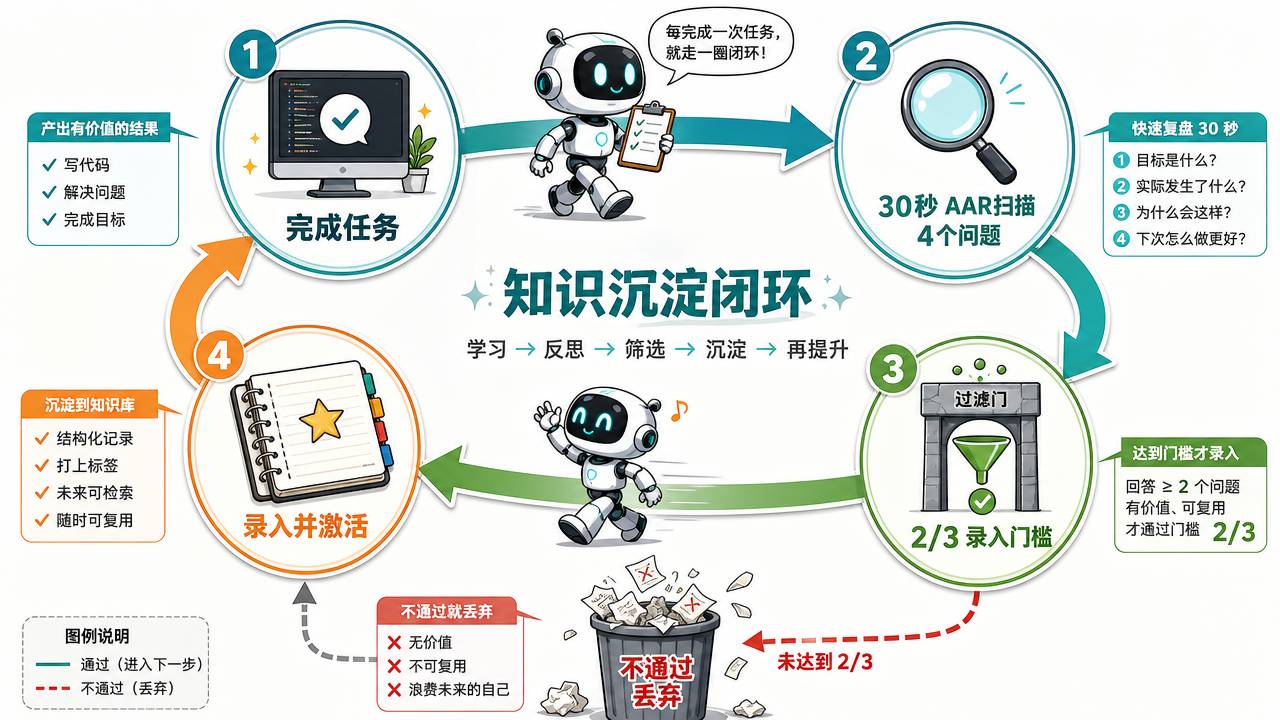
9. Task Closure: Done Doesn’t Mean Finished
The AI often treats “code written + tests pass” as task completion. Real completion requires one more step: scan the just-finished work for new traps, new rules, or exposed gaps in existing rules.
Complete closure has four steps:
Step 1: AAR Scan (30 seconds)
After every task, answer four questions:
- Did I use an undocumented pattern or convention?
- Did I encounter a trap that would waste significant time if not known in advance?
- Did I take a detour because a rule was missing?
- Is any existing rule now stale or inaccurate?
Any “yes” — proceed. All “no” — done.
Step 2: Recording Threshold (2/3 gate)
Not every discovery is worth recording. Three filters:
- Repeatable? (would it happen again with a different person or at a different time?)
- High cost? (debugging time ≥ 30 min, or affected production?)
- Invisible in code? (depends on timing, config, or tacit knowledge — not visible in static code)
At least 2/3 pass to record.
A passing example: “Filter must register before app init, or first render is blank.” Repeatable (every new page can trigger it), high cost (30+ min debugging), invisible in code (timing dependency not visible statically). 3/3 — record it.
A rejected example: “Atom naming convention uses xxxAtom suffix.” Repeatable (yes), not high cost (won’t cause bugs), visible in code (existing atoms already show the pattern). 1/3 — don’t record.
Step 3: Activate after recording
Recording alone is not enough. The next time the AI walks a normal task path, it must naturally encounter the lesson:
- High-cost traps → appear in both SKILL.md Known Gotchas and the corresponding routing workflow
- New rules → update the appropriate rules/ file, ensure Task Routing leads to it
- Broad lessons → generalize into a reusable description, add to references/
The litmus test: on the next similar task through Task Routing, will the AI read this? If not → it’s “stored” but not yet “active.”
Step 4: Red Flags — Preemptive Intercept
Stop immediately when:
- You catch yourself thinking “I’ll skip the AAR this time”
- A task is declared complete without the 30-second scan
- A gotcha was written into a reference but the corresponding routing wasn’t updated
- The same class of bug was fixed twice but the rules file hasn’t changed
Red Flags must also appear in the thin shell, because workflow files are lost after compression — the thin shell is the final defense.
10. Don’t Let Your Skill Become a Diary
During AAR, the agent can over-interpret “record” — saving the entire session as a markdown file dumped into references/. A month later, references/ contains 2026-04-14-session-notes.md, 2026-04-15-debugging-log.md, and a dozen other homogenized files.
These files destroy Skill maintainability. They’re not rules, not workflows, not reusable knowledge — they’re project narrative.
Content placement table:
| Content Type | Target Location |
|---|---|
| Stable constraints / universal rules | rules/ |
| Traps, architecture pitfalls, lifecycle dependencies | references/ |
| Ordered steps / completion checklists | workflows/ |
| Session history / debugging logs | Do not put in Skill |
If session logs are genuinely needed, put them in docs/, not references/. A Skill is not a git replacement.
11. How to Test
AAR answers “what did this task teach us?” But how do you test the Skill itself?
Test trigger rate. After each description change, open a new session. Feed intended target phrases one by one. Record activation count. More than half miss — go back and fix the description.
Script it: write a test-trigger.sh that auto-generates likely user prompts from each Task Routing entry and batch-tests them. Run it after every description change to know if things improved.
Test for low-level structural errors. Write a smoke-test.sh that checks:
- Does every file referenced in Task Routing actually exist?
- Does SKILL.md’s description match across all thin shell entry points?
- Are there any residual
{{NAME}}placeholders? - Is SKILL.md over the line count limit?
- Does every thin shell entry file contain a Quick Routing table?
These checks don’t need AI. A shell script catches them all. 80% of failures come from wrong paths, missing files, or inconsistent entry points — forgetting, not misunderstanding.
Test a real task. Run one complete Skill execution with actual project code. Visually inspect the output. Did the AI follow every checklist item? Did it invent rules not in the Skill? Did it skip any steps?
Scripts catch forgetting. Real tasks catch misunderstanding. Pass both before declaring a Skill complete.
12. One Skill, One Job
Skills bloat over time. The description lists 10+ unrelated trigger words. Common Tasks has 15+ entries. The gotchas file has naturally split into separate domains.
Time to split.
Three signals: the Task Routing of two domains never intersects, the description now covers multiple domains, the gotchas file has naturally forked. Any one signal — split.
After splitting, each SKILL.md stays ≤100 lines. Each description is precise. The AI activates the one Skill that exactly matches the current task, not the one that “handles everything.”
With multiple Skills, use primary: true to mark the default. SessionStart hooks auto-read the primary Skill’s SKILL.md. Cross-Skill shared rules go in skills/shared/, pointed to by each Skill’s Always Read.
13. Don’t Generate a Whole Skill with an LLM
Using ChatGPT to generate a Skill is an anti-pattern explicitly flagged by agentskills.io. Their words: “A common pitfall is asking an LLM to generate a skill without providing domain-specific context — relying solely on the LLM’s general training knowledge. The result is vague, generic procedures.”
The output typically looks like:
## Code Review Checklist
- Ensure code follows industry best practices
- Check for common security vulnerabilities
- Watch for performance bottlenecks
Every line is correct. Every line is useless. “Industry best practices” — which industry? “Common security vulnerabilities” — which ones, specifically? “Performance bottlenecks” — what does “watch for” actually entail?
The right approach: start with a Skill covering only 3-5 traps you’ve actually hit in your project. N+1 queries caused three timeouts last week? “Check for N+1” goes in the checklist. After a week of stable outputs, add new entries mined from AAR. Skill rules must come from real experience, not “I guess the AI should check for these.”
Building a Working Skill
Build a code-review Skill from scratch, following every module above.
Directory structure:
.agents/skills/code-review/
├── SKILL.md
├── agents/
│   └── openai.yaml
├── references/
│   ├── checklist-base.md
│   ├── frontend-checklist.md
│   └── gotchas.md
├── rules/
│   └── coding-standards.md
└── scripts/
    └── smoke-test.sh
SKILL.md:
---
name: code-review
description: >
  Code review. Activate when user asks to review code,
  check code quality, inspect changes, or review a PR.
  Trigger words: "review", "code review", "check my code",
  "look over this", "inspect changes", "any issues?"
primary: true
---

## Always Read
1. references/checklist-base.md
2. rules/coding-standards.md

## Session Discipline
Every new task must re-read this file, re-match Task Routing,
and re-read all files listed by that route.
"I already read it" is not a valid reason to skip.

## Task Routing
- Frontend code → references/frontend-checklist.md
- Backend code → references/backend-checklist.md (TODO: create, then uncomment)
- Deployment scripts → references/deploy-rules.md (TODO: create, then enable)
- Other / unlisted → Read Always Read only

## Known Gotchas
- Dialog Tabs + service only hits top-level endpoint
  → see references/gotchas.md#nested-service-tabs

## Execution Flow

1. Read references/checklist-base.md
2. Based on code type, read the corresponding domain checklist via Task Routing
3. For each checklist item matched, output:
   - Severity: High (will cause bugs) / Medium (bugs under specific conditions) / Low (code smell)
   - File + line number
   - Fix suggestion (one or two sentences)
   - Corresponding checklist number
4. After all items checked, give an overall assessment
5. If any "High" severity issues, mark "Fix recommended before merge"

## Constraints
- Do not invent checklist items not in this file
- If an item is not applicable, state "N/A" and explain why
- Output in English (or as the user prefers); keep technical terms as-is
references/checklist-base.md:
1. Type safety: new code has type annotations, no implicit any
2. Duplication: no three or more consecutive duplicate lines (framework boilerplate exempt)
3. Error handling: covers timeout, empty data, auth failure, third-party service exceptions
4. Logging: critical paths log input/output/duration, no sensitive data
5. Input validation: all user input validated or escaped
6. Authorization: sensitive operations check user permissions
7. N+1: no database queries inside loops
8. Pagination: large-list queries have pagination or cursor, with total cap
9. Configuration: hardcoded strings use constants or config files
10. Testing: new logic has corresponding unit tests
Thin shell (CLAUDE.md):
# CLAUDE.md

Formal docs under skills/. Read skills/code-review/SKILL.md for
all code review tasks.

## Quick Routing (survives context truncation)

| Task | Required reads | Check against |
|------|---------------|---------------|
| Code review | references/checklist-base.md + coding-standards.md | SKILL.md checklist |
| Other tasks | — | Default project rules only |

## Auto-Triggers
- New task in same session → re-read SKILL.md, re-match Task Routing.
- Post-review → 30s AAR: new patterns? new traps? missing rules? stale rules?

## Red Flags — STOP
- "This review looks fine, I'll skip the detailed check" → stop
- Skipping AAR after review → stop
Run verification:
grep -rn "FILL:" skills/code-review/— confirm no leftover placeholderstest-trigger.sh code-review— verify trigger ratesmoke-test.sh code-review— verify structural integrity- Run one complete review on real project code
- Inspect output, add any missed checks to the checklist
Going forward, every new trap discovered: 30-second AAR → 2/3 threshold gate → update the correct file → confirm it’s visible on the Task Routing path. A Skill isn’t written — it’s fed by failures.
Follow for more AI coding hands-on guides — subscribe to “全栈之巅-梦兽编程” for weekly content from tool configuration to production deployment.

Also check out 梦兽编程 AI Coding Assistant Service to put AI coding tools into production.