Master OpenSpec in the AI Era: A Practical Guide to SDD (Spec‑Driven Development)

TL;DR
- SDD puts “intent and constraints (specs)” first, so delivery aligns with what users actually need.
- OpenSpec turns specs into a closed loop in your repo: Change → Spec → Tasks → Validate → PR/Release.
- This guide includes a 10‑minute quickstart, adoption advice, and failure‑mode checklists. See
openspec/AGENTS.mdin this repo for authoritative conventions.
Why Spec‑Driven Development (SDD)
Most teams don’t suffer from “can’t code,” but from “hard to ship the right thing once.” Common symptoms:
- Drifting intent; specs and implementation diverge.
- Fragmented task breakdown; PRs lack clear rationale.
- Docs and code tell different stories; knowledge decays.
SDD makes “intent and constraints (specs)” the delivery backbone: specify what and why in verifiable form, break them into tasks and implementation, then use automated validation to ensure convergence. Benefits:
- One language (specs) connects needs, tasks, code, and validation.
- Design trade‑offs and NFRs (performance, compatibility, security) are explicit.
- Every step is backed by verifiable acceptance, simplifying reviews and retros.
What Is OpenSpec
A practical set of templates and conventions that implements SDD on GitHub, typically including:
- Change: a verb‑led unique ID for a cross‑file/cross‑module capability change.
- Specs: capability‑focused requirements with scenarios and acceptance.
- Tasks: verifiable, incremental steps towards the specs.
- Design (optional): reasoning and trade‑offs for multi‑system changes.
- Validate: tooling to check consistency across spec → tasks → implementation.
- PR/Release: traceability from change to shipped artifact.
In this repo, refer to openspec/AGENTS.md and openspec/project.md for conventions and command examples. Use the openspec CLI to manage and validate your changes.
Workflow Overview
Need installation first? See:
/en/tutorials/openspec-install/
Quickstart (30s)
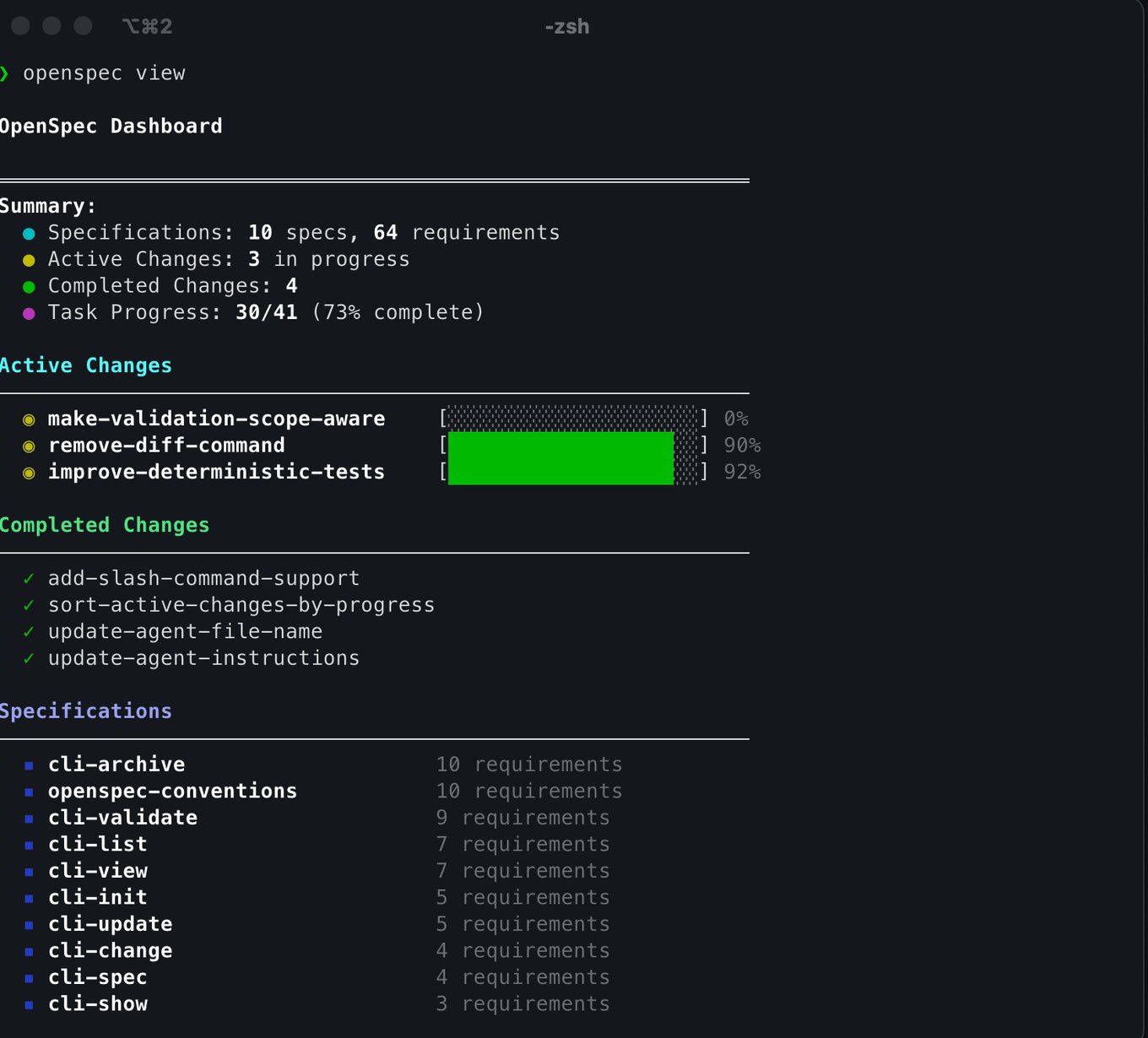
# Explore current changes and specs in this repo
openspec list
openspec list --specs

# Strict validation before submit/merge
openspec validate <change-id> --strict
- Propose a change: define a verb‑led
change-id(e.g.,add-authz-policy) and its scope. - Author specs:
openspec/changes/<id>/specs/<capability>/spec.mdwith Requirements and Scenarios. - Break down tasks:
openspec/changes/<id>/tasks.mdwith small, verifiable items. - Add design if needed: capture trade‑offs and risk mitigations in
design.md. - Validate:
openspec validate <id> --strictuntil clean. - Implement and open PRs: link PRs to the change and pass checks.
- Release and archive: ship, then archive the change for durable traceability.
Core Components and Examples
Change
- Naming: short verb‑led IDs (e.g.,
add-user-onboarding,refactor-media-pipeline). - Entry:
openspec/changes/<id>/proposal.mdwith goals, scope, non‑goals, deps, risks.
Specs
- Structure: per‑capability files; each
spec.mduses## ADDED|MODIFIED|REMOVED Requirementsand at least one#### Scenario:per requirement. - Focus: observable outcomes, boundaries, acceptance criteria, and counter‑examples.
Tasks
- Principle: incremental, verifiable steps that merge continuously.
- Examples:
- “Integrate auth middleware with a feature flag for rollout.”
- “Add mutually exclusive rate‑limits for
/v2/*routes and regression tests.”
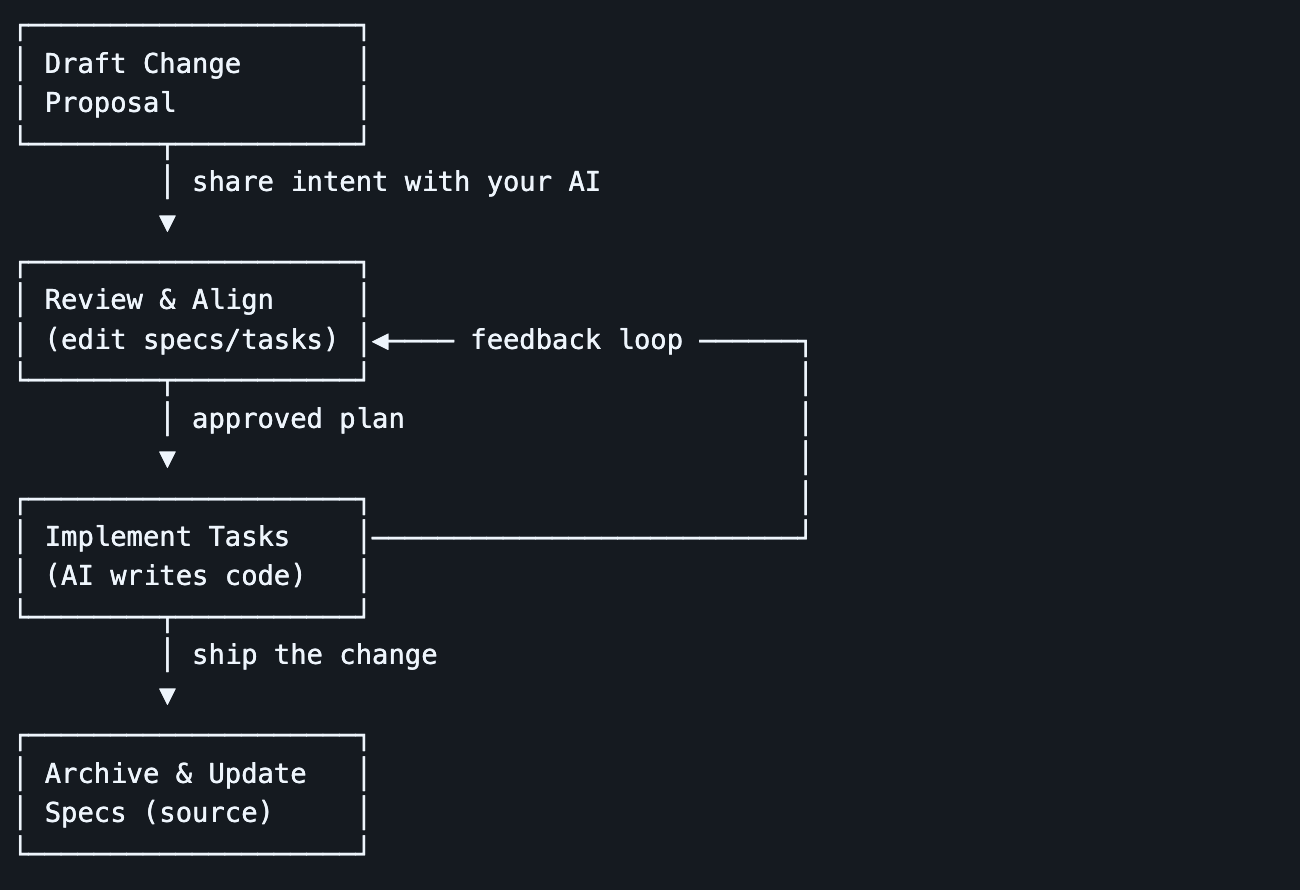 Figure: OpenSpec: drive execution with Sequential‑by‑Priority and TDD
Design
- Use for cross‑system impact, resource trade‑offs, or notable security/compliance needs.
- Include comparisons, rationale, flows/sequence diagrams, failure and fallback strategies.
Validate
- Goal: preserve consistency across specs → tasks → implementation → verification.
- Common commands:
# Enumerate changes in the repo
openspec list

# List existing capability specs
openspec list --specs

# Strict validation (run before submit/merge)
openspec validate <change-id> --strict

# Inspect details of a spec or change
openspec show <spec> --type spec
openspec show <change-id> --deltas-only

Troubleshooting: use
openspec show <id> --jsonfor details; cross‑checkopenspec/AGENTS.mdand fix issues one by one.
10‑Minute Quickstart
- Create your first change:
- Pick a user‑visible, low‑risk capability.
- Name a verb‑led
change-idand addproposal.mdunderopenspec/changes/<id>/. - Under
specs/, write at least one requirement and scenario.
- Plan and execute tasks:
- Write 3–7 small tasks in
tasks.md. - Prioritize “observability/protection” tasks before breaking changes.
- Update checkboxes and notes as you merge to preserve traceability.
- Write 3–7 small tasks in
- Validate and open a PR:
- Run
openspec validate <id> --strictuntil clean. - Include the
change-id, completion status, risk, and rollback plan in the PR.
- Run
Adopting in Your Project
- Start small: pilot in one repo/module; pick high‑impact, low‑risk capabilities.
- Mono‑repo vs multi‑repo: standardize templates/checks; for cross‑repo, model parent/child changes.
- Integrate with Issue/Jira: specs and changes live in GitHub; tasks may map to your tracker, but PRs must link the
change-id. - NFRs: maintain dedicated specs and scenarios for performance, security, and compatibility.
- Keep docs fresh: encode acceptance in validation or regression tests to keep specs executable.
Best Practices and Naming
change-id: verb-object-qualifier (e.g.,add-authz-policy-mobile,migrate-image-cdn).- Layout:
openspec/changes/<id>/{proposal.md,tasks.md,design.md,specs/...}. - Commits/PRs: Conventional Commits; PRs include scope, risk, validation, rollback.
- Validation: run
openspec validateoften; CI enforces--stricton PRs. - Releases: align changes with releases; record which specs/scenarios are satisfied.
FAQ
Will this slow delivery? No. SDD emphasizes small steps plus validation — closer to CI than heavyweight docs.
Will docs go stale? Specs are “executable” through validation and tests; drift is detected and fixed quickly.
How does it relate to ADRs?
ADRs record decisions; SDD’s design.md captures trade‑offs made to satisfy specific specs. They complement each other.
How do we collaborate across teams?
Use change-id as the unit of collaboration. Use parent changes to coordinate child changes with versioned contracts.
What’s Next in This Repo
- Conventions:
openspec/AGENTS.md,openspec/project.md. - Commands: run
openspec list,openspec list --specs,openspec validate <id> --strictat repo root. - Start with a small, user‑visible capability and walk through the 10‑minute quickstart before broader rollout.
—
If you want this tutorial to mirror the reference article’s tone and sectioning, please share copyable text or a section outline. I’ll do a paragraph‑by‑paragraph mapping and add side‑by‑side notes plus repo‑specific examples.