这是《DeepSeek Harness 权威指南 》系列第 11 篇,也是二开线(B 线)的第 4 篇。源码基线为 deepseek-harness @
47f9438(v0.1.0-rc.5)。本文把 Hook、工具策略、审批和沙箱分开。作者 demo 挂载一个没有文件 / 网络 I/O 的
greet工具,以及围绕它的 pre-execute gate 与 owner guard;它使用本机进程内的Context,不启动 UI、不使用真实 agent、不接真实审批人,也不代表一个完整的企业授权系统。
B1 讲了工具如何进入 registry,B2 讲了模型 adapter 如何把请求翻译到 provider。接下来还有一个更容易被一句“加个权限 Hook”掩盖的问题:谁在什么时刻决定一次工具调用能否继续?
先看一次工具调用的关键路径:
ctx.tools.execute(input)
        │
        ▼
tools/pre-execute  ── allow ───────────────┐
        │                                      │
        ├─ deny ──► error result               │
        │                                      ▼
        ├─ ask ──► ctx.approval ── allowed-once ──► guards
        │                    └─ rejected / cancelled / unavailable ─► deny
        │                                      │
        └──────────────────────────────────────┘
                                               │
                                  ctx.tools.guard()
                                  reason ──► deny
                                  undefined ─► tools/execute
                                                   │
                                                   ▼
                                             tool body
                                                   │
                               tools/post-execute → tools/result
这张图里有四种不同的动作:
| 动作 | 所在 seam | 能做什么 | 不能推出什么 |
|---|---|---|---|
allow | tools/pre-execute | 让这次调用继续到 guard | 不代表拿到了 sandbox 或永久授权 |
deny | tools/pre-execute | 在 body 前生成 error result | 不代表整个系统都拒绝了未来所有调用 |
ask | tools/pre-execute + ctx.approval | 把一次具体操作交给审批 seam | 不保证存在 UI、answerer 或 allowed-once |
| guard reason | ctx.tools.guard() | 施加最终的单调拒绝 | 不能返回 allow,也不能撤销别的拒绝 |
一、先跑起来:一个真正可挂载的 permission-gate 项目
上一版虽然运行了 pipeline demo,但没有把它整理成读者能复制的插件工程。下面按官方“第一个插件”
与“开发一个工具”
的路径,做一个 source checkout 内的本地 patch plugin。它不是要发布的 npm 包,所以这里不需要先写 package.json;如果你要把它变成正式 workspace package,再按官方 adding-a-package
清单补齐 manifest、tsconfig、README、测试与发布约束。
前提:你已经按官方从源码运行路径准备了 Harness checkout,且位于它的根目录。以下
$DSH_ROOT表示该根目录。官方把本地练习目录命名为scratch-plugin/;本文作者副本放在rex-hugo/.tmp-research/,不会改动你的既有scratch-plugin/。 本系列全部 demo 的完整代码见 rex-dhs-core/dsh-b3-hooks (公开仓库,含运行证据)。
1. 创建目录与三个职责明确的模块
mkdir -p scratch-plugin/src
项目最终只有这几个文件:
scratch-plugin/
├── cordis.yml
└── src/
    ├── greet-tool.ts
    ├── greet-permission-gate.ts
    └── greet-owner-guard.ts
greet-tool.ts 是无 I/O 的业务工具。它只定义 canonical string value 及 render,不内建部署策略:
import type { Context } from '@deepseek-ai/cordis'
import { defineTool } from '@deepseek-ai/dsh-tools'

export const name = 'local-greet-tool'
export const inject = ['tools']

export function apply(ctx: Context) {
  ctx.tools.register(defineTool({
    name: 'greet',
    description: 'Return a deterministic greeting for a supplied name.',
    parameters: {
      name: { type: 'string', required: true, description: 'The name to greet' },
    },
    output: {
      schema: { type: 'string' },
      render: (_args, value) => [{ type: 'text', text: value }],
    },
    async execute(args) {
      return `Hello, ${args.name}!`
    },
  }))
}
greet-permission-gate.ts 是可重排的 pre-execute policy。它把不同部署可能改变的 deniedNames 与 askNames 放进 Config schema;不要把名单写死在工具 body 中:
import type { Context } from '@deepseek-ai/cordis'
import Schema from '@deepseek-ai/schemastery'
import type { PreToolDecision } from '@deepseek-ai/dsh-tools'

export const name = 'local-greet-permission-gate'
export const inject = ['tools']

export interface Config {
  deniedNames: string[]
  askNames: string[]
}

export const Config: Schema<Config> = Schema.object({
  deniedNames: Schema.array(Schema.string()).default([]),
  askNames: Schema.array(Schema.string()).default([]),
})

export function apply(ctx: Context, config: Config) {
  console.log(`[local-greet-permission-gate] loaded deny=${config.deniedNames.join(',')} ask=${config.askNames.join(',')}`)

  ctx.on('tools/pre-execute', async (exec, next): Promise<PreToolDecision> => {
    if (exec.name !== 'greet') return next()
    const target = (exec.arguments as { name?: unknown }).name
    if (typeof target !== 'string') return next()
    if (config.deniedNames.includes(target)) {
      return { kind: 'deny', reason: 'blocked by local pre-execute policy' }
    }
    if (config.askNames.includes(target)) {
      return { kind: 'ask', reason: 'approval required by local pre-execute policy' }
    }
    return next()
  })

  ctx.effect(() => () => {
    console.log('[local-greet-permission-gate] unloaded')
  })
}
greet-owner-guard.ts 是独立的最终拒绝层。它的配置故意只返回 reason 或 undefined,没有 allow 分支:
import type { Context } from '@deepseek-ai/cordis'
import Schema from '@deepseek-ai/schemastery'

export const name = 'local-greet-owner-guard'
export const inject = ['tools']

export interface Config {
  deniedNames: string[]
}

export const Config: Schema<Config> = Schema.object({
  deniedNames: Schema.array(Schema.string()).default([]),
})

export function apply(ctx: Context, config: Config) {
  console.log(`[local-greet-owner-guard] loaded deny=${config.deniedNames.join(',')}`)

  ctx.tools.guard((exec) => {
    if (exec.name !== 'greet') return undefined
    const target = (exec.arguments as { name?: unknown }).name
    return typeof target === 'string' && config.deniedNames.includes(target)
      ? 'blocked by local monotonic guard'
      : undefined
  })

  ctx.effect(() => () => {
    console.log('[local-greet-owner-guard] unloaded')
  })
}
这样拆分后,代码审阅时可以直接回答“哪一层拥有哪一种决定”:
| 文件 | 责任 | 允许的结论 |
|---|---|---|
greet-tool.ts | 注册 schema、body 与 output projection | 工具定义存在,不代表会被模型调用 |
greet-permission-gate.ts | tools/pre-execute 的 allow / deny / ask | 是可重排策略,不是最后安全边界 |
greet-owner-guard.ts | ctx.tools.guard() 的单调 deny | 只能进一步拒绝,不能把其他拒绝恢复为 allow |
2. 用绝对路径把模块插入 Web profile
官方本地插件教程要求 patch 中的模块路径为绝对路径。创建 $DSH_ROOT/scratch-plugin/cordis.yml,把下面三处 /absolute/path/to/deepseek-harness 换成你的实际 checkout 路径:
- insert:
    - id: local-greet-tool
      name: '/absolute/path/to/deepseek-harness/scratch-plugin/src/greet-tool.ts'
    - id: local-greet-owner-guard
      name: '/absolute/path/to/deepseek-harness/scratch-plugin/src/greet-owner-guard.ts'
      config:
        deniedNames: ['guarded']
    - id: local-greet-permission-gate
      name: '/absolute/path/to/deepseek-harness/scratch-plugin/src/greet-permission-gate.ts'
      config:
        deniedNames: ['blocked']
        askNames: ['ask']
这份 patch 的含义有限:loader 应加载三个 module,并把 YAML 的 config 交给各自导出的 Schemastery Config。它不创建 ApprovalService,不配置模型,也不授予 sandbox、文件或网络能力。
官方 Web 启动命令是:
pnpm dsh web --patch ./scratch-plugin/cordis.yml
若你的 base profile 已经有可调用的模型,打开 http://127.0.0.1:3080 后可以请求模型调用 greet,例如:
Use the greet tool to greet Cordis.
但“工具出现在 schema 中”与“模型必然选择它”是两回事;没有可调用模型、tool presentation 受限、模型没有选择该工具或 policy 拒绝时,都不会得到成功 body result。本文的可复现实证不依赖这一步模型选择。
3. 没有模型也能验证:挂载、策略、结果与卸载
为了让你在尚未配置 provider 时也能排除插件装配错误,下面是作者本机运行的 plugin-project-demo.ts。它直接 import 上面三个同一份插件模块,先挂载 SystemPrompt 与 ToolRuntime,再通过 ctx.plugin() 挂载工具、guard 和 pre-execute gate:
/**
 * Runs the same three source modules that the cordis.yml patch loads.
 * It deliberately mounts no ApprovalService, UI, agent, sandbox, or provider.
 * Run from E:/coding/deepseek-harness:
 * node --import tsx E:/coding/rex-hugo/.tmp-research/dsh-b3-hooks/practical-plugin/plugin-project-demo.ts
 */
import { Context } from '@deepseek-ai/cordis'
import { CallId } from '@deepseek-ai/dsh-llm'
import SystemPrompt from '@deepseek-ai/dsh-system-prompt'
import ToolRuntime, { type ToolExecutionResult } from '@deepseek-ai/dsh-tools'
import * as greetTool from './src/greet-tool.ts'
import * as ownerGuard from './src/greet-owner-guard.ts'
import * as permissionGate from './src/greet-permission-gate.ts'

interface CaseSummary {
  label: string
  events: string[]
  isError: boolean
  content: ToolExecutionResult['content']
  error: ToolExecutionResult['error']
}

async function invoke(ctx: Context, label: string, name: string, events: string[]): Promise<CaseSummary> {
  events.push(`call:${name}`)
  const result = await ctx.tools.execute({
    signal: new AbortController().signal,
    callId: CallId(`project-${label}`),
    name: 'greet',
    arguments: { name },
  })
  return { label, events: [...events], isError: result.isError, content: result.content, error: result.error }
}

async function main(): Promise<void> {
  const ctx = new Context()
  await ctx.plugin(SystemPrompt)
  await ctx.plugin(ToolRuntime)
  await ctx.plugin(greetTool)
  await ctx.plugin(ownerGuard, { deniedNames: ['guarded'] })
  await ctx.plugin(permissionGate, { deniedNames: ['blocked'], askNames: ['ask'] })

  const events: string[] = []
  ctx.on('tools/execute', async (_exec, next) => {
    events.push('execute-hook')
    return next()
  })
  ctx.on('tools/post-execute', async (_exec, _result, next) => {
    events.push('post-execute')
    return next()
  })
  ctx.on('tools/result', (_exec, result) => {
    events.push(`result:${result.isError ? 'error' : 'success'}`)
  })

  for (const [label, name] of [
    ['allowed', 'Cordis'],
    ['pre-denied', 'blocked'],
    ['guard-denied', 'guarded'],
    ['ask-without-approval', 'ask'],
  ] as const) {
    console.log(`=== ${label} ===`)
    console.log(JSON.stringify(await invoke(ctx, label, name, events)))
    events.length = 0
  }

  console.log('=== dispose ===')
  await ctx.fiber.dispose()
}

main().catch((error) => { console.error(error); process.exit(1) })
放在 scratch-plugin/plugin-project-demo.ts 后,从 Harness checkout 根目录运行:
node --import tsx ./scratch-plugin/plugin-project-demo.ts
作者本机的实际 stdout 如下。它是进程内实证,不是 Web UI、真实模型或真实审批人的截图:
[local-greet-owner-guard] loaded deny=guarded
[local-greet-permission-gate] loaded deny=blocked ask=ask
=== allowed ===
{"label":"allowed","events":["call:Cordis","execute-hook","post-execute","result:success"],"isError":false,"content":[{"type":"text","text":"Hello, Cordis!"}]}
=== pre-denied ===
{"label":"pre-denied","events":["call:blocked","post-execute","result:error"],"isError":true,"content":[{"type":"text","text":"Error: blocked by local pre-execute policy"}],"error":{"message":"blocked by local pre-execute policy"}}
=== guard-denied ===
{"label":"guard-denied","events":["call:guarded","post-execute","result:error"],"isError":true,"content":[{"type":"text","text":"Error: blocked by local monotonic guard"}],"error":{"message":"blocked by local monotonic guard"}}
=== ask-without-approval ===
{"label":"ask-without-approval","events":["call:ask","post-execute","result:error"],"isError":true,"content":[{"type":"text","text":"Error: approval required by local pre-execute policy"}],"error":{"message":"approval required by local pre-execute policy"}}
=== dispose ===
[local-greet-permission-gate] unloaded
[local-greet-owner-guard] unloaded
你应该检查四件事:
Cordis只有在execute-hook出现时才进入 body,结果为Hello, Cordis!。blocked在 pre-execute 拒绝;guarded在 owner guard 拒绝;两者都没有execute-hook。ask没有挂载ApprovalService,所以按 fail-closed 规则返回 error,而不是伪造一个用户已批准的结果。ctx.fiber.dispose()后看到两个unloaded日志,说明这里用ctx注册的 listener、guard 与工具注册随插件 fiber 清理。生产中 HMR / config reload 也依赖同一 effect 生命周期;不要额外手写全局removeListener来对抗它。
验证边界:
pnpm dsh web --patch是官方本地 Web 加载路径;本文作者的可复现实证是上面的Context.plugin()runner,它已经真实挂载三个 module、调用ctx.tools.execute()、验证四种结果并执行 dispose。不要把这个进程内 runner 误称为 Web UI、真实模型、真实 approval answerer 或 sandbox 的端到端验证;这些应在你的目标 profile 和可用 pnpm 环境中单独验收。
二、Hook 不是“权限”这个名词的同义词
官方扩展手册先给了一个重要限定:权限门禁只是 Hook plugin 的一种用法;Hook plugin 也可以拦截别的 extension point,本身并不天然变成权限系统。官方示例位于 docs/cookbook/extension-cookbook.zh.md:13-35:
import type { Context } from '@deepseek-ai/cordis'
import type { PreToolDecision, ToolExecution } from '@deepseek-ai/dsh-tools'

declare function isAllowed(exec: ToolExecution): Promise<boolean>

export const name = 'permission-gate'

export function apply(ctx: Context) {
  ctx.on('tools/pre-execute', async (exec, next): Promise<PreToolDecision> => {
    if (!(await isAllowed(exec))) {
      return { kind: 'deny', reason: 'Denied by policy.' }
    }
    return next()
  })
}
英文注释之外,官方中文说明有三层信息:
- 这是一个普通 Cordis plugin,拦截的是
tools/pre-execute;不需要另造一套外部协议。 isAllowed()是部署自己的策略实现,不是 Harness 自带的“万能权限判断器”。- Hook 选择哪个 extension point 很重要:
tools/pre-execute适合 allow/deny/ask;tools/execute适合围绕实际 dispatch 的 timeout / retry / metrics;tools/post-execute适合结果决定;tools/result是观察不可变结果。
因此,下面的 permission-gate 只是一个策略贡献者。它不自动拥有:
- 文件系统权限;
- 网络访问权限;
- shell sandbox;
- UI 交互;
- agent identity;
- 用户或管理员的永久授权;
- 跨进程或跨机器的安全边界。
tools/pre-execute 返回的是闭合 decision
PreToolDecision 的源码把三种返回值写成了闭合 union(packages/core/tools/src/index.ts:582-591):
/**
 * Pre-dispatch decision. `allow` runs the call; `deny` materializes an error;
 * `ask` runs only after an approval service returns `allowed-once` and otherwise
 * denies. Input rewriting is excluded because arguments are already logged and
 * presented.
 */
export type PreToolDecision =
  | { kind: 'allow' }
  | { kind: 'deny'; reason: string }
  | { kind: 'ask'; reason?: string }
这段注释有两个经常被忽略的约束:
ask不是“先放行,稍后再补一个弹窗”;它只有在 approval 返回allowed-once后才会进入后续 dispatch。- pre-execute 不提供 input rewrite。参数已经被记录、展示并物化;如果策略悄悄改参数,日志、UI、审计和真正执行的对象会分叉。
这个类型用在哪里:一次调用的三个角色
读完类型定义后最常见的困惑是“那我该在哪里写它”。答案:PreToolDecision 不是函数、不是 API,它只是回调函数的返回类型标注。你写监听器时给它做标注,registry 在调用你的监听器时按这个类型检查返回值。
回到你自己的 greet-permission-gate.ts,这个类型出现的唯一位置就是监听器签名:
export function apply(ctx: Context, config: Config) {
  ctx.on('tools/pre-execute', async (exec, next): Promise<PreToolDecision> => {
    //                                          ↑ 返回类型标注:只允许三种 return
    if (exec.name !== 'greet') return next()
    // ...
    if (config.deniedNames.includes(target)) {
      return { kind: 'deny', reason: 'blocked by local pre-execute policy' }
    }
    if (config.askNames.includes(target)) {
      return { kind: 'ask', reason: 'approval required by local pre-execute policy' }
    }
    return next()   // 不做决定,交给下一个监听器或默认值
  })
}
一次工具调用涉及三个角色:
| 角色 | 谁 | 做什么 |
|---|---|---|
| 调用方 | 你的脚本 / agent loop | ctx.tools.execute() 发起一次调用 |
| 调度方 | registry(ToolRuntime) | 跑 tools/pre-execute waterfall,把 exec 依次交给所有监听器,收集决策 |
| 策略方 | 你的插件 | 返回 PreToolDecision,告诉 registry 这次怎么办 |
你的监听器永远不会“自己执行”;它只回答一个问题:这次调用我同不同意,凭什么。执行权始终在 registry。
为什么用返回值,而不是在监听器里直接拒绝
监听器有很多个(gate、guard、wrapper、观察者)。如果允许监听器直接中断:
// 反例:直接 throw 的问题
ctx.on('tools/pre-execute', async () => {
  throw new Error('denied')   // 每个监听器各抛各的,结果无法统一
})
返回值让 registry 能统一处理:waterfall 先收集到 deny / ask,registry 统一生成结构化的 isError + error.message,后续 post-execute / tools/result 仍然能观察到这次拒绝(见第六节的输出表)。
默认决策是 allow,不是必须显式写
registry 的 waterfall 自带默认值(packages/core/tools/src/index.ts:1475-1478):
const gate = await this.ctx.waterfall(
  carrier, 'tools/pre-execute', exec,
  () => Promise.resolve<PreToolDecision>({ kind: 'allow' }),  // ← 默认
)
没有任何监听器返回 deny / ask 时,结果就是默认的 allow。这也是为什么你自己的监听器里,不匹配的情况必须 return next()——你的监听器不是唯一决策者,next() 表示“我不表态,交给下一个或默认值”。
三、Hook、guard 与 approval 的先后关系
官方执行准备阶段先运行 tools/pre-execute,再解析 ask,然后检查 guard;只有没有 denial 的调用才会进入 dispatch(packages/core/tools/src/index.ts:1463-1503 的关键分支):
      const carrier = scopeTarget(this, exec.agent)
      const gate = await this.ctx.waterfall(
        carrier, 'tools/pre-execute', exec,
        () => Promise.resolve<PreToolDecision>({ kind: 'allow' }),
      )
      const askResolution: ToolAskResolution = gate.kind === 'ask'
        ? await this.serviceAsk(exec, gate)
        : { decision: gate, approvalCancelled: false }
      const { decision } = askResolution
      if (this.callerCancelled(exec) && askResolution.approvalCancelled) {
        return await next({ kind: 'post-result', exec, result: toolAbortedBeforeDispatchResult() })
      }
      const denialReason = decision.kind === 'allow'
        ? this.guardReason(exec)
        : decision.reason
      if (denialReason !== undefined) {
        return await next({
          kind: 'post-result',
          exec,
          result: this.materializeFinalResult({
            content: [{ type: 'text', text: `Error: ${denialReason}` }],
            isError: true,
            error: { message: denialReason },
          }),
        })
      }
      if (this.callerCancelled(exec)) {
        return await next({ kind: 'post-result', exec, result: toolAbortedBeforeDispatchResult() })
      }
      return await next({ kind: 'dispatch', exec })
逐行解释:
pre-execute是 waterfall;没有 listener 拒绝时,默认决策是{ kind: 'allow' }。ask会进入serviceAsk();普通allow/deny不会经过 approval。decision.kind === 'allow'时,runtime 才会计算guardReason(exec)。- 只要
denialReason存在,工具 body 不进入dispatch;但该 denial 仍然作为 normalized result 经过后续结果处理。 next({ kind: 'dispatch' })只表示准备进入 around-dispatch;它不是“body 已经成功执行”。
ask 之后发生了什么:serviceAsk 的完整链路
ask 是最容易误解的分支,因为你的监听器返回 ask 后,接下来的事情你完全看不到——它发生在 registry 内部。完整链路是:
你的监听器返回 { kind: 'ask', reason: '...' }
        │
        ▼
registry 调 serviceAsk(exec, gate)          ← packages/core/tools/src/index.ts:1689
        │
        ├─ ① 没有 approval service? ──► 变成 deny(带你的 reason)→ 结束
        ├─ ② 没有 agent? ────────────► 变成 deny("no agent to route it through")→ 结束
        ▼
        approval.request({ agent, toolName, callId, reason, signal })
        │                                     ← 要求 open turn,记录 asked/decided 审计对
        ▼
        answerer 链(UI 弹窗 / ACP 自动化 / 无人回答)
        │
        ├─ allowed-once ──► 变成 allow → 继续到 guard
        ├─ rejected     ──► 变成 deny("the user rejected tool ...")
        ├─ cancelled    ──► 变成 deny("approval ... was cancelled")
        └─ unavailable  ──► 变成 deny("no approval channel is available")
serviceAsk 的分支代码逐字见第四节源码块;这里只讲结论:ask 的放行条件比 allow 多一整套前置,缺任何一环都关闭为 deny:
| 前置条件 | 缺失时的结果 |
|---|---|
| approval service 已挂载 | 变成 deny(带你的 reason) |
| 调用有 agent | 变成 deny(无路由对象) |
| 会话处于 open turn | approval.request() 抛错(见第四节) |
存在 answerer 且返回 allowed-once | 只有它才是放行 |
| 其他 outcome(rejected / cancelled / unavailable) | 全部变成 deny |
一个可运行验证:挂载 ApprovalService 后,ask 的输出会变
在 plugin-project-demo.ts 里加两行:
import ApprovalService from '@deepseek-ai/dsh-user-approval'

await ctx.plugin(ApprovalService, { policy: 'ask' })
作者本机重跑 ask case 后,输出从:
Error: approval required by local pre-execute policy
变成(真实 stdout 摘录):
Error: tool "greet" requires approval, but the call has no agent to route it through
两次都是拒绝,但拒绝原因不同:第一次是“没有 approval service”(serviceAsk 分支 ①),第二次是“有 service 但调用没有 agent”(分支 ②)。这验证了两件事:ask 确实进入了 approval seam;而 demo 的无 agent 调用还不足以真正走到 answerer。要走到 allowed-once,还需要 agent、open turn 和 answerer——这正是第七节动作 2 的内容。
什么时候用 ask
| 场景 | 选择 |
|---|---|
| 配置黑名单 / 明确不允许 | deny |
| 无条件放行 | allow(或 next()) |
| 写文件、执行命令、沙箱降级等敏感操作 | ask |
| 需要人确认才能继续的操作 | ask |
| 策略自己就能定的任何事 | 不要用 ask |
一句话记忆:allow / deny 是策略自己能定的;ask 是策略认为自己不能定、需要外部回答者决定。
guard 没有 allow 分支
ToolGuard 的类型与注释(packages/core/tools/src/index.ts:703-711)是 B3 最值得记住的安全不变量:
/**
 * A monotonic execution guard evaluated after every `tools/pre-execute`
 * listener and before the tool body. Returning a reason denies the call;
 * returning `undefined` leaves it unchanged. Because guards have no allow
 * result, listener ordering cannot turn a denial back into permission.
 * @param execution - the identity-protected call after extensible pre-execute policy completed.
 * @returns a final denial reason, or `undefined` to leave the call allowed.
 */
export type ToolGuard = (execution: Readonly<ToolExecution>) => string | undefined
注册 API 还说明了作用域与生命周期(packages/core/tools/src/index.ts:1100-1116):
  /**
   * Register a monotonic guard after the extensible `tools/pre-execute`
   * waterfall. A plain-context guard applies globally; one registered through
   * `agent.ctx` applies only to that agent. Any matching guard may deny by
   * returning a reason, while no guard can force-allow a call another guard
   * denied. The exact effect disposer is returned for ordered ownership and
   * HMR cleanup.
   * @param guard - synchronous check; a returned string denies the execution.
   * @returns the exact disposer that unregisters the guard.
   */
  guard(guard: ToolGuard): () => void {
    return this.layers.effect(
      this.ctx,
      layer => layer.guards.append(guard),
      { label: 'tools.guard()', notify: false },
    )
  }
这里的“单调”不是修辞:后续 Hook 可以继续观察结果,却不能通过返回某个 allow 把 guard 的 reason 变回允许。普通 Context 上注册的 guard 是全局层;在 agent scope 的 agent.ctx 上注册才是该 agent 的 scope 层。二者都跟随 effect disposer 清理。
四、approval 是一次性决策 seam,不是 UI API
用户审批文档把 ApprovalOutcome 定义为闭合集合(docs/subsystems/approval.zh.md:21-29):
/**
 * Closed approval outcomes: a one-shot grant, explicit rejection, withdrawn
 * request, or unavailable answerer. Callers fail closed on `unavailable`.
 */
type ApprovalOutcome = 'allowed-once' | 'rejected' | 'cancelled' | 'unavailable'
只有 allowed-once 是 grant,而且它只对应当前这个 approval request。其余三种结果都不会进入工具 body:
| approval outcome | 对这次工具调用的含义 |
|---|---|
allowed-once | 只允许被询问的这一次操作继续 |
rejected | 明确拒绝 |
cancelled | 请求被取消 / withdrawn |
unavailable | 没有可用回答方、回答方异常或回答不合规;fail closed |
Approval policy 又是另一个轴(docs/subsystems/approval.zh.md:31-47):
/**
 * A session's approval policy — what happens to an {@link ApprovalService}
 * ask BEFORE any interactive answerer sees it:
 *
 * - `'ask'` (the default) — delegate to the composed answerers; with none
 *   composed the chain falls through to the fail-closed `'unavailable'`.
 * - `'never'` — never prompt anyone: every ask resolves `'rejected'`
 *   deterministically. The strict headless stance (CI, unattended runs) and
 *   the policy whose outcome is knowable without asking.
 */
type ApprovalPolicy = 'ask' | 'never'
ask 也不等于“肯定弹窗”:它只表示把一次请求交给 approval service 的 answerer chain。缺少 service、agent、open turn、answerer,或者 answerer 返回异常,都会以关闭失败的结果结束。never 则在 answerer dispatch 之前直接将 ask 变成 rejected。
serviceAsk() 的 source 还把两个常见缺失条件明确降级为 deny(packages/core/tools/src/index.ts:1693-1728):
    const approval = this.ctx.get('approval')
    if (approval === undefined) {
      return {
        decision: { kind: 'deny', reason: ask.reason ?? `tool "${exec.name}" requires approval (not yet supported)` },
        approvalCancelled: false,
      }
    }
    if (exec.agent === undefined) {
      return {
        decision: { kind: 'deny', reason: `tool "${exec.name}" requires approval, but the call has no agent to route it through` },
        approvalCancelled: false,
      }
    }
    const outcome = await approval.request({
      agent: exec.agent,
      toolName: exec.name,
      callId: exec.callId,
      ...ask.reason !== undefined ? { reason: ask.reason } : {},
      signal: exec.signal,
    })
    switch (outcome) {
      case 'allowed-once': return { decision: { kind: 'allow' }, approvalCancelled: false }
      case 'rejected': return {
        decision: { kind: 'deny', reason: `the user rejected tool "${exec.name}"` },
        approvalCancelled: false,
      }
      case 'cancelled': return {
        decision: { kind: 'deny', reason: `approval for tool "${exec.name}" was cancelled` },
        approvalCancelled: true,
      }
      case 'unavailable': return {
        decision: { kind: 'deny', reason: `tool "${exec.name}" requires approval, but no approval channel is available` },
        approvalCancelled: false,
      }
      default: return assertNever(outcome, 'ApprovalOutcome')
    }
因此本机 demo 的 ask case 故意只证明 缺少 ApprovalService 时,带有本地 reason 的 ask 会变成 error result,body 不调用;它没有把这个结果伪装为已发出审批提示。
Approval service 的公开 API 还要求 ctx.approval.request() 位于一个 open turn 中,并为每次请求生成一对 approval/asked / approval/decided 审计事件;audit 是日志,不是模型 transcript。B3 demo 没有创建 agent / session / open turn,也没有挂载 approval service,因此它不会伪造一个“审批 UI 已通过”的结果。
五、permission preset 只组合 knob,不负责强制执行
docs/subsystems/permission-presets.zh.md:5-11 对 permission preset 的边界非常明确:
ctx.permissionPresets是可选能力;- 它把
sandbox/mode与approval/policy两个独立 knob 组合成具名 preset; - preset 自身不拥有强制执行;执行和提示词仍由各自 knob 的消费方处理;
- 默认表可以包含
workspace-write + ask与danger-full-access + never,但这不是“点击一个权限按钮就自动打开所有能力”。
因此不能把 permissionPresets.set(session, 'workspace-write') 写成“工具已获得 workspace 写权限”。正确的因果链是:
permission preset selection
       ├─ writes sandbox/mode knob → sandbox consumer decides execution confinement
       └─ writes approval/policy knob → approval service decides ask behavior
                                             └─ tools/pre-execute / guard still apply
B3 的 Hook 代码只负责工具调用策略;它没有实现 sandbox runner,也没有替代 credential、OS permission 或 container boundary。
六、把项目 demo 的输出读成 pipeline evidence
上面 plugin-project-demo.ts 不是另写一套伪代码:它 import 的就是 greet-tool.ts、greet-permission-gate.ts 与 greet-owner-guard.ts 三个项目文件。它没有 model、UI、agent、approval service 或外部 I/O,因此输出的含义可以压缩成下面这张表:
| case | 进入 tools/execute wrapper? | 工具 body 的证据 | 最终结果 |
|---|---|---|---|
Cordis | 是,出现 execute-hook | 成功 content 为 Hello, Cordis! | success |
blocked | 否 | pre-execute reason;没有 wrapper | normalized error |
guarded | 否 | guard reason;没有 wrapper | normalized error |
ask | 否 | 未挂载 approval service,ask fail closed | normalized error |
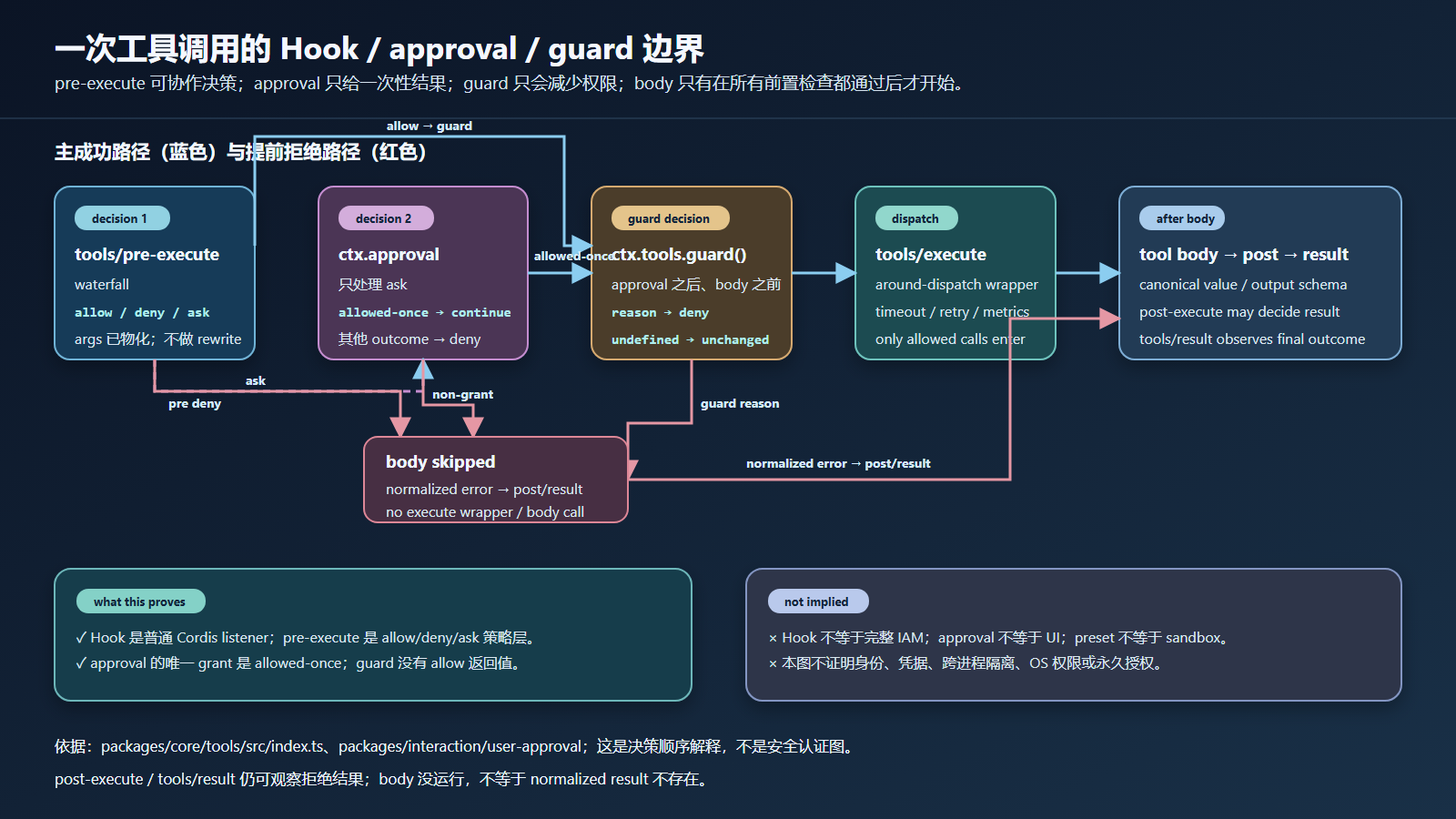
这里有一个非常重要的观察:deny / guard / ask-deny 仍然能经过 post-execute 与 tools/result,但没有 execute-hook。这与“拒绝就是整个流程什么都不发生”不等同:body 被跳过,normalized error result 仍然需要被后续结果层处理和观察。

图:成功、pre-deny、guard-deny、ask-without-approval 共用同一个无 I/O greet registry;不同点在于 body 是否进入 dispatch。图没有表示真实 UI、agent、sandbox 或外部权限系统。
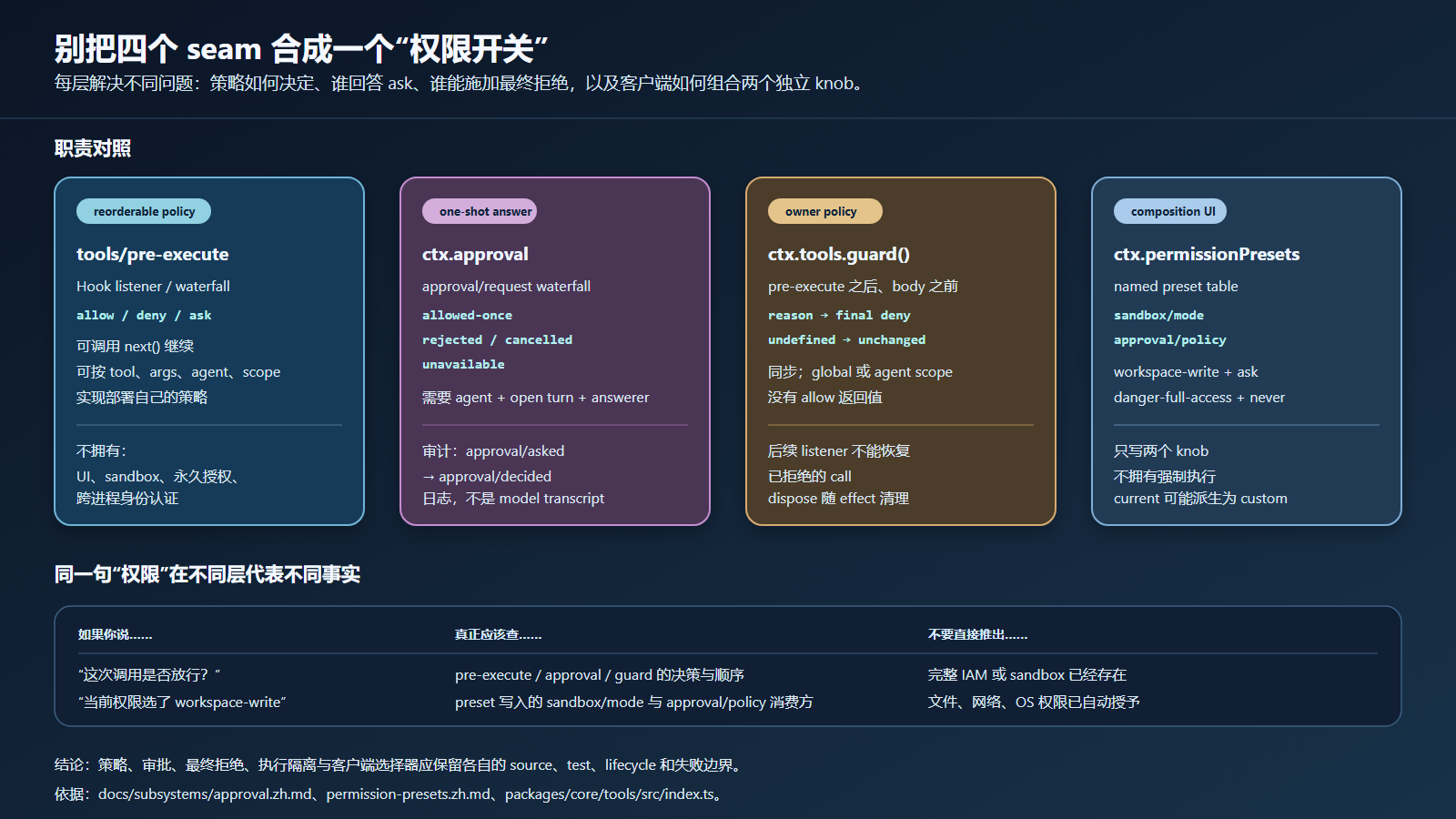
图:ask 只有得到 allowed-once 才能继续;guard 没有 allow 返回值,后续监听器不能把 reason 改回允许。
七、从项目 demo 到真实部署:六个补齐动作
把 plugin-project-demo 的四种结果当成“安全已完成”是危险的:它没有 agent、session、approval service、sandbox、UI 或真实工具集。下面按“当前证据 -> 照做验证 -> 官方参考”给六个补齐动作;每做完一个,你的插件就离真实 profile 近一步。
动作 1:给 pre-execute gate 补上非 greet 工具的策略
当前证据:demo 里 gate 只拦截 exec.name === 'greet',对其他工具直接 next()。
照做验证:把 gate 的条件从“只针对 greet”改成“按工具名查策略表”,然后注册第二个无 I/O 工具(例如 echo),分别用允许与拒绝两组配置各调用一次,断言只有预期工具被拒绝、其余照常成功。
官方参考:PreToolDecision 的三个分支见 packages/core/tools/src/index.ts:588-591;waterfall 默认决策是 allow(index.ts:1477),你的 listener 返回决策即短路。
动作 2:让 ask 走真实 approval service
当前证据:demo 没有挂载 ctx.approval,所以 ask 在 serviceAsk() 中直接关闭为 deny(packages/core/tools/src/index.ts:1693-1699)。
照做验证:在 runner 中挂载 @deepseek-ai/dsh-user-approval,注册一个 approval/request answerer,为带 agent 的调用返回 allowed-once;再分别验证 rejected、cancelled、unavailable 三个 outcome 都变成 error result。注意 ctx.approval.request() 要求 open turn,需要先造出 turn/start 事件(官方实现见 packages/interaction/user-approval/src/index.ts:257-276)。
官方参考:docs/subsystems/approval.zh.md 的 outcome 表,以及 packages/acp/acp/tests/approval.spec.ts(机器 answerer 的完整测试形态)。
动作 3:验证卸载后策略真的消失
当前证据:demo 的 dispose 只打印 unloaded 日志。
照做验证:在 ctx.fiber.dispose() 之前把允许集合记下来;dispose 后新建第二个 Context 重新挂载工具但不挂 gate,断言同一名称的调用恢复成功;再在同一 Context 中挂载-卸载-挂载 gate,断言策略在新 fiber 上重新生效。官方把每次注册都建模为 ctx.effect(packages/core/tools/src/index.ts:1110-1116),HMR 与 config reload 依赖同一生命周期。
动作 4:补一个取消路径
当前证据:demo 从不 abort,exec.signal 始终未触发。
照做验证:让 pre-execute listener 返回一个等待中的 promise,同时 abort 调用方 signal,断言调用以 ABORTED 收敛、不会悬挂 listener;再让 approval answerer 挂起时 abort,断言 outcome 是 cancelled 而不是 grant。官方说明见 packages/core/tools/README.md 的 pre-execute 注释:async gate 必须观察 exec.signal,注册表在 gate settle 后会复查取消。
动作 5:把策略放进 agent scope
当前证据:demo 的 guard 与 gate 都注册在全局 Context 上。
照做验证:通过 agent 的 agent.ctx 注册 guard,再让两个 agent 分别调用同一工具,断言 guard 只拦截目标 agent 的调用。官方 scope 行为见 packages/core/tools/src/index.ts:1100-1116(plain-context 全局、agent.ctx 仅该 agent),scope 过滤分发见 packages/core/scope/tests/invariant.spec.ts:74-80。
动作 6:把审计与模型输入分开断言
当前证据:demo 没有 session log,也没有 model transcript。
照做验证:在有 session 的 runner 里触发一次 allowed-once 与一次 deny,分别读取 session log 中的 approval/asked / approval/decided 对,以及 model 可见的 tool result 与 runtime context,断言审计对完整、且审计文本没有进入 model transcript。官方契约见 docs/subsystems/approval.zh.md(audit 是日志不是 transcript)与 docs/subsystems/tools.md 的流水线说明。
六个动作做完后,再回头看那张“常见错误写法”表,你会发现每条错误都已经有对应的验证方法:不再需要靠读代码猜,而是可以运行并断言。
八、常见错误写法
| 过强写法 | 更准确的写法 |
|---|---|
| “写一个 Hook 就获得了工具权限系统。” | Hook 只接入一个扩展点;策略、approval、sandbox、身份与审计仍分别由不同 seam 负责。 |
| “pre-execute 返回 ask 就会弹窗。” | ask 会请求 approval seam;是否有 answerer、UI、agent、open turn 和 allowed-once 需要分别验证。 |
| “guard 可以在后面的 Hook 里重新 allow。” | guard 只有 `string |
| “拒绝后没有任何 pipeline。” | body / execute wrapper 被跳过,但 normalized denial 仍可经过 post / finalizer / result 观察边界。 |
| “permission preset 等于 sandbox。” | preset 只是组合 sandbox mode 与 approval policy 两个 knob;实际执行由各消费方决定。 |
| “allowed-once 可以缓存为用户永久授权。” | allowed-once 只覆盖本次 approval request;永久或会话级策略需要独立、可审计的设计。 |
| “本机 greet demo 证明真实命令权限。” | demo 没有文件、网络、shell、模型或 UI;它只证明进程内工具 pipeline 的决策边界。 |
九、下一步
B3 的核心不是再造一个“大权限模块”,而是把一次调用的 decision surface 画清楚:
Hook plugin
  -> tools/pre-execute: allow / deny / ask
  -> approval seam: allowed-once / rejected / cancelled / unavailable
  -> monotonic guard: reason / undefined
  -> execute body only when still allowed
  -> post-execute / result observe the normalized outcome
当你需要接真实部署策略时,先回答四个问题:
- 策略作用于哪个 tool name、agent scope 和 session?
- 它是可重排的协作策略,还是必须不可撤销的 owner guard?
- ask 的 answerer、open turn、audit pair 和取消路径在哪里?
- sandbox / credential / OS permission 是否另有独立事实来源?
回答不完整时,优先返回可诊断的 deny / unavailable,而不是把“Hook 已安装”描述成“权限已安全”。
下一篇进入 B4:把工具执行结果、审计事件与 UI presentation 分开,观察一次 canonical result 如何在不同表面投影。
下一篇:工具结果、审计与 UI Presentation:一个 value 的多种投影
如果一个 permission plugin 需要同时改写模型可见 schema、决定工具是否执行、弹出用户问题、启动 sandbox runner 并写审计日志,先把这些动作拆成独立 seam;这样每个结论才有对应的源码、测试和失败边界。