这是《DeepSeek Harness 权威指南 》系列第 12 篇,也是二开线(B 线)的第 5 篇。源码基线为 deepseek-harness @
47f9438(v0.1.0-rc.5)。B1 讲了工具如何注册,B2 讲了 LLM adapter,B3 讲了谁在调用前决定放行。这篇回答另一个问题:一次工具调用产生的结果,到底有几种“样子”? 作者 demo 仍是无模型、无 I/O 的进程内观察;它不证明真实 UI 渲染或生产审计存储。
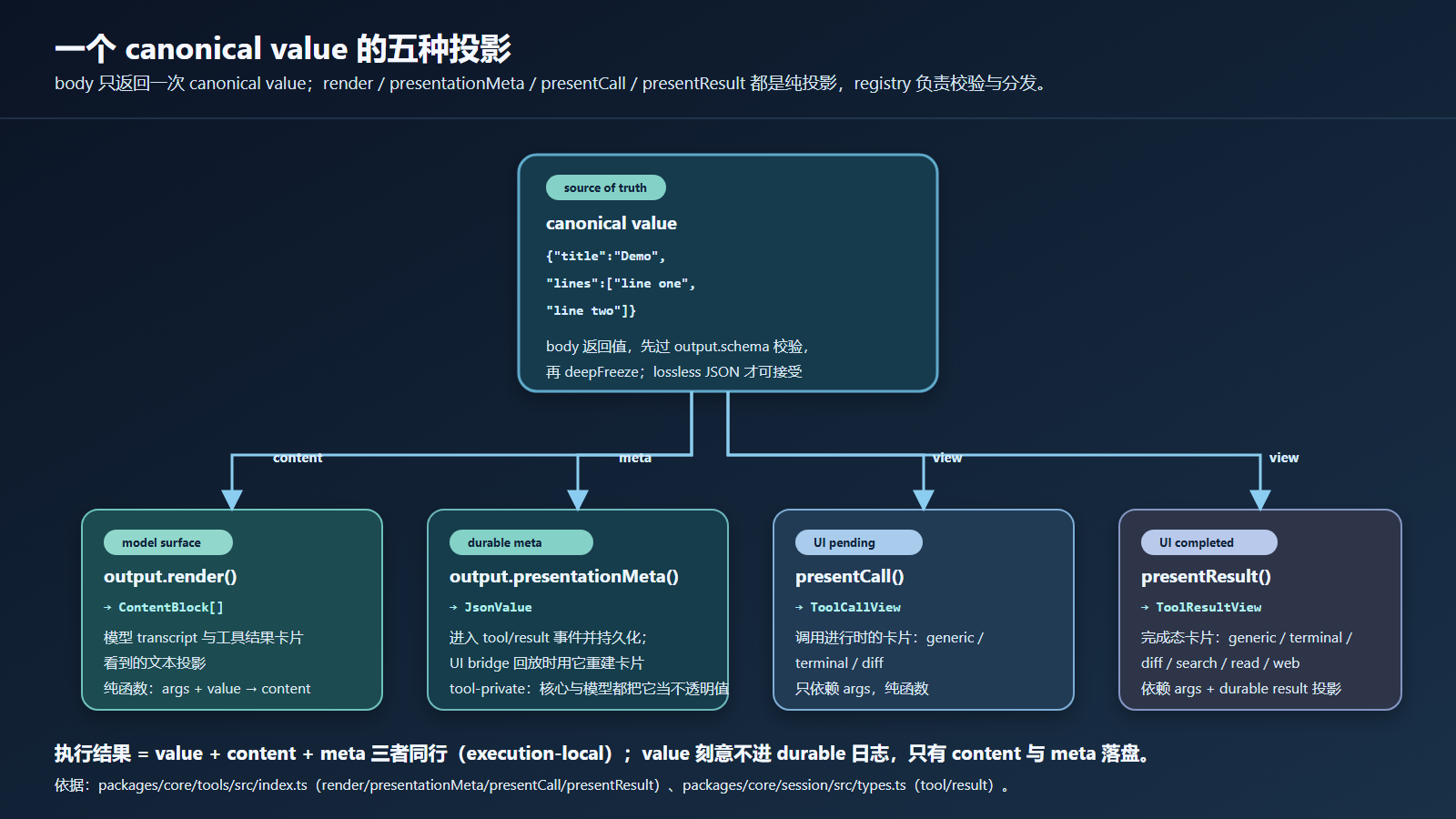
B3 里你已经见过一次工具调用的决策面。本篇把镜头移到结果面:同一个 canonical value,在五个地方以五种形态出现,而且这些形态之间只有单向的投影关系。

图:body 只返回一次 canonical value;output.render 投影模型 content,output.presentationMeta 投影持久化 meta,presentCall / presentResult 投影 UI 视图。
一、先跑起来:note 工具的五面投影
作者本机项目(rex-hugo/.tmp-research/dsh-b4-result,完整代码见 GitHub:rex-dhs-core/dsh-b4-result
)
dsh-b4-result/
└── result-projection-demo.ts
它注册一个返回结构化对象的 note 工具,并把五个投影全部声明出来。运行:
node --import tsx E:/coding/rex-hugo/.tmp-research/dsh-b4-result/result-projection-demo.ts
1. 工具定义:canonical value 与四个投影
const noteTool = defineTool({
  name: 'note',
  description: 'Return a structured note (canonical object value).',
  parameters: {
    title: { type: 'string', required: true, description: 'Note title' },
  },
  output: {
    schema: {
      type: 'object',
      additionalProperties: false,
      properties: {
        title: { type: 'string', required: true },
        lines: { type: 'array', required: true, items: { type: 'string' } },
      },
    },
    render: (_args, value) => {
      const v = value as { title: string; lines: string[] }
      return [{ type: 'text', text: `# ${v.title}\n${v.lines.map((l) => `- ${l}`).join('\n')}` }]
    },
    presentationMeta: (_args, value) => {
      const v = value as { title: string; lines: string[] }
      return { lineCount: v.lines.length, title: v.title }
    },
  },
  async execute(args) {
    return { title: args.title, lines: ['line one', 'line two'] }
  },
  presentCall(args): ToolCallView | undefined {
    return { card: 'generic', title: `Read note ${args.title}`, kind: 'read' }
  },
  presentResult(_args, result): ToolResultView | undefined {
    return { card: 'generic', title: `Note completed`, content: result.content }
  },
})
逐块解释:
output.schema是 value schema DSL:required: true写在每个属性项内部,顶层不支持required数组(这也是官方grep工具的写法,见packages/fs/tool-fs-search/src/grep.ts:293-319)。output.render把 canonical value 投影为模型可见的ContentBlock[]:模型和 transcript 看到的是文本,不是对象。output.presentationMeta把 value 投影为工具私有的JsonValue:随日志持久化,核心不解析它。presentCall/presentResult把 args(和结果)投影为 UI 渲染意图:不进入模型 schema,也不进入 transcript。execute返回的裸对象会先被output.schema校验、再被冻结;不合格的返回值在 body 之后立刻变成错误结果。
2. Part A:执行结果与两个 UI view
=== A: execution-local result (tools/result) ===
{"events":["result:success"],"isError":false,"value":{"title":"Demo","lines":["line one","line two"]},"content":[{"type":"text","text":"# Demo\n- line one\n- line two"}],"meta":{"lineCount":2,"title":"Demo"}}
=== A: UI views (pure projections) ===
{"callView":{"card":"generic","title":"Read note Demo","kind":"read"},"resultView":{"card":"generic","title":"Note completed","content":[{"type":"text","text":"# Demo\n- line one\n- line two"}]}}
同一时刻,同一个 value 有三个可见形态:
| 形态 | 内容 | 谁消费 |
|---|---|---|
value | {title, lines} 对象 | 只有 execution-local 结果 |
content | # Demo\n- line one\n- line two | 模型 transcript、日志 |
meta | {lineCount: 2, title: "Demo"} | 日志持久化、UI bridge 回放 |
callView / resultView | 卡片渲染意图 | UI bridge |
tools/result 事件(registry 的观察事件)把整个 ToolExecutionResult 交给监听器;本 demo 用 ctx.on('tools/result', ...) 捕获并打印。
3. Part C:会话日志与模型 transcript 的边界
demo 用 Session.create() 直接构造一个会话日志,追加 turn/start、tool/call、tool/result 三个事件(tool/result 必须带 surfaceOp: 'append' 与 sourceEventSeqs,与官方 agent-loop 的写法一致,见 packages/core/agent-loop/src/tool-calls.ts:276-288):
=== C: durable session log (events) ===
{"type":"turn/start","seq":0,"data":{"turn":0}}
{"type":"tool/call","seq":1,"data":{"turn":0,"step":0,"callId":"b4-logged-call","name":"note","arguments":"{\"title\":\"Demo\"}"}}
{"type":"tool/result","seq":2,"data":{"turn":0,"step":0,"message":{...tool-result message...},"meta":{"lineCount":2,"title":"Demo"}}}
=== C: checks ===
{"callArgsIsRawString":true,"resultHasNoValueField":true,"transcriptHasNoToolCall":true,"transcriptRoleAndSource":[{"role":"user","source":{"kind":"tool","callId":"b4-logged-call"}}]}
三个检查全部为真,它们就是本篇最重要的三个边界:
tool/call.arguments是模型产出的原始 JSON 字符串(未解析);tool/result事件里没有 value 字段——canonical value 不进日志;deriveMessages()的 transcript 只有 tool/result 的 user-role 消息,没有 tool/call。
deriveMessages() 的完整输出见本机文件 result-projection-demo-output.txt;其中 id 是每次运行新生成的 UUID,其余字段稳定。
二、源头只有一个:canonical value
B1 提过 execute() 返回 canonical value,本篇把这个词的边界说死。官方源码(packages/core/tools/src/index.ts:555-580):
/** Successful canonical tool execution, including its Native/model projection. */
export interface ToolExecutionSuccess {
  readonly isError: false
  /** Execution-local canonical value; deliberately omitted from durable events. */
  readonly value: JsonValue
  readonly content: ContentBlock[]
  readonly error?: never
  readonly meta?: JsonValue
  readonly additionalContexts?: UserMessage[]
  /** The agent loop stops after committing this successful result batch. */
  readonly concludesTurn?: true
}

/** Failed canonical tool execution; failures never carry a successful value. */
export interface ToolExecutionFailure {
  readonly isError: true
  readonly error: ToolFailure
  readonly value?: never
  readonly content: ContentBlock[]
  readonly meta?: JsonValue
  readonly additionalContexts?: UserMessage[]
  readonly concludesTurn?: never
}

/** The discriminated, execution-local outcome of one tool call. */
export type ToolExecutionResult = ToolExecutionSuccess | ToolExecutionFailure
注意两行注释:
value上写着 “deliberately omitted from durable events”——这是设计决定,不是忘记持久化。日志可回放模型对话,但不需要重放执行中间值。ToolExecutionFailure用value?: never排除了成功值:失败结果不可能携带成功 value。content与meta同时存在于成功与失败:失败也有模型可见文本(错误渲染)。
createSuccessResult() 的流程是“snapshot → validate → freeze → render →(可选)presentationMeta”(index.ts:1792-1823):任何一步失败都会把整次调用变成 INVALID_TOOL_OUTPUT 错误,而不是把坏值继续往下传。
三、execution-local:结果对象只活在调用内
ToolExecutionResult 是调用方(agent loop / 你的脚本)拿到的对象,tools/result 事件把它原样交给观察者。它的生命周期只有一次调用的执行期:
- 成功:
value(校验过、冻结过)+content(render 投影)+meta?(presentationMeta 投影); - 失败:
error+content(错误文本投影)+meta?; additionalContexts可以在结果上附加给下一次请求的用户消息;concludesTurn: true表示这次成功结果提交后 agent loop 停止。
本 demo 的 Part A 就是通过 tools/result 监听器拿到完整结果并打印。不要在监听器里假设结果对象可以被修改:它是 deep-frozen 的,读取即可,改写会抛错。
四、durable 日志:tool/call 与 tool/result 存了什么
会话事件日志(packages/core/session/src/types.ts:274-297)定义了两个工具事件:
  /**
   * The model requested one tool invocation: `name` with the raw `arguments`
   * JSON string exactly as the model produced it (unparsed). `callId` pairs the
   * call with its `tool/result`.
   */
  'tool/call': { turn: number; step: number; callId: CallId; name: string; arguments: string }
  /**
   * A completed tool call's model-facing result, optional internal failure
   * identity, and optional tool-private `meta` presentation payload. `meta` is
   * opaque to the core (the producing tool owns its shape and reads it back in
   * `presentResult`) but MUST be JSON-serializable: `Session.append`
   * runtime-validates all event data with `isJsonValue`, so a non-serializable
   * `meta` is rejected at the source, and the durable log reproduces the
   * identical card on replay. Absent
   * unless the tool attaches one (e.g. `dsh-tool-fs` carries its result-time
   * contextual diff here).
   */
  'tool/result': {
    turn: number
    step: number
    message: ToolResultMessage
    error?: { name: string; code: string }
    meta?: JsonValue
  }
对应到 demo 的 C 段输出:
tool/call.arguments是原始字符串"{\"title\":\"Demo\"}"——没有解析。解析后的{title}只存在于 execution 层;tool/result.message是createToolResultMessage()生成的 user-role 消息(内含tool-resultblock 与callId);error只在失败时出现,是{name, code}结构化身份;meta来自presentationMeta投影,持久化以便 replay 时重建卡片;- 没有
value。
官方 agent-loop 追加这两个事件时(packages/core/agent-loop/src/tool-calls.ts:263 与 276-288),tool/result 必须带 surfaceOp: 'append' 和 sourceEventSeqs: [callSeq]:它声明自己进入 surface 并引用之前的 tool/call。
五、model transcript:surface 投影只有 tool/result
模型看到的对话历史由 session.deriveMessages() 投影产生。投影规则(packages/core/session/src/surface.ts:106-108)只承认三种 message-producing 事件:
    case 'tool/result': {
      return event.data.message
    }
tool/call 不在其中,投影为 null。所以:
| 事件 | 进 durable 日志? | 进模型 transcript? |
|---|---|---|
tool/call | 是(arguments 原文) | 否 |
tool/result | 是(message + meta) | 是(message 部分) |
meta | 是 | 否 |
demo 的 C 段检查 transcriptHasNoToolCall: true 与 transcriptRoleAndSource: [{role:'user', source:{kind:'tool'}}] 就是这一条的实证:模型只看到 tool-result 消息(role 是 user,source 标注 tool),看不到工具调用记录本身。
六、post-execute:结果可以被策略改写
tools/post-execute 是围绕结果的 waterfall(packages/core/tools/src/index.ts:593-600):
/**
 * Post-dispatch decision: accept, replace one projection, attach context for the
 * next request, or block by turning corrective feedback into an error result.
 */
export type PostToolDecision =
  | { kind: 'accept'; content?: ContentBlock[]; value?: never; additionalContexts?: UserMessage[] }
  | { kind: 'accept'; value: JsonValue; content?: never; additionalContexts?: UserMessage[] }
  | { kind: 'block'; feedback: ContentBlock[]; additionalContexts?: UserMessage[] }
实现(index.ts:1742-1781)有三个不变量:
- 不能同时替换 content 和 value(
TypeError: tools/post-execute accept decision cannot replace both value and content); - value 替换会重新走
createSuccessResult():新 value 要再过 output.schema 校验、再 render、再投影 meta——替换不是绕过校验的后门; - 失败结果上不能替换 value(
TypeError: tools/post-execute cannot replace the value of a failed result)。
demo 的 Part B 用四个独立 Context 逐一验证:
=== B1: accept content replace ===
{"events":["result:success"],"isError":false,"value":{"title":"Demo","lines":["line one","line two"]},"content":[{"type":"text","text":"redacted summary"}],"meta":{"lineCount":2,"title":"Demo"}}
=== B2: accept value replace ===
{"events":["result:success"],"isError":false,"value":{"title":"Replaced","lines":["x"]},"content":[{"type":"text","text":"# Replaced\n- x"}],"meta":{"lineCount":1,"title":"Replaced"}}
=== B3: block with feedback ===
{"events":["result:error"],"isError":true,"content":[{"type":"text","text":"blocked by result policy"}],"error":{"message":"blocked by result policy"}}
=== B4: value replace on failed result ===
{"events":["result:error"],"isError":true,"content":[{"type":"text","text":"Error: tools/post-execute cannot replace the value of a failed result"}],"error":{"message":"tools/post-execute cannot replace the value of a failed result"}}
四个输出的含义:
- B1:只换
content(比如保密策略把内容替换成摘要),value原样保留; - B2:换
value后,content与meta都重新投影了(# Replaced\n- x、lineCount:1)——替换走完整校验链; - B3:
block把成功结果变成失败,feedback成为 content 与 error message,value消失; - B4:body 抛错后的失败结果上做 value 替换,registry 把 TypeError 规范化为 error result(
events仍是result:error,监听器看到的是错误而不是异常逃逸)。
七、UI 视图是可回放的纯函数
presentCall / presentResult 的契约(index.ts:270-302):
  /**
   * Optional: how to present the PENDING state of one call in a UI, derived from
   * the call's `args` (parsed arguments, `unknown` — the tool validates/narrows
   * its own input). Returns a {@link ToolCallView} (a `card`-tagged render intent),
   * or `undefined` (or omit the method) to fall back to a generic presentation
   * (title = tool name, raw args as input). Pure and side-effect-free: a UI may
   * call it during live streaming AND a session-log replay, so it must depend
   * only on `args`.
   */
  presentCall?(args: unknown): ToolCallView | undefined
  /**
   * Optional: how to present the COMPLETED state, given the same `args` and the
   * durable result projection (`content`, failure state, and optional `meta`). Returns a
   * {@link ToolResultView}, or `undefined` (or omit the method) to keep the
   * pending title and render the raw result content. Pure and side-effect-free
   * for the same replay reason.
   */
  presentResult?(args: unknown, result: ToolResult): ToolResultView | undefined
两个方法都被要求纯函数、无副作用,理由写在注释里:UI 可能在 live 流式期间调用它们,也可能在会话日志回放时调用它们——同一份日志必须重建出同一张卡片。
视图词汇表是 card 标签联合(packages/core/tools/src/presentation.ts):
- 调用态
ToolCallView = GenericCallView | TerminalCallView | DiffCallView; - 完成态
ToolResultView = GenericResultView | TerminalResultView | DiffResultView | SearchResultView | ReadResultView | WebResultView; - 例如
ReadResultView带lines/totalLines字段,让有能力渲染的 UI 显示行号与“showing N of M”,无能力时退化为 content 文本。
demo 的 Part A 直接调用这两个纯函数并打印结果——它们不依赖 registry,任何地方都能跑,这正是“可回放”的体现。真正消费它们的是 UI bridge(官方 client 侧有对应 fixture,见 packages/client/connection/src/client/fixture.ts:607-735)。
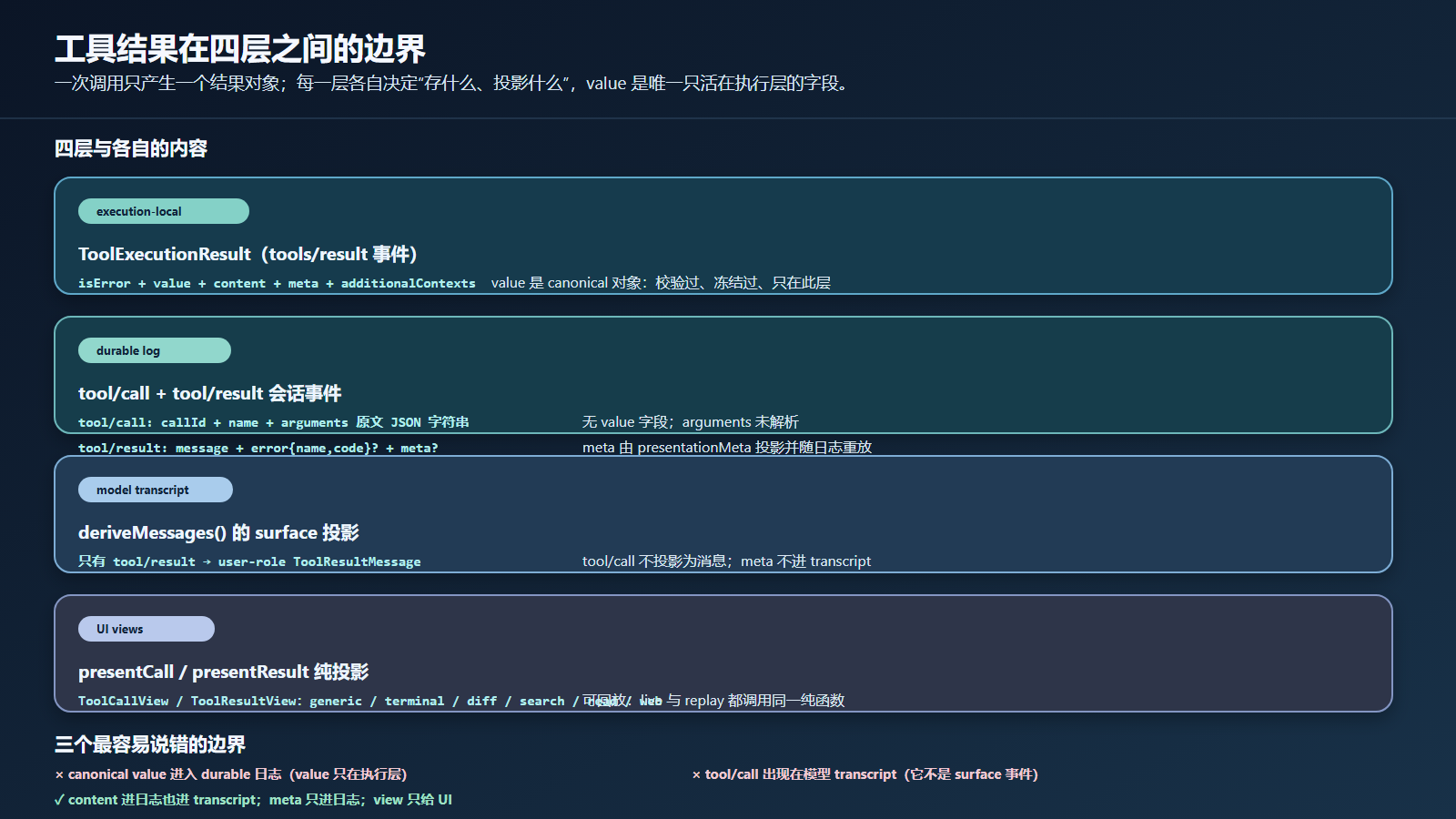
图:value 只在 execution 层;日志层存 content / error / meta;transcript 层只有 tool/result 投影;UI 层是可回放视图。
八、常见错误写法
| 过强或错误的说法 | 更准确的表述 |
|---|---|
| “value 会随 tool/result 事件持久化。” | value 是 execution-local;日志只有 message、error、meta。 |
| “模型 transcript 包含 tool/call。” | surface 投影只承认 tool/result;tool/call 不进 transcript。 |
| “post-execute 可以直接改结果对象。” | 结果 deep-frozen;改写必须通过返回 PostToolDecision。 |
| “post-execute 换 value 不需要再校验。” | 换 value 会重新走 snapshot → schema 校验 → render → presentationMeta。 |
| “失败结果可以换成成功 value。” | 失败结果上做 value 替换会变成规范化的错误。 |
| “presentCall 是给模型看 schema。” | 模型只拿到 name/description/parameters;视图只给 UI。 |
| “presentationMeta 是模型可见内容。” | meta 是工具私有持久化 payload,核心与模型都不解析。 |
| “本机 demo 证明真实 UI 卡片渲染。” | demo 只证明纯投影函数的值;真实渲染、回放、UI 主题是另一套验证。 |
九、下一步
B4 的核心结论:一次工具调用只有一个事实源(canonical value),但有四层独立的投影与持久化边界。设计自己的工具时,按这个顺序问:
execute()返回的 canonical value 是什么形状?(结构化对象还是字符串?)output.render给模型看什么?(文本投影)output.presentationMeta需要持久化什么工具私有元数据?(回放卡片用)- 需要 post-execute 策略吗?(保密替换、结果审核、block 纠错)
- UI 需要什么卡片?(generic / terminal / diff / search / read / web)
回答完这五个问题,你的工具从“能跑”变成“可审计、可回放、可渲染”。
一个 canonical value 被投影成 content、meta、view 三种形态,又被日志、transcript、UI 三个消费方各自约束;记住“value 不进日志、call 不进 transcript、meta 不进模型”三句话,就不会再把各层承诺混在一起。